
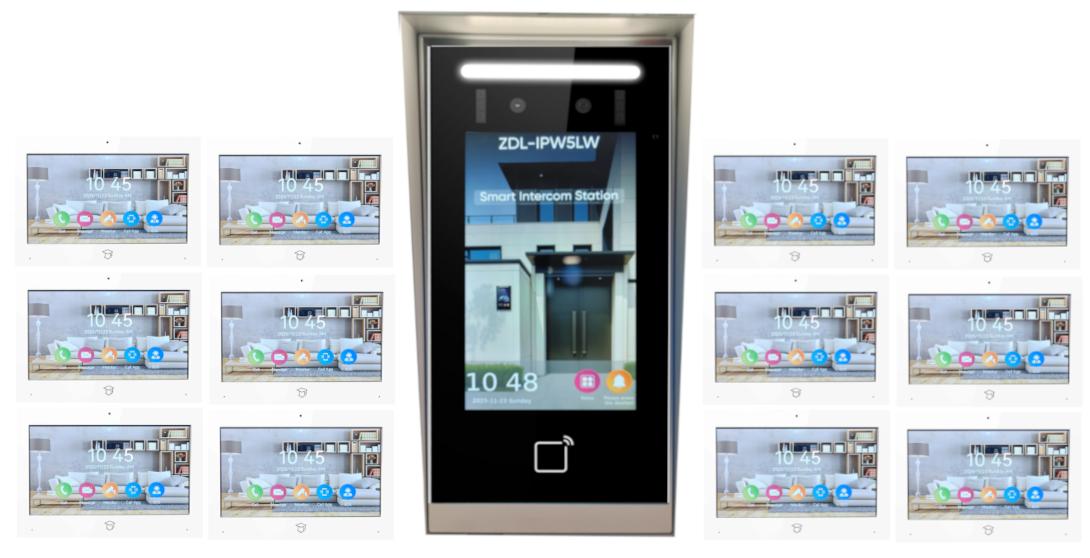
When a property needs more than a basic front-door station and a single indoor monitor, the zdl-ipw5112wc premium 12-room smart ip video intercom starts to make sense. This is the kind of system buyers look at when they need organized visitor communication across multiple rooms, units, offices, or managed spaces without piecing together a mix of consumer devices that were never built for daily access control.
For installers, property managers, and facility operators, the real question is not whether a 12-room IP intercom sounds impressive. The question is whether it fits the building layout, the traffic pattern, the door hardware, and the level of control expected by the end user. That is where product selection gets practical very quickly.
Where the ZDL Premium 12-Room Smart IP Video Intercom Fits Best
A 12-room smart IP video intercom is typically a better match for properties that need structured communication across several indoor stations. That can include multi-tenant residential setups, office suites, private schools, mixed-use buildings, small medical facilities, or larger single-family properties with detached areas and multiple controlled entry points.
The biggest advantage of an IP platform is flexibility in how the system is deployed. Traditional analog intercoms still have their place, especially in straightforward retrofit jobs, but IP systems give more room for expansion, remote management, network-based integration, and cleaner scaling when the site may grow. If the customer expects future additions such as extra indoor monitors, mobile app access, network recording, or integration with electric locks and gate control, IP usually gives a stronger foundation.
That said, more capability also means more planning. A 12-room setup is not a plug-and-play product category. It needs to be matched to power, cabling, switch capacity, network design, and the operational habits of the people who will use it every day.
What Buyers Should Look For in a 12-Room IP Intercom
The zdl premium 12-room smart ip video intercom category appeals to serious buyers because it combines video verification with room-to-door and room-to-room communication. In the field, that matters because visual confirmation reduces bad unlock decisions and helps staff or residents respond faster to deliveries, guests, and service calls.
Video quality is one factor, but it should not be the only one driving the purchase. A sharp image is useful only if the door station camera has reliable low-light performance, the monitor response is quick, and the audio remains clear when there is street noise, wind, or hallway echo. In commercial and multi-room environments, audio intelligibility often matters just as much as image resolution.
The lock control side also deserves close attention. Many buyers assume any smart intercom will work with any electric strike, magnetic lock, gate operator, or exit device. That is not always the case. Relay outputs, power requirements, unlock timing, request-to-exit devices, and fire-code considerations all need to be reviewed before the order is placed. A good-looking intercom package can still become the wrong solution if it does not align with the door hardware already on site.
Installation Planning Matters More Than the Spec Sheet
On paper, a 12-room intercom may look straightforward. In a real building, cable pathways, wall conditions, network equipment placement, and power availability determine how clean the install will be.
New construction is usually the easiest environment because cable runs and monitor locations can be planned in advance. Retrofit projects are more variable. If the job site has limited conduit space, finished walls, older low-voltage wiring, or a patchwork network setup, the labor side can grow quickly. That does not rule out the system, but it changes the conversation from product-only to product-plus-installation strategy.
Indoor station placement is another detail that often gets overlooked until late in the project. Monitors should be easy to access, visible in normal movement paths, and mounted at practical heights for the users on site. In a multi-office or multi-room property, putting screens in the wrong locations can slow response times and reduce the value of the whole system.
For larger deployments, it is also worth deciding early whether the intercom network will operate on a dedicated segment or share infrastructure with other devices. Shared networks can work, but only if bandwidth, PoE budgets, addressing, and security policies are handled properly. A professional buyer usually wants that conversation before installation starts, not after intermittent performance shows up.
Smart Features Are Useful, but Only When They Solve a Real Need
The word smart gets used loosely in this category. For a professional-grade IP video intercom, smart features should improve control, not add distractions.
Remote answering is one example. For certain offices, managed properties, and homes with frequent package traffic, being able to respond from a mobile device adds real value. For other sites, especially where on-site reception or controlled entry staffing is already in place, mobile access may be less important than dependable indoor station operation and stable lock release.
Call routing is another feature worth evaluating carefully. A 12-room system can be configured to match how the property actually functions, whether that means one entry panel reaching several offices, separate room assignments, or layered response paths for staff. The best setup depends on the building’s workflow. A school administrative office has different needs than a multi-tenant residence or a light industrial site.
Some buyers also want recording capability, snapshots, call logs, or event history. Those functions can be helpful for accountability and incident review, especially in commercial settings, but they also raise questions about storage, retention, user permissions, and network coordination. More features are not automatically better if they complicate the end user’s routine.
Common Use Cases and Trade-Offs
In apartment or multi-unit settings, a 12-room intercom can provide centralized visitor handling without requiring separate standalone solutions for each area. That can improve communication and make entry management more organized. The trade-off is that multi-tenant layouts often need careful directory setup, naming conventions, and tenant-specific access planning.
In office environments, the system can support reception, internal communication, and controlled visitor entry at a main door or secondary entrances. Here, the benefit is operational control. The trade-off is that office staff turnover may require periodic reprogramming, user training, and administrative maintenance.
For schools, churches, and community facilities, video verification at the door adds a practical layer of screening before release. That is especially useful when buildings need to stay locked during operating hours. The trade-off is that these sites often have stricter expectations around emergency procedures, lockdown coordination, and compliance with existing door control systems.
In larger homes or estate-style properties, a 12-room system may support front entry, gate communication, detached guest spaces, or secondary buildings. The value here is convenience and visibility across a spread-out site. The trade-off is that residential buyers sometimes underestimate the infrastructure needed to support a commercial-style IP intercom properly.
Questions to Answer Before You Buy
Before selecting a system in this class, buyers should pin down a few operational details. First, how many entry points need to be controlled today, and how many may be added later? Second, do the 12 rooms represent separate users, shared spaces, or a mix of both? Third, will the system need to trigger strikes, maglocks, gates, or elevator-related access workflows?
It also helps to know who will administer the system after installation. Some properties have a dedicated maintenance lead or IT contact. Others rely on the installing dealer for ongoing support. That difference affects how much configuration flexibility the buyer should want versus how much simplicity they need.
Budget should be looked at the same way. The system cost is only part of the project. Network hardware, lock integration, door station mounting, power supplies, cabling, labor, and post-install setup all shape the final number. Experienced buyers usually get better results when they budget for the full deployment rather than comparing monitor kit prices in isolation.
For customers working through these variables, a specialized distributor such as UnikCCTV can often help narrow down whether a 12-room IP platform is the right fit or whether the application calls for a different intercom architecture.
Why This Category Appeals to Professional Buyers
The reason systems like the ZDL premium 12-room smart IP video intercom get attention is simple. They sit in the middle ground between small residential door-answering kits and large enterprise access platforms. For many properties, that middle ground is exactly where the practical solution lives.
It offers more structure than entry-level consumer hardware, but it does not force every site into an oversized enterprise deployment. That balance is useful for installers who need reliable hardware, for property managers who want predictable operation, and for owners who care less about novelty and more about controlled entry that works every day.
The right intercom is not the one with the longest feature list. It is the one that matches the building, the users, the door hardware, and the service expectations after the install is complete. If a 12-room smart IP system lines up with those realities, it can become a very efficient part of the property’s security and communication infrastructure.
A good buying decision starts with the floor plan, the entry points, and the daily routine – because that is where the system will either prove its value or create extra work.

 No products in the cart.