
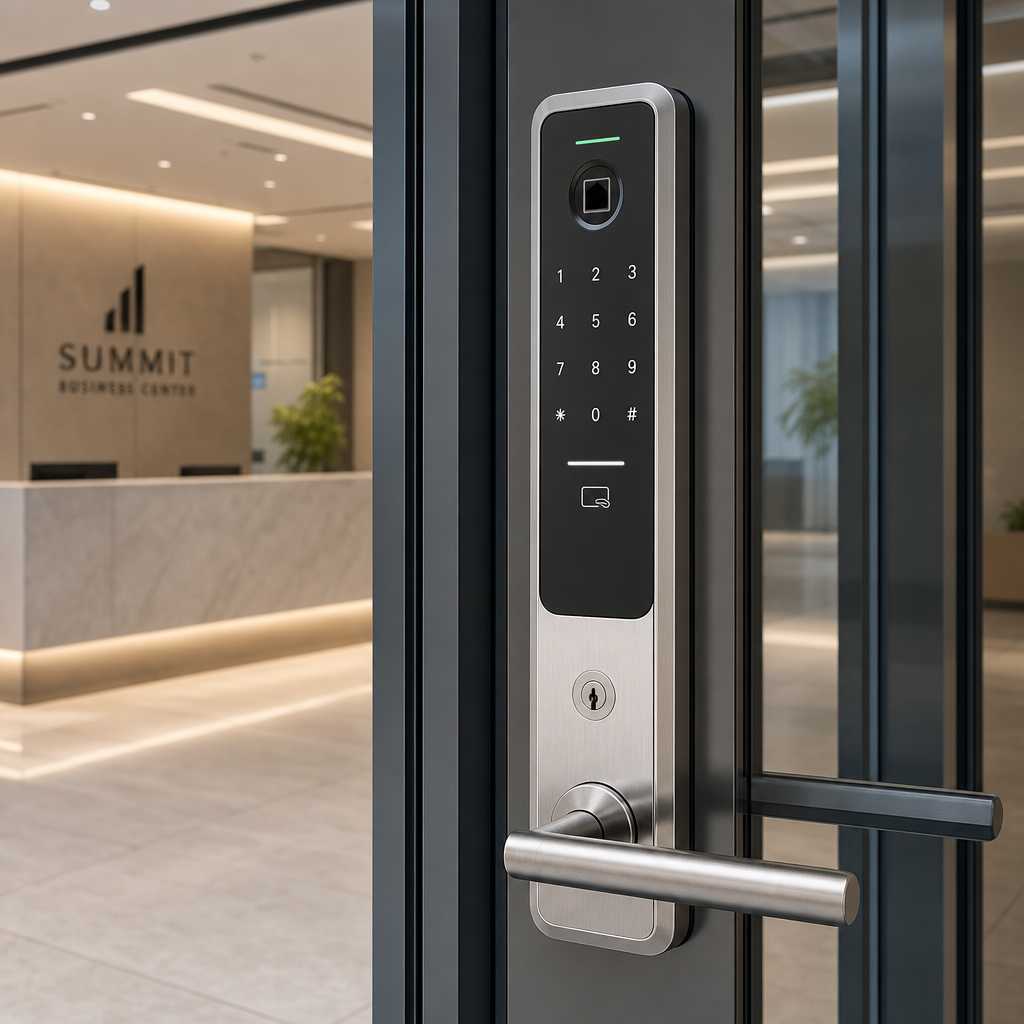
Picking the wrong smart door lock for a commercial building is not just an inconvenience. It is a liability. Property managers and facility operators consistently underestimate how quickly a poorly chosen system creates credential chaos, audit gaps, and after-hours security failures. The smart door lock commercial market is flooded with consumer-grade hardware dressed up in business packaging. Knowing which features actually perform under daily commercial load separates a secure facility from a lawsuit waiting to happen. This guide cuts through the noise and tells you exactly what to look for.
Table of Contents
- Quick Takeaways
- Why Commercial Smart Locks Differ From Residential Models
- Access Credential Management and Multi-User Scalability
- Keyless Entry for Commercial Property: Which Methods Hold Up
- Bluetooth Door Lock Technology in Commercial Settings
- Audit Trails, Real-Time Alerts, and Reporting
- Integration With Intercoms, CCTV, and Access Control Systems
- Comparison: Three Commercial Smart Lock Approaches
- Installation Requirements and Hardware Durability
- Frequently Asked Questions
- References
Quick Takeaways
| Key Insight | Explanation |
|---|---|
| Multi-user credential scaling matters immediately | Commercial facilities can have dozens to hundreds of users. A lock system that caps access credentials at 50 users will fail fast in a real building environment. |
| Audit trail depth is non-negotiable | Timestamped entry and exit logs tied to individual credentials protect facilities during disputes, insurance claims, and compliance audits. |
| Keyless entry for commercial property must support multiple credential types | PIN-only systems get bypassed or shared. The best systems combine PIN, card, biometric, or mobile credentials simultaneously. |
| Bluetooth door lock range and reliability vary significantly | Consumer Bluetooth locks often rely on a phone being within 10 feet. Commercial-grade Bluetooth or BLE locks should use cloud relay or bridge hardware to function reliably at entry points. |
| Integration with existing security infrastructure is critical | A smart lock that cannot communicate with your CCTV system, intercom, or access control panel creates dangerous security silos. |
| Fail-safe versus fail-secure mode affects emergency compliance | Fire codes in most jurisdictions require specific door behavior during power failures. Choose the mode based on the door function and local code requirements. |
| Tamper detection and alarm output protect high-traffic entry points | Commercial doors face forced entry attempts. A lock with onboard tamper detection and alarm relay output is a basic requirement, not a premium feature. |
Why Commercial Smart Locks Differ From Residential Models

A residential smart lock is designed for one household, one primary user, and maybe a handful of guest codes. A commercial building is a completely different operating environment. You have shift workers, contractors, delivery personnel, cleaning crews, and management teams all needing different levels of access at different times.
In practice, the hardware itself must be rated for far higher cycle counts. Residential smart locks are often rated for 250,000 to 500,000 cycles. A commercial entry point on a busy office building can hit those numbers in two to three years. Look specifically for locks rated to ANSI/BHMA Grade 1, which is the commercial standard, rather than Grade 2 residential ratings.
Duty cycle and ingress protection ratings matter on commercial installations. An IP65 rating means the lock resists dust and water jets, which is essential for any exterior door. An IP44 rating is insufficient for outdoor commercial use despite being common in consumer products.
Access Credential Management and Multi-User Scalability
This is where most commercial buyers make a costly mistake. They evaluate a lock based on features at the point of purchase without asking how the system behaves at 200 users, 500 users, or during high-turnover periods like end-of-lease cycles in an apartment complex or staff changes in a corporate building.
Role-Based Access Levels
A proper commercial smart lock system must support tiered access roles. At minimum, you need an administrator level, a standard user level, and a time-restricted visitor or contractor level. Facilities that give every user full 24/7 access because the system cannot restrict by role are creating unnecessary exposure.
Look for systems where access schedules can be applied per user or per group. A cleaning crew should only have access during a defined window. A manager may need override access at any time. These distinctions need to live in the access control system, not on a spreadsheet managed by a facilities coordinator.
Remote Credential Issuance and Revocation
The ability to add or revoke credentials remotely without physically touching the lock hardware is not optional for commercial facilities. When an employee leaves a company, their access needs to be revoked immediately. Systems that require a technician on-site to update credentials create a gap window that is a direct security risk.
Cloud-managed platforms allow instantaneous credential changes from any device. This is a baseline requirement for any building with more than ten regular users.
Pro tip: When evaluating platforms, ask the vendor specifically how long it takes for a credential change to propagate to the physical lock hardware. Some systems have sync delays of several minutes. In high-security applications, that delay is unacceptable.
Keyless Entry for Commercial Property: Which Methods Hold Up
Keyless entry for commercial property is not a single technology. It is a category that includes PIN pads, RFID and proximity cards, mobile credentials, biometric readers, and combinations of the above. Each method has a different risk profile and a different operational overhead.
PIN Pads
PIN codes remain common in commercial settings but have a well-documented weakness: code sharing. A common mistake is treating a single shared PIN as a security control. If ten employees know the same code, the audit trail becomes meaningless. PIN systems only work well when every user has an individual code and codes are rotated regularly.
RFID and Proximity Card Systems
RFID cards and fobs are the workhorses of commercial access control. They are fast, reliable, and easy to revoke. The major vulnerability is card cloning. Older 125kHz proximity technology is highly susceptible to low-cost cloning attacks. For any new commercial installation, insist on 13.56MHz MIFARE or DESFire technology, which is significantly harder to clone.
Biometric Access for Commercial Use
Fingerprint readers and facial recognition locks are increasingly practical for commercial applications. UnikCCTV carries biometric access systems and facial recognition locks designed specifically for commercial door entries. Biometric credentials cannot be shared or cloned, which makes them the strongest single-factor method available. The tradeoff is enrollment overhead and the need for proper reader placement to handle high-throughput entry points without creating queues.
Pro tip: For high-traffic commercial entries, pair biometric readers with a secondary fast-entry method like RFID cards. Biometrics work best as the primary secure layer rather than the only layer during peak hours.
Bluetooth Door Lock Technology in Commercial Settings
Bluetooth door lock technology has matured significantly, but there are still meaningful distinctions between consumer and commercial implementations that facility operators need to understand before specifying a system.
Standard Bluetooth requires the user’s smartphone to be within approximately 10 to 30 feet of the lock, depending on the hardware. This works reasonably well for a single entry point where users approach the door directly. It breaks down in lobbies with long approaches, parking garages, or any scenario where hands-free automatic unlocking is expected.
BLE With Cloud Bridge Hardware
Commercial Bluetooth systems address the range problem by using a cloud-connected bridge device installed near the lock. The bridge maintains a persistent connection to the cloud management platform and handles credential validation independently of whether a user’s phone is in Bluetooth range. This architecture makes the system more reliable and allows remote unlock commands from a management dashboard.
According to Statista’s reporting on smart building technology adoption, mobile-based access credentials are projected to overtake physical cards as the primary commercial access method before 2030. A Bluetooth or BLE system with solid cloud infrastructure positions a building for that transition without requiring a full hardware swap.
Bluetooth Versus Wi-Fi Connected Locks
Wi-Fi connected locks offer direct cloud connectivity without a bridge, but they consume significantly more power and are more vulnerable to network outages. In a commercial building with a managed network, Wi-Fi locks can work well. In buildings with inconsistent Wi-Fi coverage near entry points, a Bluetooth system with a bridge is the more reliable architecture.
Audit Trails, Real-Time Alerts, and Reporting
An audit trail is not just a nice-to-have feature for commercial buildings. It is often a legal and insurance requirement. The data consistently shows that property managers who investigate security incidents without adequate access logs spend three to four times longer resolving disputes than those with timestamped credential-level records.
A commercial smart lock audit trail should capture the following at minimum: credential used, timestamp, door state (locked or unlocked), and whether entry was granted or denied. Systems that only log successful entries are insufficient for security auditing.
Real-Time Alerts for Forced Entry and Door-Held-Open
Forced entry detection and door-held-open alerts are critical commercial features that many buyers overlook during demos because salespeople emphasize the shiny credential management interface. A door held open longer than a defined threshold is one of the most common ways unauthorized individuals gain building access.
The alert system should send notifications to designated administrators via the management platform, not just log an event for someone to find later. A delayed discovery of a door-held-open event is operationally useless in a security context.
“Access control without audit intelligence is just a lock with extra steps. The value of a smart system is entirely in what it tells you about who entered, when, and whether they should have.” – Physical Security Industry Association guidance on commercial access control best practices.
Integration With Intercoms, CCTV, and Access Control Systems
A standalone smart lock that cannot communicate with the broader security infrastructure of a building is a significant limitation in commercial applications. Property managers operating multi-door facilities need their smart locks to function as part of a unified system, not as isolated endpoints.
UnikCCTV’s product range specifically addresses this integration requirement by offering intercom systems, CCTV surveillance equipment, and access control panels that are designed to work together. When a visitor triggers an intercom at the front entrance, the property manager should be able to verify identity via a camera feed and remotely unlock the door from a single interface.
Wiegand and OSDP Protocol Support
In commercial access control, the communication protocol between the reader and the controller determines system interoperability. Wiegand is the legacy standard and is still widely supported. OSDP (Open Supervised Device Protocol) is the modern standard that adds bidirectional communication, encryption, and tamper detection between reader and panel. For any new installation, specifying OSDP-capable hardware is the right choice.
API Access for Building Management Systems
Larger commercial facilities operating building management systems (BMS) or facility management software need smart lock platforms that expose a proper API. This allows access events to be logged within the central building management dashboard alongside HVAC, lighting, and other facility data. Vendors who cannot provide API documentation on request are not serious commercial players.
Comparison: Three Commercial Smart Lock Approaches
| Approach | Best For | Key Limitations |
|---|---|---|
| Standalone Smart Lock (Wi-Fi or BLE only) | Small offices, single-door commercial units, retail shops with minimal users | Limited credential scaling, no native integration with CCTV or intercom, power-hungry if Wi-Fi dependent |
| Cloud-Managed Smart Lock With Bridge Hardware | Mid-size commercial buildings, apartment complexes, multi-door office facilities | Requires bridge hardware installation at each entry point, dependent on cloud platform uptime |
| Integrated Access Control System With Smart Lock Readers | Large commercial buildings, corporate campuses, facilities requiring compliance audit trails | Higher upfront installation cost, requires professional setup and ongoing system administration |
Installation Requirements and Hardware Durability
Commercial door hardware faces a significantly different operating environment than residential hardware. High-traffic entryways in office buildings or apartment complexes can see 300 to 500 door cycles per day. Over a three-year period, that is between 300,000 and 550,000 cycles. Hardware not rated for this load will fail mechanically before the software reaches end-of-life.
Door Compatibility and Backset Measurements
Before purchasing any commercial smart lock, confirm the door preparation requirements. Commercial doors vary in thickness, backset, and cutout dimensions. Hollow metal doors, aluminum storefront frames, and solid wood doors all require different hardware configurations. A common mistake is ordering hardware based on photos without confirming actual door prep dimensions, which results in expensive return shipping and installation delays.
Backup Power and Fail-Safe Modes
Power outages happen. A commercial smart lock must have a defined and compliant behavior when building power is interrupted. Fail-safe locks release to the unlocked position when power is lost, which is required for egress doors under most fire codes. Fail-secure locks remain locked when power is lost, which is appropriate for high-security internal doors or server rooms.
Most commercial smart locks accept an external power supply from an access control panel, with battery backup as a secondary option. Confirm that the lock hardware includes a mechanical override cylinder for genuine emergency situations where all electronic methods fail.
Pro tip: Request installation documentation from your vendor before ordering, not after. The difference between a mortise-style lock and a cylindrical lock installation is significant in terms of door prep time and cost. UnikCCTV provides professional installation resources and expert consultation specifically to help facilities avoid these pre-purchase mismatches.
Frequently Asked Questions
What makes a smart door lock specifically suited for commercial use versus residential?
Commercial smart locks are rated for higher cycle counts, typically ANSI/BHMA Grade 1, support larger numbers of individual credentials, include audit trail functionality, and offer integration with broader access control panels, CCTV, and intercom systems. Residential models prioritize convenience and simplicity over the scalability and security depth that commercial facilities require.
How many users can a commercial smart lock system support?
Entry-level commercial smart locks typically support 100 to 500 users stored locally on the device. Cloud-managed commercial platforms can scale to thousands of users across multiple doors and locations. Always verify the user capacity ceiling with the specific hardware model, not just the software platform, since some locks have on-device memory limits even when connected to a cloud system.
Is keyless entry for commercial property secure enough to replace traditional key systems entirely?
Yes, when implemented correctly. Multi-factor keyless entry systems combining RFID credentials with PIN verification or biometrics provide stronger security than physical keys, which can be duplicated without detection. The critical factor is proper credential management: individual credentials per user, immediate revocation upon termination, and regular audit trail reviews. A poorly managed keyless system is not more secure than keys; it is just more convenient.
How does a Bluetooth door lock compare to an RFID system for commercial buildings?
Bluetooth door locks using mobile credentials offer the advantage of issuing access via an app without physically distributing cards or fobs. This reduces administrative overhead for onboarding and offboarding. RFID systems are faster at the door (tap versus phone unlock) and do not depend on users having a charged smartphone. The best commercial installations use platforms that support both methods simultaneously, allowing users to choose their preferred credential type.
What should I ask a vendor before buying a smart lock for a commercial building?
Ask for the ANSI/BHMA grade rating, the maximum user credential capacity, the audit log retention period, whether the lock supports OSDP protocol, the fail-safe or fail-secure behavior, and whether the management platform has an open API. Also request documentation on how long credential changes take to propagate to the physical lock and what happens to access control during an internet outage. Vendors who cannot answer these questions clearly are selling consumer hardware to commercial buyers.
Can a smart lock integrate with an existing CCTV or intercom system?
Yes, provided the smart lock supports standard integration protocols such as Wiegand output, OSDP, or an open API. Integrated security setups allow a visitor intercom trigger to display a live camera feed and enable a remote door release from a single management interface. UnikCCTV specializes in exactly this type of integrated solution, combining smart locks with intercom systems and CCTV equipment designed to work as a unified access control platform.
If you manage a commercial property or facility, share what has been the most challenging aspect of upgrading your door access system in the comments below.
We would love your feedback and any insights you would share with others. What perspective would you add?
References
- Statista: smart building technology market data and access control adoption statistics
- NIST: federal guidelines on physical access control systems and credential security standards
- Forbes: commercial real estate security technology trends and smart building investment data
- GSA: government facility access control specifications and PACS compliance requirements
- McKinsey: smart building and facility management technology adoption research
 No products in the cart.