
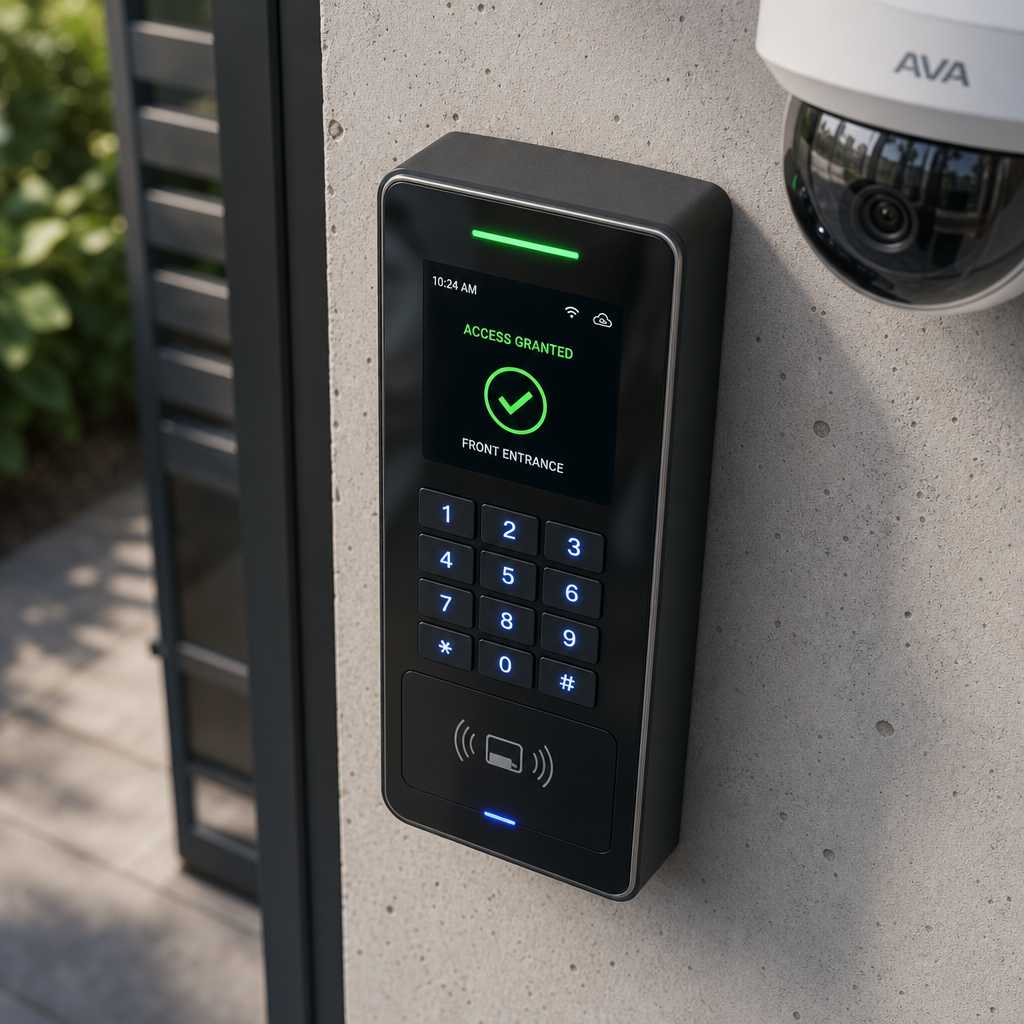
Most property managers and business owners install access control and security cameras as separate systems, then discover too late that they cannot correlate an unlocking event with the footage that captured it. That gap is where security incidents slip through. Access control integration solves this by linking door controllers, readers, and locks to your camera network so every access event triggers a synchronized video record. This guide walks through the practical steps, the real compatibility challenges, and the specific equipment decisions that determine whether your unified security system actually works or just looks good on paper.
Table of Contents
- Quick Takeaways
- Why Integration Matters More Than Two Separate Systems
- Assessing Your Existing Security Camera Infrastructure
- Integration Methods: Which Approach Fits Your Building
- Comparison of Integration Approaches
- Step-by-Step Integration Process
- Common Mistakes That Kill Integration Projects
- Equipment Selection for a Unified Security System
- Frequently Asked Questions
- References
Quick Takeaways
| Key Insight | Explanation |
|---|---|
| Event-triggered recording beats continuous recording | Linking camera recording to access events reduces storage use by up to 60% while making footage retrieval instant instead of a manual search through hours of video. |
| Protocol compatibility is the first thing to verify | Most integration failures happen because the access control panel uses a proprietary output and the NVR only accepts standard alarm inputs. Confirm Wiegand, OSDP, or dry-contact compatibility before purchasing anything. |
| IP-based systems integrate far more cleanly than analog | An IP camera on the same network as an IP-based access controller can share events through API calls. Analog cameras require additional relay modules to achieve the same result. |
| Biometric readers add a second verification layer without major rewiring | Fingerprint or facial recognition readers that output Wiegand data slot into most existing door controller setups, upgrading security without replacing the backend hardware. |
| Time synchronization is non-negotiable | If the access controller and NVR clocks differ by even 30 seconds, correlating an access event to its camera footage becomes unreliable. Use a shared NTP server for both systems. |
| A unified management platform outperforms siloed software | Managing access logs in one application and camera footage in another doubles investigation time. A single dashboard that ties both reduces incident response from hours to minutes. |
| Wireless transmitters can bridge gaps where cabling is impractical | In retrofit projects for older buildings or gated properties, wireless transmitters let you add camera coverage at entry points without running new conduit. |
Why Integration Matters More Than Two Separate Systems
Running access control and cameras as isolated systems creates an investigation problem. When an unauthorized entry occurs, security staff have to pull an access log from one system, note the timestamp, and then manually scrub through footage in a completely separate application. According to the Security Industry Association, the average time to investigate a physical security incident using disconnected systems is over 45 minutes. With an integrated system, that same investigation takes under five minutes because the access event links directly to the camera clip.
The operational benefit extends beyond incident response. Security camera integration allows managers to enforce dual verification: the system can flag any door that opens without a corresponding valid credential event, catching tailgating or door-propping in real time rather than after the fact.
For apartment buildings and commercial properties, this matters at a compliance level too. Many commercial insurance carriers and building codes now require demonstrable audit trails that tie identity verification to video evidence. A siloed setup makes producing that audit trail laborious. A unified security system makes it automatic.
Pro tip: Before investing in any new hardware, document every current access point and camera location on a floor plan. Overlaying these two maps reveals coverage gaps and tells you exactly which cameras need to be triggered by which doors, making your integration design specific rather than guesswork.


Assessing Your Existing Security Camera Infrastructure
Integration starts with an honest audit of what you already have. The two most important variables are camera type and recorder architecture. Analog cameras connected to a DVR through coaxial cable have limited integration options compared to IP cameras running on a network video recorder (NVR). This does not mean analog systems are dead ends, but it does mean the integration path is different and usually requires additional hardware.
DVR-Based Analog Systems
Analog DVRs typically offer alarm input terminals. These are dry-contact inputs that trigger recording on a specific channel when a circuit closes. You can wire the relay output from an access control panel directly into these alarm inputs, creating a basic event-triggered recording link. The limitation is that this approach is one-directional and offers no shared software layer. You still manage two separate interfaces.
IP Camera and NVR Systems
IP-based systems open up significantly more integration options. Many NVRs support ONVIF Profile C, which is specifically designed to share access control events with camera systems over a network. If your NVR is ONVIF Profile C compliant and your access controller supports the same, you can trigger recording, display access alerts on-screen, and pull combined reports without any relay wiring.
In practice, most mid-range NVRs sold in the last four years support at least basic alarm input integration, but full ONVIF Profile C compliance is still not universal. Verify your specific NVR model before assuming compatibility.
Pro tip: Check whether your existing NVR has unused alarm input terminals on the back panel. Many installers leave these unpopulated. If they are there, you can start basic access-triggered recording within a day without purchasing new recording hardware.
Integration Methods: Which Approach Fits Your Building
There are three practical integration methods used in real installations. Each has a different cost profile, technical complexity, and ceiling for what it can do.
Relay-Based Hardware Integration
This is the oldest and most universal method. The access control panel outputs a dry-contact relay signal when a door is accessed. That signal runs to the alarm input on a DVR or NVR, which triggers recording on the camera covering that door. It works with virtually any camera system because it operates at the hardware level, not the software level. The downside is that it provides no shared data layer. Logs and footage remain in separate systems.
Network API Integration
Modern IP access controllers and smart lock platforms expose APIs that allow a video management system (VMS) to query access events or receive webhooks in real time. When a credential is presented at a reader, the access controller sends an API call to the VMS, which then stamps the footage, creates a linked event record, and can trigger alerts. This is the cleanest integration method and the one that produces a genuinely unified security system. It requires both systems to support open APIs or a shared middleware platform.
Unified Platform Software
Some manufacturers and solution providers offer a single software platform that natively manages both access control hardware and IP cameras. Rather than integrating two separate systems, you deploy hardware that is designed to communicate within a single ecosystem from the start. For new installations or full replacements, this is the most efficient approach. For retrofits of existing systems from different manufacturers, it usually requires replacing at least one side of the equation.
“The convergence of physical security systems is not a future trend. It is the current baseline expectation for any enterprise or multi-unit residential deployment.” — ASIS International, Physical Security Professional guidelines
Comparison of Integration Approaches
| Integration Method | Best Fit | Key Limitation |
|---|---|---|
| Relay-Based Hardware Integration | Existing analog or mixed systems where software integration is not possible. Low budget retrofits on DVR infrastructure. | No shared data layer. Access logs and camera footage remain in separate interfaces. Investigation still requires manual correlation. |
| Network API Integration | IP camera systems with modern NVRs and IP-based access controllers. Multi-door commercial properties and apartment complexes. | Requires open API support on both sides. Proprietary systems from closed ecosystems will not expose usable APIs without middleware. |
| Unified Platform Software | New builds or full system replacements. Large facilities that need a single management console for access, cameras, and intercoms. | Higher upfront cost. Locking into one vendor ecosystem can create dependency. Retrofitting partial components is often not supported. |
Step-by-Step Integration Process
This is the actual sequence used in professional installations. Skipping steps, particularly steps two and three, is the single biggest reason integration projects fail or deliver incomplete results.
Step 1: Map Access Points to Camera Coverage
Every door, gate, or entry point that has an access reader must have a camera with a clear sightline to that point. Create a physical map showing which camera ID covers each access point. This becomes your trigger map, defining which camera activates in response to which door event.
Step 2: Verify Protocol and Hardware Compatibility
Confirm that your access control panel and your NVR or VMS share at least one compatible communication method. For hardware integration, verify alarm input terminal availability and voltage ratings. For API integration, confirm that both systems support ONVIF Profile C or that the access controller has a documented REST API. For biometric readers, verify that they output standard Wiegand data that your existing controller can read.
Step 3: Synchronize System Clocks
Set both the access control system and the camera recorder to pull time from the same NTP server. This is a five-minute configuration task that most installers skip, and it creates timestamp mismatches that make correlated footage retrieval unreliable. Use a public NTP pool or your network’s internal time server.
Step 4: Configure Event Triggers
In your NVR or VMS, map each alarm input or API event source to its corresponding camera channel. Define the pre-record buffer (typically 5 to 10 seconds before the event) and the post-record duration (typically 30 seconds after). These settings ensure you capture the approach to the door and the full entry sequence, not just the moment of access.
Step 5: Test Every Linked Point
Present credentials at each reader in sequence and confirm that the correct camera channel triggers, that the event timestamp matches the access log within two seconds, and that the footage is retrievable by event rather than requiring a timeline scrub. Document any mismatches and resolve them before going live.

Common Mistakes That Kill Integration Projects
A common mistake is treating access control integration as a software task and ignoring the physical layer. Cameras that are poorly aimed, obstructed by signage, or operating at too low a resolution to identify faces at a door distance of more than three meters make the entire integration pointless from an investigative standpoint. Resolution and camera placement must be validated before any software work begins.
Another consistent failure point is mixing Wiegand and OSDP readers without understanding that OSDP is encrypted and Wiegand is not. Installing a biometric facial recognition reader that outputs unencrypted Wiegand data on a high-security door defeats the purpose of the biometric credential. Match the security level of the reader output protocol to the sensitivity of the door it is protecting.
The third most common error is purchasing access control hardware and camera hardware from vendors whose systems have no documented integration path. In practice, this forces the installer to build a custom middleware solution, which introduces ongoing maintenance overhead and a single point of failure. Always confirm a documented integration path before committing to hardware.
Finally, neglecting wireless entry points is a consistent gap in retrofits. Gates, parking barriers, and outbuildings are often left out of the integration because running cable is expensive. Wireless transmitters designed for security applications solve this without trenching. Products from UnikCCTV’s wireless transmitter range, for example, allow camera feeds from remote entry points to reach the central NVR without new cable runs, making complete site integration achievable even in complex layouts.
Equipment Selection for a Unified Security System
Equipment selection determines the ceiling of what your integrated system can do. The following criteria apply regardless of brand or budget level.
Access Controllers
Choose controllers that support OSDP version 2 for reader communication and that have both dry-contact relay outputs and network API access. Single-door controllers are appropriate for residential and small commercial applications. Multi-door IP controllers are the right choice for buildings with more than four controlled entry points, as they consolidate management and reduce wiring complexity significantly.
Cameras for Entry Points
Entry point cameras need a minimum of 4 megapixels, a wide dynamic range (WDR) rating of at least 120dB to handle backlighting from doorways, and a focal length appropriate for the distance to the face capture zone. For standard commercial doors, a 2.8mm to 4mm lens covers the approach corridor and the door face. For wider lobbies or gates, a varifocal lens gives you adjustment flexibility after installation.
Smart Locks and Biometric Readers
For applications where credential type matters, biometric access systems including fingerprint readers and facial recognition locks provide identity-based access rather than credential-based access. This distinction matters for audit trails: a card can be shared or stolen, a fingerprint or face cannot. Products from UnikCCTV’s biometric and facial recognition range integrate cleanly with standard Wiegand-based controllers, meaning you do not need to replace existing backend infrastructure to upgrade the reader technology at the door.
Intercoms and Gate Access
Wireless intercoms and gate access controllers are often the last pieces added to an integration. For apartment complexes and gated properties, integrating the intercom call station with both the access controller and the nearest camera creates a full visitor management record. When a visitor presses the call button, the camera triggers, the intercom session is logged, and the gate release event is tied to both the call record and the video clip.
Pro tip: When selecting a NVR for a new unified system, prioritize models that include dedicated alarm input channels equal to or greater than your total number of controlled doors. Running out of alarm inputs forces workarounds that complicate the installation and reduce reliability.
Frequently Asked Questions
Can I integrate access control with an existing analog DVR system?
Yes, but with limitations. Most analog DVRs have alarm input terminals that accept dry-contact relay signals from an access control panel. This allows event-triggered recording, but it does not create a shared data layer. You will still manage access logs and footage in separate applications. If deeper integration is a priority, upgrading to an IP NVR with ONVIF Profile C support is the more practical long-term path.
What does ONVIF Profile C mean for access control integration?
ONVIF Profile C is a standardized communication protocol that defines how access control systems and IP camera systems share event data over a network. A camera system that is ONVIF Profile C compliant can receive door events from a compliant access controller, trigger recording, display alerts, and generate linked reports without custom programming. It is the most reliable compatibility guarantee to look for when purchasing equipment for integration.
How do biometric readers fit into an existing Wiegand-based access system?
Most biometric readers, including fingerprint scanners and facial recognition units, are designed to output standard Wiegand data after verifying the biometric credential locally on the device. This means the door controller receives a standard Wiegand credential string, just as it would from a card reader. In practice, you can replace a card reader with a biometric reader on an existing Wiegand controller without changing any controller configuration, provided the reader’s Wiegand format matches the controller’s expected format.
How far apart can the access controller and the camera be and still integrate reliably?
For relay-based hardware integration, the distance is limited by standard alarm cable runs, typically up to 300 meters for low-voltage wiring without signal boosters. For IP-based and API integration, distance is irrelevant as long as both devices are on the same network. For remote entry points like gates or outbuildings where network cabling is impractical, wireless transmitters bridge the connection and allow both the camera feed and the access event data to reach the central system without new physical cable runs.
Does integrating access control with cameras affect camera recording quality or NVR performance?
Event-triggered recording reduces NVR storage load significantly compared to continuous recording, often by 50 to 60 percent. NVR processing load does increase slightly when managing alarm inputs and event linking, but any NVR specified in the last three years handles this without performance degradation. The practical effect is that integration improves storage efficiency and makes footage retrieval faster, without a meaningful tradeoff in recording quality.
What is the difference between a unified platform and an integrated system?
An integrated system connects two separate products, usually from different manufacturers, through a hardware or software bridge. A unified platform is a single product ecosystem where access control and camera management are built to share data natively from the start. Unified platforms are simpler to deploy and maintain. Integrated systems offer more flexibility when you already own hardware from different vendors and need to connect it rather than replace it. For most retrofit projects, integration is the realistic path. For new installations, a unified platform is almost always the better choice.
If you manage a property or facility and have gone through an access control integration project, share what worked and what you wish you had known before starting.
References
- Statista: global physical security market size data and access control industry statistics
- Forbes: analysis of enterprise security technology investment trends and unified security system adoption
- NIST: federal guidelines on physical access control systems and security integration standards
- ASIS International: professional standards for physical security systems including access control and camera integration best practices
- CISA: government resources on physical security infrastructure protection and access control recommendations
 No products in the cart.