
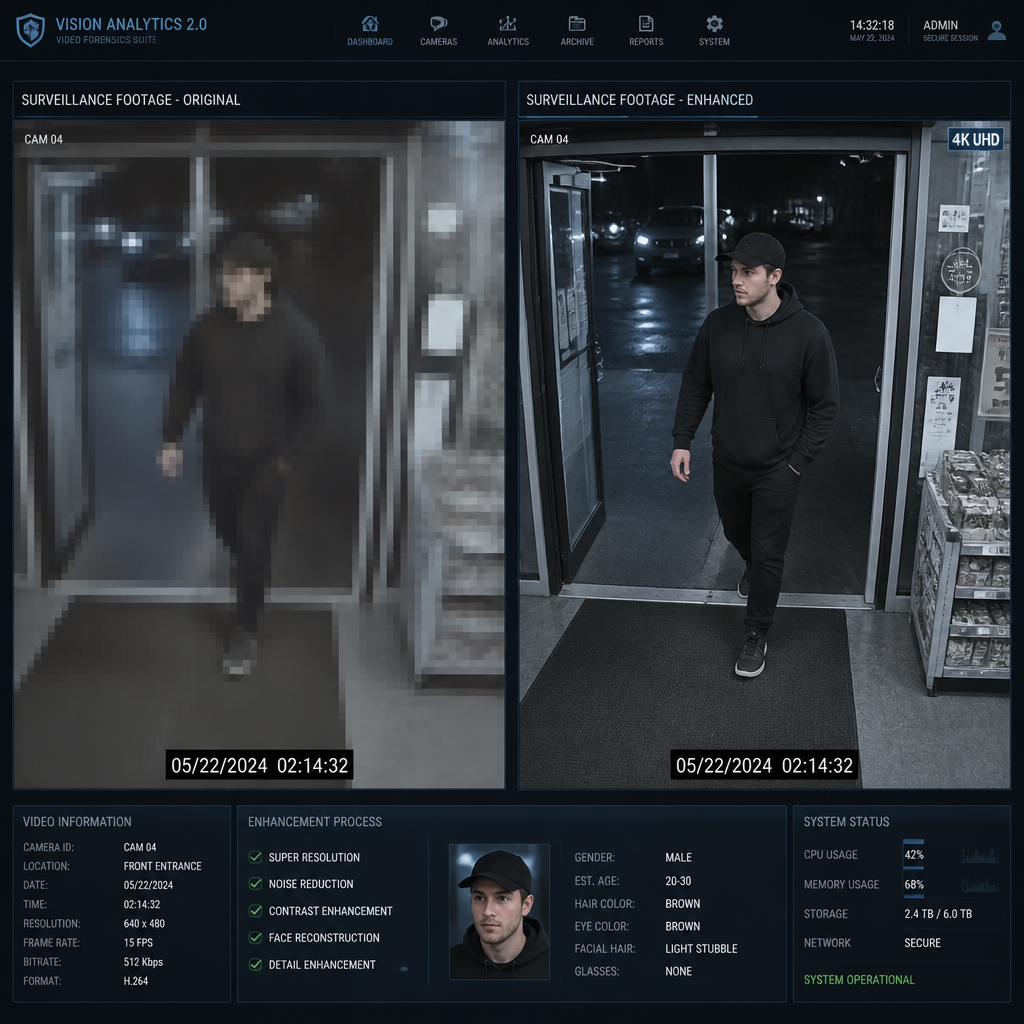
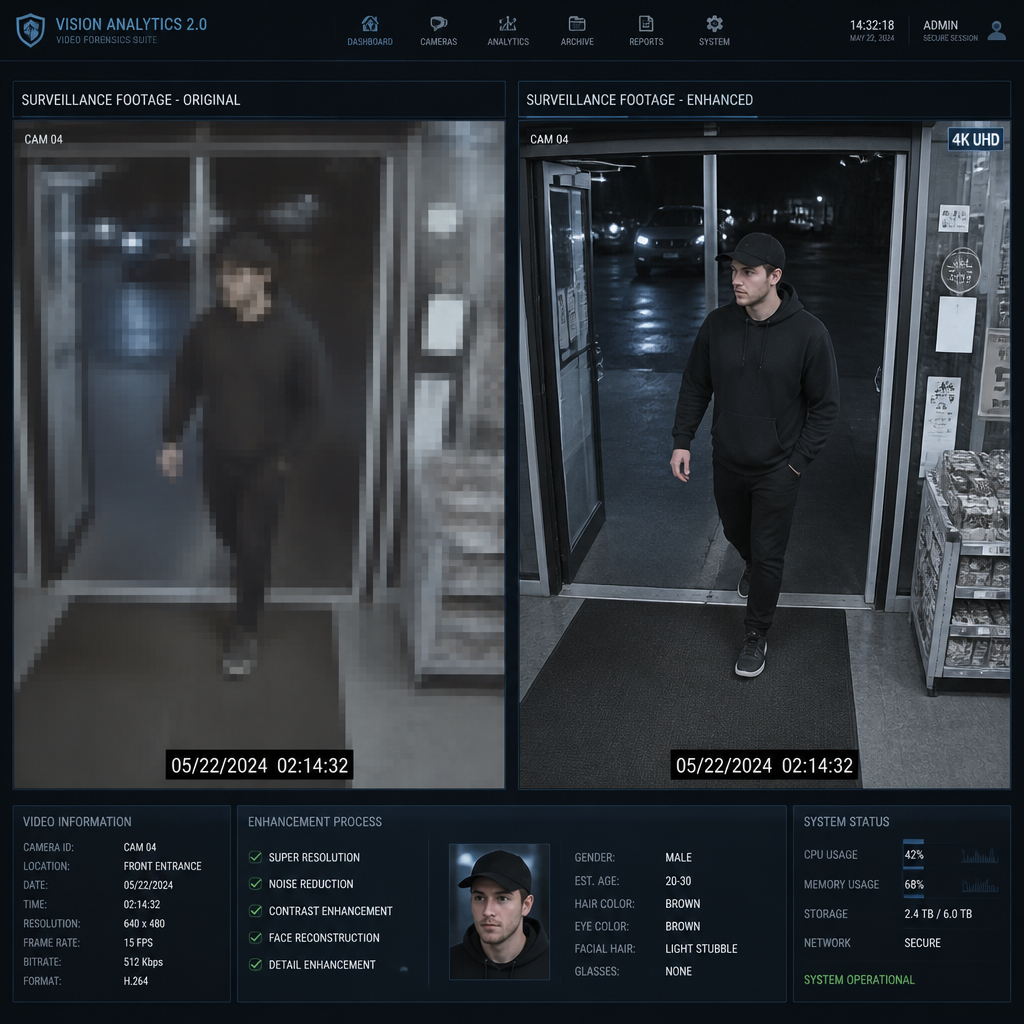
Most small business owners shopping for surveillance cameras fixate on price per unit and ignore the question that actually decides whether their footage is usable in a crisis: can this camera clearly identify a face, a license plate, or a stolen item at the distance where the incident actually happens? A 4K IP camera and a standard 1080p HD CCTV camera can both record your shop floor, but only one of them will give you something actionable when you need to hand footage to police or defend against a liability claim. This guide cuts through the spec-sheet noise and tells you exactly when the upgrade pays off and when it does not.
Table of Contents
- Quick Takeaways
- What Separates 4K IP from HD CCTV
- Resolution and Real-World Identification
- Storage, Bandwidth, and Network Demands
- Cost Comparison: Cameras, NVR, and Infrastructure
- Where 4K Wins and Where HD Is Enough
- The Smart Hybrid Approach
- Side-by-Side Comparison
- Frequently Asked Questions
- References
Quick Takeaways
| Key Insight | Explanation |
|---|---|
| 4K captures four times the pixel data of 1080p | This translates to sharper facial recognition, readable license plates at greater distances, and the ability to digitally zoom post-incident without losing usable detail. |
| Storage costs are the hidden budget item | A single 4K camera recording continuously at 30 fps using H.265 compression generates roughly 8 GB of footage per day. Motion-triggered recording can reduce that by up to 80 percent. |
| Your network infrastructure must support the load | Each 4K IP camera requires approximately 8 to 12 Mbps of bandwidth using H.265. A ten-camera system can demand up to 120 Mbps during peak recording periods. |
| HD 1080p is still the right answer for many areas | For indoor spaces under 20 feet or areas where presence monitoring rather than identity confirmation is the goal, 1080p delivers solid surveillance at a significantly lower cost. |
| NVR vs. DVR matters as much as resolution | 4K IP cameras require a Network Video Recorder. Existing analog DVR infrastructure is incompatible, which adds to the upgrade cost but also opens up remote access and smarter analytics. |
| Hybrid deployments are the professional standard | The most effective commercial systems place 4K cameras at entrances, cash registers, and parking lots, then use 1080p for general interior coverage where detail is less critical. |
| H.265 compression changes the cost math | Modern H.265 encoding reduces bandwidth and storage requirements by roughly 40 to 50 percent compared to older H.264 systems, making 4K more accessible than it was just a few years ago. |
What Separates 4K IP from HD CCTV
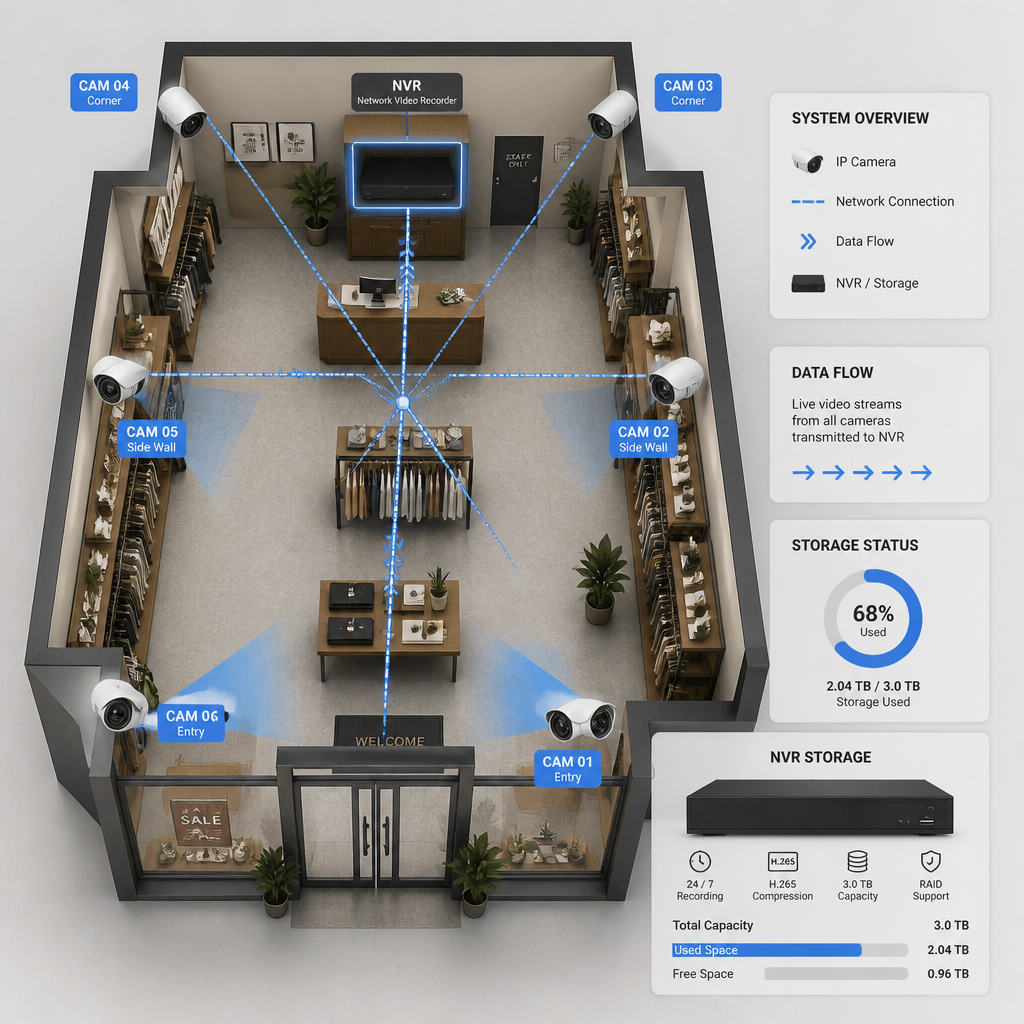
The term “CCTV” is often used loosely to describe any closed-circuit surveillance system, but in the context of this comparison it refers specifically to traditional analog or HD-over-coax systems that transmit signal to a Digital Video Recorder (DVR). A 4K IP camera, by contrast, digitizes video directly at the sensor and sends it over a standard Ethernet or PoE (Power over Ethernet) cable to a Network Video Recorder (NVR). That architectural difference matters beyond just resolution.
Standard HD CCTV cameras typically top out at 1080p (2 megapixels). Some HD-over-coax formats push to 4MP or 5MP, but the underlying analog signal path limits what is practically achievable. IP cameras, because they transmit fully digital signals from the start, scale cleanly from 1080p all the way to 4K (8 megapixels) and beyond. The IP architecture also supports remote viewing via smartphone or browser, software-based analytics, and network-level integration with access control systems and intercoms.
Traditional analog CCTV systems use DVRs with limited scalability and do not support native remote access without additional workarounds. IP-based NVR systems, on the other hand, allow businesses to add cameras, expand storage, and enable AI-driven features with software updates rather than hardware replacements. For a growing retail shop, office suite, or multi-unit property, that distinction translates directly to total cost of ownership over a three-to-five year horizon.
Pro tip: If you are still running coaxial cable infrastructure from an older analog install, do not assume you need to rip and replace everything. HD-over-coax adapters exist, but if you are investing in 4K performance, a proper Cat5e/Cat6 IP network is the only infrastructure that will give you full resolution, remote access, and integration capability going forward.
Resolution and Real-World Identification
Resolution only matters when it changes what your footage can actually prove. The practical question is not megapixels; it is whether a camera at a given mounting height and angle can produce a clear, court-admissible identification of a person or vehicle at the distance where an incident is likely to occur.
What 4K Actually Gives You in the Field
A 4K IP camera produces images at 3840×2160 pixels. That is four times the pixel count of a 1080p camera. In practice, this means a wider field of view with usable detail throughout the frame, not just in the center. You can digitally zoom into a recorded 4K image post-incident and still extract readable license plate numbers or recognizable facial features. With 1080p footage, that same digital zoom quickly produces a blurry, legally useless image.
For entrances, cash register areas, parking lots, and any high-traffic zone where identity confirmation is the goal, 4K is the right choice. These are the spots where your footage will be scrutinized most closely if something goes wrong, and 1080p often fails to deliver the detail needed to act on what was captured.
When 1080p Is Genuinely Sufficient
For interior spaces under roughly 20 feet, or for zones where you only need to confirm that something happened rather than identify exactly who did it, 1080p HD performs well and costs considerably less. A break room, a corridor, or a general stock area are all reasonable 1080p deployments. The image is clear enough to confirm an event and establish a timeline without the overhead of a 4K data stream.
“Most security camera decisions come down to one question: do you need to see something happened, or do you need to prove who did it? That’s the real difference between 1080p and 4K.”
A common mistake is placing high-resolution cameras where they are architecturally easy to mount rather than where identification is most critical. Putting a 4K camera in a low-risk back hallway while leaving the front entrance covered by an aging 1080p unit is exactly backwards. Map your identification risk zones first, then assign resolution accordingly.
Storage, Bandwidth, and Network Demands
This is where many small business owners get surprised after committing to a 4K upgrade. The image quality is immediately obvious and satisfying. The storage bill arrives later.
How Much Storage Does 4K Actually Consume
A single 4K camera recording continuously at 30 frames per second using H.265 compression generates approximately 8 GB of footage per day. Four cameras recording continuously for 30 days require roughly 960 GB of storage capacity. Most surveillance system builds start at 1 TB or 2 TB of storage for a four-camera system to accommodate this. Switch to motion-triggered recording only, and the same four cameras drop to 30 to 50 GB per camera per day, reducing disk space use by around 80 percent.
For comparison, a comparable 1080p system running H.265 uses roughly half that storage. If your business has a 30-day retention policy requirement (common for insurance or compliance purposes), the difference in hard drive expenditure between a four-camera 1080p and a four-camera 4K system is substantial.
Network Bandwidth Requirements
Each 4K IP camera requires approximately 8 to 12 Mbps of network bandwidth when using H.265 compression. A ten-camera 4K installation could consume up to 120 Mbps during peak recording periods. For most small businesses running shared Wi-Fi or a basic router setup, that is a real infrastructure concern. You will likely need to segment your surveillance network from your business operations network using a dedicated switch or VLAN to prevent cameras from degrading point-of-sale or office traffic.
Pro tip: Use a PoE NVR with a dedicated switch for your camera network rather than routing camera traffic through your main business router. This isolates surveillance bandwidth, makes the system more secure, and significantly simplifies troubleshooting if a camera goes offline.

Cost Comparison: Cameras, NVR, and Infrastructure
The upfront cost difference between 4K IP and 1080p HD systems is real, and it extends beyond the camera units themselves. Quality 4K cameras are priced roughly 30 to 40 percent higher than equivalent 1080p cameras when comparing similar feature sets such as weatherproofing and low-light performance. The NVR required to record 4K footage adds further cost on top of that, depending on channel count and storage capacity.
Beyond hardware, factor in the following for a realistic small business budget: network infrastructure upgrades if your existing cabling is not Cat5e or Cat6, larger or additional hard drives to meet your retention window, and potentially professional installation to ensure the PoE switch and NVR are configured correctly. Businesses without in-house IT staff should also factor in ongoing firmware update and network security maintenance, which IP-based systems require to stay protected against unauthorized access.
The honest long-term case for 4K comes down to future-proofing and analytic capability. Installing 4K-ready infrastructure now means you do not need to replace core hardware again when AI-powered features such as license plate recognition, people counting, and behavioral analysis become standard. These analytics work significantly better with higher-resolution source video. If you plan to stay in your current space for more than three years, the incremental cost of 4K tends to pay out.
Where 4K Wins and Where HD Is Enough
The clearest way to make this decision is to walk through your property with a specific question in mind: if an incident happened in this spot, what would I need the footage to show? Map each camera position against that question before specifying any resolution.
Deploy 4K at These Locations
Building entrances and exits are the single most important 4K deployment point. Everyone who enters your property passes through this zone, and it is where identity confirmation has the highest value. The same logic applies to cash register counters, where transaction disputes and theft are most likely to be recorded. Parking lots and loading docks, where vehicles need to be identified by plate, are also strong 4K use cases because the wider field of view allows a single camera to cover a large area without sacrificing plate legibility.
Where 1080p HD Remains the Right Choice
Interior hallways, break rooms, server rooms, and stock areas where the goal is confirming access rather than identifying a specific person across a distance are all solid 1080p deployments. Spaces under 20 feet with consistent lighting rarely justify the storage and bandwidth overhead of 4K. Small retail environments with good lighting throughout often find that 1080p covers most of their floor plan well at a fraction of the system cost.
The Smart Hybrid Approach
The most effective commercial surveillance deployments do not choose between 4K and 1080p. They use both strategically. Place 4K cameras at identification-critical points such as entrances, cash desks, and parking areas. Use 1080p for general interior coverage. This approach delivers the forensic capability of 4K where it matters most while keeping storage, bandwidth, and hardware costs under control in zones where that level of detail is not required.
For property managers overseeing apartment buildings or multi-unit commercial properties, the hybrid model is especially relevant. The lobby, mail room, and parking structure justify 4K. Interior corridors and common laundry rooms do not. A UnikCCTV consultation can help you map these zones accurately so you are not over-specifying low-risk areas or under-protecting high-risk ones. Their range of IP cameras, NVR systems, and access control products supports exactly this kind of mixed-resolution deployment without forcing you into a single-vendor locked system.
The hybrid approach also simplifies future upgrades. Because all cameras on an IP NVR system share the same network infrastructure and recording platform, swapping a 1080p unit for a 4K model at a specific location later requires only a camera swap and a configuration update, not a full system overhaul.
Side-by-Side Comparison
| Feature | Standard HD CCTV (1080p, Analog/DVR) | 4K IP Camera System (NVR-Based) |
|---|---|---|
| Resolution | 1920×1080 (2 megapixels) | 3840×2160 (8 megapixels) |
| Recording Device | DVR (Digital Video Recorder) | NVR (Network Video Recorder) |
| Cabling | Coaxial cable | Cat5e / Cat6 Ethernet or PoE |
| Remote Access | Limited, requires workarounds | Native via smartphone or browser |
| Daily Storage Per Camera (H.265, continuous) | Roughly 4 GB | Roughly 8 GB |
| Bandwidth Per Camera | 2 to 4 Mbps | 8 to 12 Mbps |
| AI Analytics Compatibility | Limited; depends on DVR | Full support: facial recognition, plate reading, people counting |
| Digital Zoom Post-Incident | Degrades quickly; limited usability | Remains clear and actionable at high zoom |
| Scalability | Requires additional cabling and hardware per camera | Scales via network; software-managed |
| Upfront Cost (relative) | Lower | 30 to 40 percent higher per camera, plus NVR |
| Best Use Case | Budget deployments, low-risk interior zones | Entrances, parking, cash desks, high-risk zones |
Frequently Asked Questions
Do 4K IP cameras work with my existing DVR system?
No. Standard 4K IP cameras transmit a digital signal over Ethernet and require a Network Video Recorder (NVR) to store and manage footage. Analog DVRs are designed for coaxial-connected cameras and cannot decode IP camera streams at any resolution. If you are upgrading to 4K, you are also upgrading your recording infrastructure. This is worth planning for in your budget from the start rather than discovering it mid-installation.
How much internet speed do I need for a 4K IP camera system?
Your internet speed is less critical than your local network bandwidth. Each 4K IP camera requires roughly 8 to 12 Mbps of local network capacity when using H.265 compression. For remote viewing over the internet, a business-grade upload speed of 25 Mbps or more is recommended if you plan to stream live footage from multiple cameras simultaneously to a smartphone or remote workstation. The cameras record locally to the NVR regardless of your internet connection.
Is 4K overkill for a small retail shop or office?
Not for every camera, but for every entrance and point-of-sale location, 4K is genuinely worth the cost. The key is not deploying 4K everywhere uniformly. A small shop with good lighting and a layout under 20 feet deep at the counter can often manage with a 1080p unit on the sales floor and a 4K unit covering the door and register. The hybrid approach keeps costs manageable while placing the highest resolution where an identification will actually be required.
Will 4K cameras work in low-light conditions inside my business?
Low-light performance depends on the sensor size and the camera’s aperture specification, not on resolution alone. Some 4K cameras perform well in low light; others do not. Look specifically for cameras specifying wide apertures (f/1.4 to f/1.8) and larger CMOS sensors if your installation environment has inconsistent or poor ambient lighting. Do not assume 4K automatically means better night performance, and confirm low-light specs before committing to a specific model.
How long can I store 4K footage before running out of hard drive space?
Using H.265 compression with motion-triggered recording, four 4K cameras can be managed on a 2 TB drive for approximately 30 days. With continuous 24/7 recording at full resolution, that same drive fills significantly faster. For a 30-day retention window with continuous recording across an 8-camera 4K system, plan for 4 to 8 TB of NVR storage capacity. Surveillance-rated hard drives are strongly recommended over standard consumer drives, as they are designed for the constant read/write cycles that security recording demands.
Can a 4K IP camera system integrate with access control or intercom systems?
Yes, and this is one of the strongest arguments for moving to an IP-based architecture. Because 4K IP cameras operate on a standard network, they can be integrated with IP-based intercom systems, smart locks, biometric access controls, and building management platforms. This means a single event, such as a door being forced open, can trigger a camera to flag the timestamp and notify staff simultaneously. UnikCCTV’s product range includes IP intercoms, access control units, and CCTV equipment that are designed to work together on a unified network, which is a meaningful advantage over standalone analog systems that offer no such integration.
Have you recently upgraded from HD CCTV to a 4K IP system, or are you weighing the decision right now? Share what factors matter most in your specific setup, we would like to hear from property managers and business owners working through the same trade-offs.
References
- 4K Security Cameras for Business: Buying Guide Covering Cost, Bandwidth, and Storage Requirements
- 1080p vs. 4K Security Camera: Resolution, Storage, Cost, and Real-World Use Cases Compared
- CCTV vs. IP Cameras: Resolution, Remote Access, Scalability, and Total Cost of Ownership Explained
- Security Camera Storage Calculator: How Much Storage 4K and 1080p Cameras Actually Use
- HD Security Cameras vs. 4K: A Practical Assessment of Whether the Upgrade Is Worth the Cost



 No products in the cart.