

Choosing the wrong gate keypad access system for a residential community is not a minor inconvenience. It is a security liability that affects every resident, every visitor, and every maintenance crew that needs entry. A common mistake property managers make is purchasing hardware based on price alone, then discovering the system cannot handle 200 resident credentials, lacks audit logs, or fails during power outages. This guide cuts through the noise and tells you exactly what to evaluate before committing to any gate access control solution for your community.
Table of Contents
- Quick Takeaways
- Why Most Gate Keypads Fail Residential Communities
- Key Factors to Evaluate in a Gate Keypad Access System
- Keypad vs. Card vs. Biometric: Which Access Type Fits Your Community?
- Wired vs. Wireless Gate Access Control for Communities
- Credential Management and Resident Capacity
- Integration with Intercoms, CCTV, and Smart Locks
- System Comparison: Three Common Approaches
- Installation Requirements and Long-Term Maintenance
- Frequently Asked Questions
- References
Quick Takeaways
| Key Insight | Explanation |
|---|---|
| Credential capacity matters more than price | A 50-user keypad is useless in a 120-unit community. Always verify maximum user storage before purchasing. |
| Audit logs are non-negotiable for communities | Property managers need timestamped entry records for liability, lease enforcement, and incident investigation. |
| Power backup protects residents during outages | Gate keypads without battery backup or fail-safe modes can trap or expose residents when power drops. |
| Wireless systems reduce installation cost significantly | In retrofit situations, wireless gate access control eliminates the need for expensive conduit trenching. |
| Integration with intercoms reduces gate-runner incidents | Pairing a keypad with a video intercom lets gate staff verify identity before releasing the gate motor. |
| Biometric options improve accountability | PIN codes can be shared; fingerprints and facial recognition cannot. High-traffic communities benefit from this distinction. |
| Vandal-resistant ratings protect hardware investment | Outdoor keypads need at minimum an IK08 impact rating and IP65 weatherproofing to survive community environments. |
Why Most Gate Keypads Fail Residential Communities
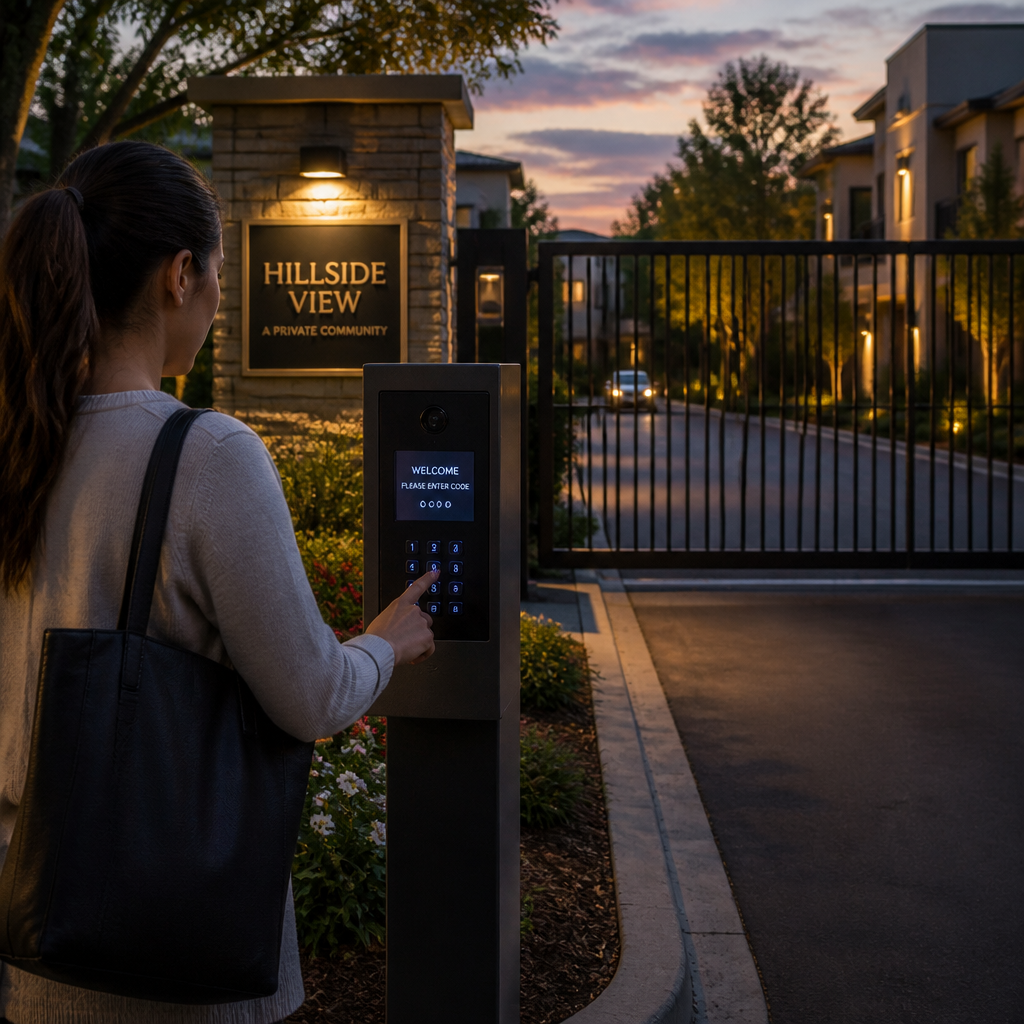
The failure pattern is predictable. A property manager installs a basic four-digit keypad, hands the code to every resident, and within six months the code has circulated to non-residents, delivery drivers, and people who moved out two years ago. The gate becomes theater rather than security.
In practice, the core problem is that consumer-grade keypads were not built for multi-user, multi-credential environments. They lack remote code management, they do not log entries, and they offer no way to revoke access without changing the code for everyone simultaneously. That is not a security system. That is a combination lock on a front door.
Residential communities need systems built to a different specification: individual PIN assignment, time-scheduled access windows, remote credential management, and integration with cameras and intercoms. The rest of this guide explains how to find that specification in real products.
Key Factors to Evaluate in a Gate Keypad Access System
Before looking at any product spec sheet, define your community’s parameters. How many units are there? How many entry points need coverage? Do you have on-site staff, or is this a fully automated entry system? These answers determine which product categories are even worth considering.
User Capacity and Scalability
A 100-unit apartment community needs a system that can store at minimum 300 to 500 credentials, accounting for residents, guests, staff, and service providers. Systems with a hard cap of 100 users will require replacement the moment the community grows or management adds contractor access profiles. Always buy above your current need.
Scalability also means software-side management. Systems that require a technician on-site to add or remove users create operational drag. Look for cloud-managed gate access control platforms where property managers can add, edit, and revoke credentials remotely through a web portal or mobile app.
Weather and Vandal Resistance
Outdoor keypads face rain, direct sun, humidity, and deliberate physical abuse. The minimum acceptable specification for a community gate keypad is IP65 weatherproofing and IK08 impact resistance. Anything below this will show hardware failures within 18 to 24 months in most climates.
Fail-Safe vs. Fail-Secure Operation
This is one of the most overlooked specifications in residential gate access. Fail-safe means the gate opens automatically when power is lost. Fail-secure means it stays locked. For a primary community entrance, fail-safe is typically required by fire codes, but verify your local authority having jurisdiction before specifying either mode. A system that locks residents inside during a power outage is a legal exposure, not just a nuisance.
Pro tip: Ask any vendor explicitly whether their keypad supports fail-safe mode and whether that mode is field-configurable or requires a firmware change. This question alone will separate serious commercial-grade vendors from consumer-grade resellers.
Keypad vs. Card vs. Biometric: Which Access Type Fits Your Community?
The authentication method you choose shapes the entire resident experience and your administrative workload. There is no universal right answer, but there are wrong choices for specific contexts.
PIN Keypads
PIN-only systems are the lowest-cost entry point. They work reliably, require no physical credential to carry, and are easy for elderly residents to use. The problem is credential sharing. A PIN is knowledge, and knowledge spreads. For communities where security accountability matters, PIN-only is a weak foundation.
The improvement here is individual PIN assignment rather than shared codes. Systems that issue each resident a unique PIN provide audit trail capability: you know that Unit 14B entered at 9:47 AM, not just that someone with the gate code entered.
Proximity Card and Key Fob Systems
RFID cards and key fobs are the most common solution for medium to large residential communities. They are convenient, fast, and provide individual credential accountability. The downside is lost cards. Property managers need a streamlined process for deactivating lost fobs and issuing replacements, ideally through a software dashboard without requiring a technician visit.
Biometric Access
Fingerprint readers and facial recognition locks eliminate the shared-credential problem entirely. UnikCCTV carries biometric access systems suited for gate and door applications, and these are increasingly practical for residential communities that prioritize security over cost. The practical limitation is enrollment: every authorized user must register their biometric data during setup, which requires physical presence and a coordinated rollout.
Pro tip: For large communities, a hybrid system combining RFID fobs with a PIN fallback offers the best balance. Residents use fobs daily, and the PIN fallback prevents lockouts when a fob is lost before a replacement arrives.
Wired vs. Wireless Gate Access Control for Communities
The installation method affects both upfront cost and long-term reliability. Neither approach is universally superior, but the context of your property strongly favors one over the other in most cases.
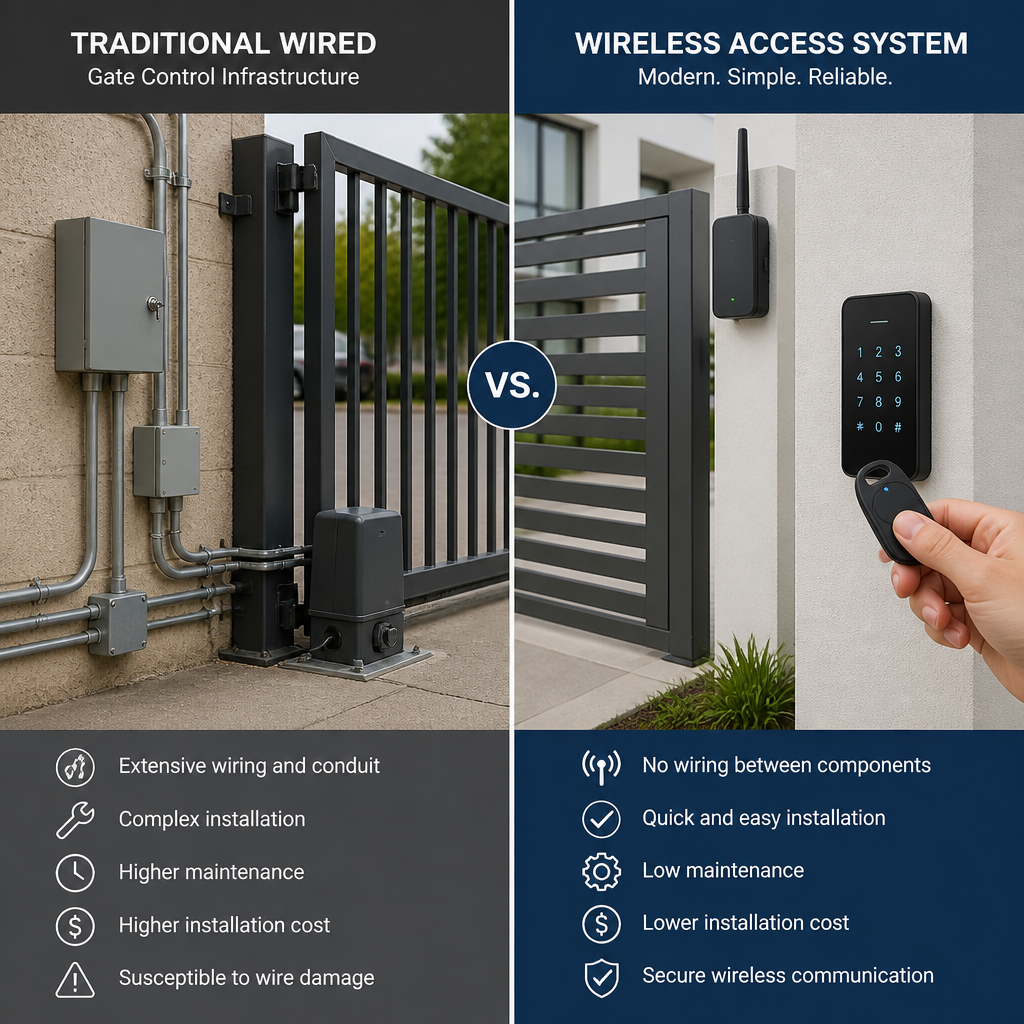
Wired systems using RS-485 or TCP/IP connections are more stable and do not depend on radio frequency reliability. They are the correct choice for new construction where conduit can be run during the build phase. In retrofit situations on developed properties, trenching conduit through paved driveways and landscaped areas can cost more than the hardware itself.
Wireless gate access control systems, including those using long-range RF transmitters, solve the retrofit problem cleanly. UnikCCTV offers wireless transmitter solutions specifically designed for gate and perimeter applications. In practice, wireless systems perform reliably within manufacturer-specified ranges, and modern encrypted protocols have largely eliminated the interception vulnerabilities that plagued older wireless gate systems.
The honest trade-off is battery maintenance. Wireless keypads and readers that are not hardwired for power require periodic battery replacement. This is a manageable operational task, but it must be assigned to someone. Properties without dedicated maintenance staff should factor this into the total cost of ownership.
Credential Management and Resident Capacity
This is where most residential gate systems fall apart in year two. The hardware works fine. The software management does not scale.
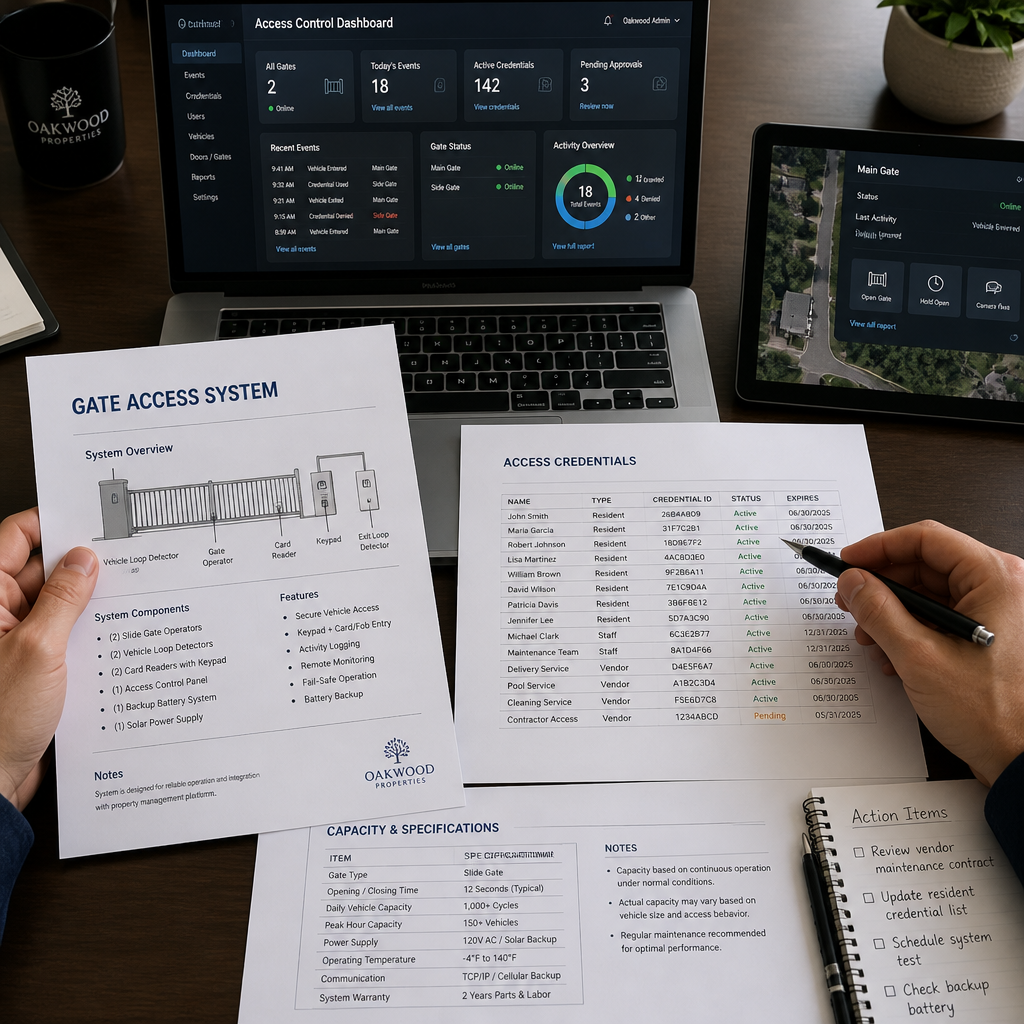
A community of 200 units with two residents per unit plus dedicated staff and contractor profiles needs to manage 500 or more credentials across potential multiple entry points. The gate to the main entrance, the gate to the parking structure, the pedestrian entry, and the pool area may all need separate but linked access control. A system that manages each gate as an isolated device with no central dashboard forces property managers to configure each point separately, which means errors and unclosed access gaps.
“Access control systems that lack centralized credential management create administrative overhead that overwhelms property staff and leads to security gaps nobody notices until an incident occurs.” — Security Industry Association, Physical Access Control Systems guidelines
Look for systems that offer centralized access control software where all gates and entry points appear in a single interface. The ability to suspend a resident’s access across all entry points simultaneously, when they are in lease violation or after move-out, is a feature that pays for itself in the first incident where you need it.
Time-based access scheduling is equally important. Maintenance contractors should have access only during business hours, Monday through Friday. Cleaning crews should be restricted to specific time windows. These rules should be configurable by the property manager without requiring vendor support calls.
Integration with Intercoms, CCTV, and Smart Locks
A gate keypad operating in isolation is a limited tool. The same gate entry point becomes a comprehensive security checkpoint when integrated with a video intercom, a CCTV camera positioned to capture plate numbers, and audit-logged access control software.
UnikCCTV’s product catalog spans intercom systems, CCTV surveillance, smart locks, and gate access control, which means community managers can source a genuinely integrated system rather than stitching together incompatible products from different vendors. In practice, this matters because integration through a common software platform is more reliable than trying to connect systems through third-party APIs that may break with firmware updates.
For a typical gated residential community, the recommended integration stack is: a gate keypad or card reader at each vehicular and pedestrian entry, a wireless video intercom for visitor verification at the main entrance, CCTV coverage of the gate throat and surrounding area, and a central software dashboard that logs all events with timestamps and camera snapshots.
Smart lock integration matters for multi-access-point properties where the main gate is one of several controlled entry points. A resident whose access is revoked at the main gate should also lose access to secondary entry points simultaneously. This requires a system where all hardware speaks to the same access control database.
System Comparison: Three Common Approaches
| System Type | Best Fit | Key Limitation |
|---|---|---|
| Standalone PIN Keypad | Small communities under 30 units with low security requirements and on-site management | No individual credential tracking, shared codes circulate freely, no audit log capability |
| RFID Card or Fob System with Central Software | Medium to large communities needing individual accountability, audit trails, and remote management | Physical credential loss creates administrative work and temporary security gaps |
| Biometric System with Facial Recognition or Fingerprint | High-security communities or those with frequent credential sharing problems and budget for premium hardware | Enrollment requires physical presence, higher upfront hardware cost, and occasional false rejections in poor lighting |
Installation Requirements and Long-Term Maintenance
The best gate keypad access system specified poorly during installation becomes a source of ongoing problems. Three installation details cause the majority of post-installation service calls in residential community gate systems.
Gate Operator Compatibility
The keypad or access controller must be compatible with your existing gate operator, whether that is a swing gate, slide gate, or barrier arm. Most commercial-grade access controllers provide dry contact relay outputs that work with any gate operator brand, but verify this before purchasing, particularly if your gate operator is an older model. Incompatibility discovered after installation means an expensive service call and potential hardware return.
Reader Mounting Height and Reach
Vehicle-side keypads installed at the wrong height create accessibility problems. The recommended mounting height for a vehicle-accessible keypad is 48 to 52 inches from the pavement surface to the center of the keypad. This allows access from both standard vehicle windows and higher truck or SUV windows without requiring drivers to exit the vehicle. Mounting too low creates the same access problem it was meant to solve.
Firmware Updates and Software Support Lifecycle
A common mistake is purchasing hardware from vendors who will discontinue software support within three to five years. Cloud-managed access control systems in particular require ongoing software infrastructure from the vendor. Before committing, ask directly: what is the vendor’s software support commitment for this product line, and what happens to the hardware if the cloud platform is discontinued? Vendors who cannot answer this question clearly should be disqualified. UnikCCTV provides professional consultation to help communities evaluate these factors before purchase, which is a meaningful advantage over purchasing blindly from a big-box retailer.
Frequently Asked Questions
How many users can a typical residential gate keypad system support?
Consumer-grade keypads typically support 10 to 100 users. Commercial-grade systems designed for residential communities support 500 to 10,000 users depending on the controller. For any community with more than 50 units, specify a system with at least 500-user capacity to accommodate residents, staff, and service providers without hitting limits as the community grows.
Is a wireless gate keypad as reliable as a wired system?
Modern wireless gate access control systems using encrypted RF protocols are reliable within their specified operating range, typically 300 to 1,000 feet depending on the transmitter. The primary reliability variable is battery maintenance for the wireless components. Hardwired power to the keypad with wireless communication back to the controller is the best of both approaches for communities where trenching is impractical but power is available at the gate.
What is the difference between fail-safe and fail-secure for a community gate?
Fail-safe means the gate opens automatically when power is lost, allowing free egress and entry. Fail-secure means the gate stays locked during a power outage. Most residential community gates should be fail-safe on the exit side to comply with fire and life safety codes. Consult your local building department before specifying, as requirements vary by jurisdiction and property type.
Can a gate keypad system integrate with an existing intercom or CCTV setup?
Yes, provided both systems support compatible interface protocols. Most commercial-grade gate access controllers offer dry contact relay outputs for gate operators and can trigger CCTV cameras through auxiliary output connections. Integration with video intercoms varies by brand. Sourcing both the access control and intercom from the same supplier, as offered through UnikCCTV, eliminates compatibility guesswork and simplifies support when troubleshooting is needed.
How do I handle access revocation when a resident moves out?
In a properly configured system, move-out access revocation should take less than two minutes through the management software dashboard. The property manager deletes or suspends the former resident’s credential, which immediately disables their PIN, RFID fob, or biometric enrollment across all connected access points. In systems without central management software, this requires either changing the shared code for everyone, which is disruptive, or physically visiting each reader to delete the credential, which is impractical at scale. This is precisely why individual credential management is non-negotiable for communities above 30 units.
What maintenance does a gate keypad system require annually?
Annual maintenance should include cleaning keypad surfaces and reader lenses, testing battery backup systems if present, reviewing and purging inactive credentials from the user database, confirming that firmware is current, and physically inspecting all cable connections and mounting hardware for weathering damage. Gate access systems in coastal or high-humidity environments should also have their weatherproof gaskets inspected and replaced if compromised. Scheduling this as an annual task prevents the small degradations that compound into system failures.
What has been your biggest challenge when managing gate access for a residential community? Share your experience so others in similar situations can learn from what actually happens in the field.
References
- Statista: access control market size and adoption statistics for security systems globally
- Forbes: property management technology trends and smart building security investment insights
- NIST: physical access control system standards and identity credential management guidelines
- U.S. Department of Homeland Security: guidelines on perimeter security and access control for residential and commercial facilities
- National Criminal Justice Reference Service: research on crime prevention through environmental design and gate access effectiveness



 No products in the cart.