
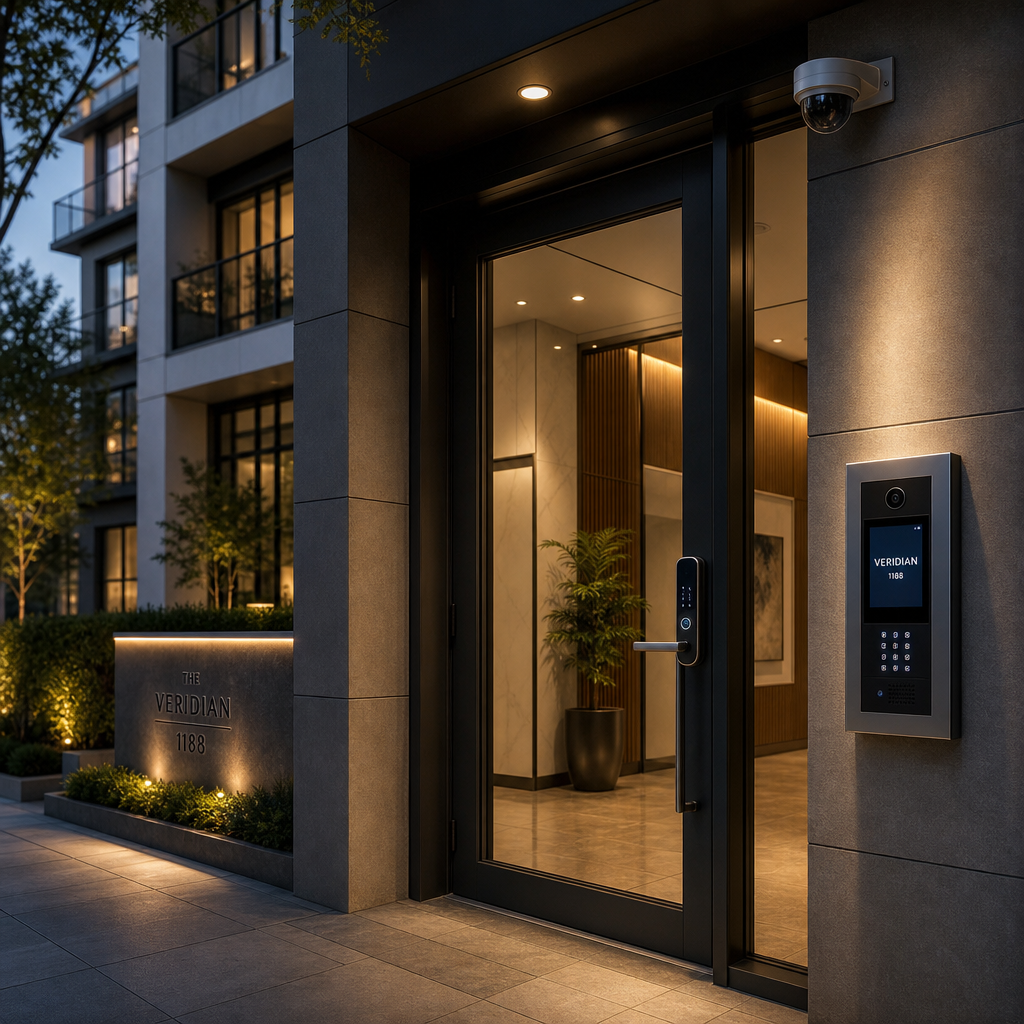
Single-point security fails. A smart lock without CCTV coverage is a blind spot. An intercom without access control logs is a liability. According to the FBI’s Uniform Crime Report, a burglary occurs roughly every 26 seconds in the United States, and properties with only one security measure in place are three times more likely to be targeted than those with multiple overlapping systems. Building a true layered security system means designing each component to compensate for the weaknesses of the others. This article breaks down how to combine intercoms, smart locks, access control, and CCTV into a single, coherent security architecture that actually holds up under real-world pressure.
Table of Contents
- Why Single-Layer Security Fails
- Quick Takeaways
- The Four Pillars of a Layered Security System
- How Intercoms Anchor Visitor Verification
- Smart Locks as the Physical Enforcement Layer
- Integrated Access Control: The Permission Engine
- CCTV: The Evidence and Deterrence Layer
- How to Integrate All Four Layers Without Creating Chaos
- System Comparison: Approaches to Building Layered Security
- Common Mistakes That Undermine Layered Security
- Frequently Asked Questions
- References
Why Single-Layer Security Fails
Most property managers and homeowners make the same mistake: they invest heavily in one security tool and assume coverage. A deadbolt lock at the front door does nothing for a tailgater who walks in behind an authorized tenant. A CCTV camera records the event but cannot stop it. Security works through redundancy, not replacement.
In practice, every security layer has a designed-in failure mode. Intercoms can be bypassed if no one monitors them. Smart locks can be defeated if credentials are stolen or shared. Access control logs are useless after the fact if no camera captured the event. CCTV footage without access timestamps is hard to interpret in an investigation. Each gap is exactly where a well-designed layered system steps in.
Quick Takeaways
| Key Insight | Explanation |
|---|---|
| Layer for redundancy, not replacement | Each component must cover the blind spots of the others. No single device is sufficient on its own. |
| Intercoms are your first filter | A video intercom screens visitors before they reach any physical barrier, reducing unauthorized entry attempts at the source. |
| Smart locks enforce access, not just restrict it | Credential-based locks create time-stamped audit trails, making accountability possible rather than guesswork. |
| Integrated access control centralizes permissions | Managing all entry points from one platform eliminates the configuration gaps that appear when systems are managed separately. |
| CCTV placement must match access points | Cameras positioned at every controlled entry point create a corroborated record that access logs alone cannot provide. |
| Biometric credentials outperform PIN codes for multi-tenant buildings | Biometric access eliminates shared-credential risk, which is the leading cause of unauthorized entry in commercial buildings. |
| System integration beats component quality | A mid-range intercom that shares data with your access control panel outperforms a premium intercom operating in isolation. |
The Four Pillars of a Layered Security System
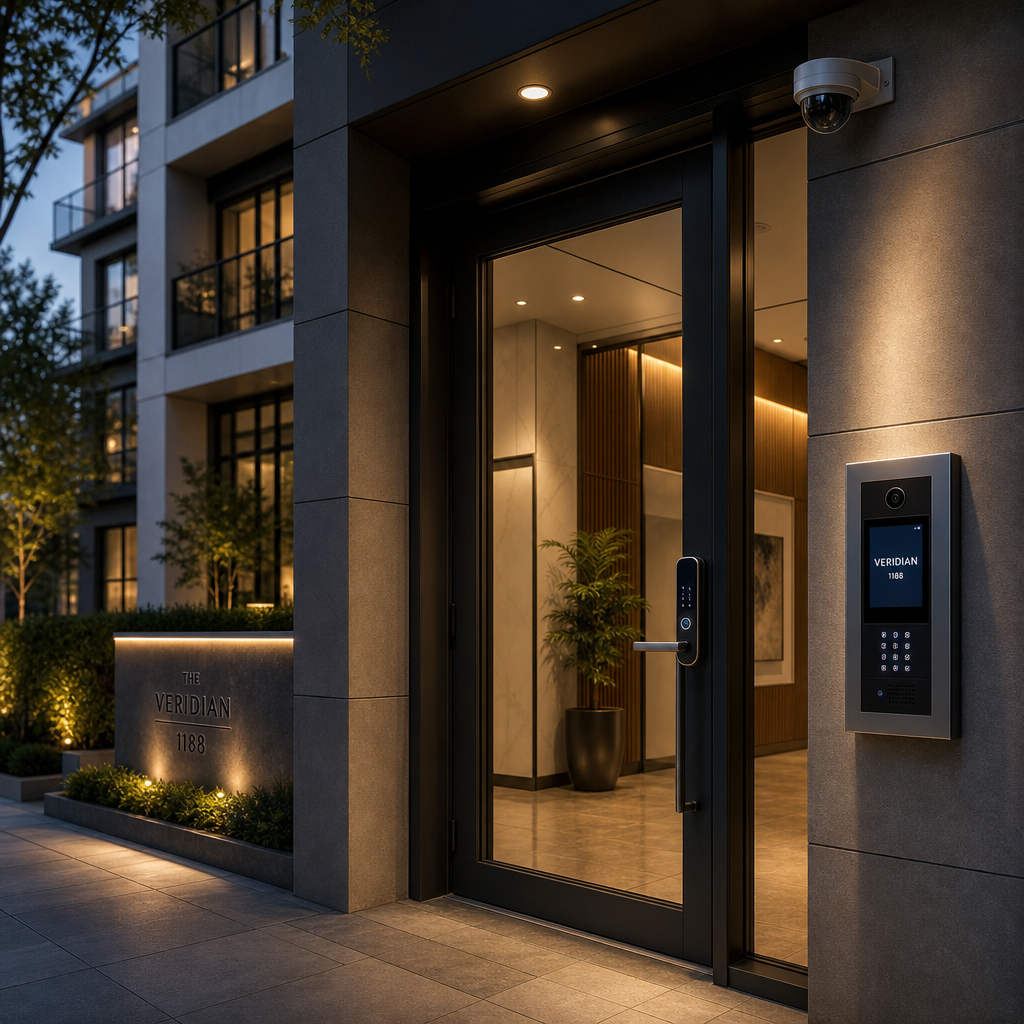
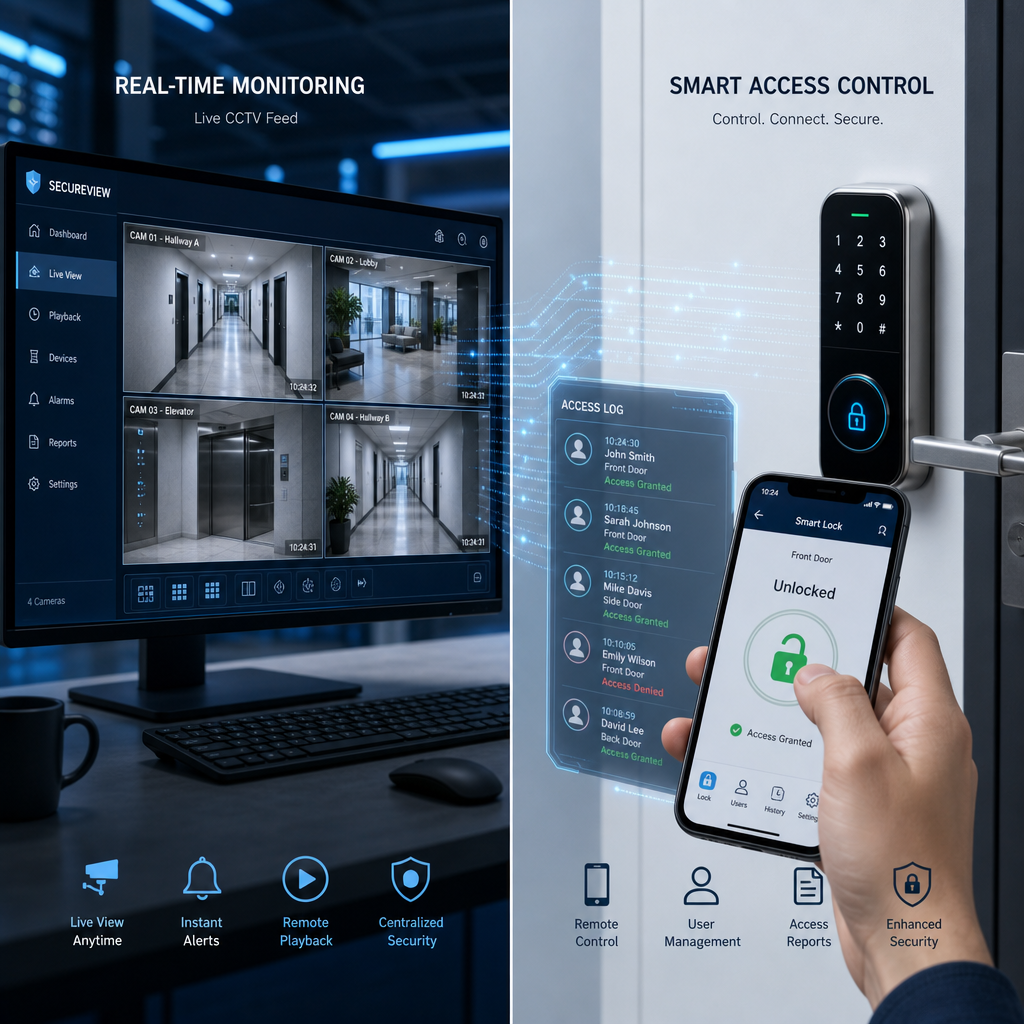
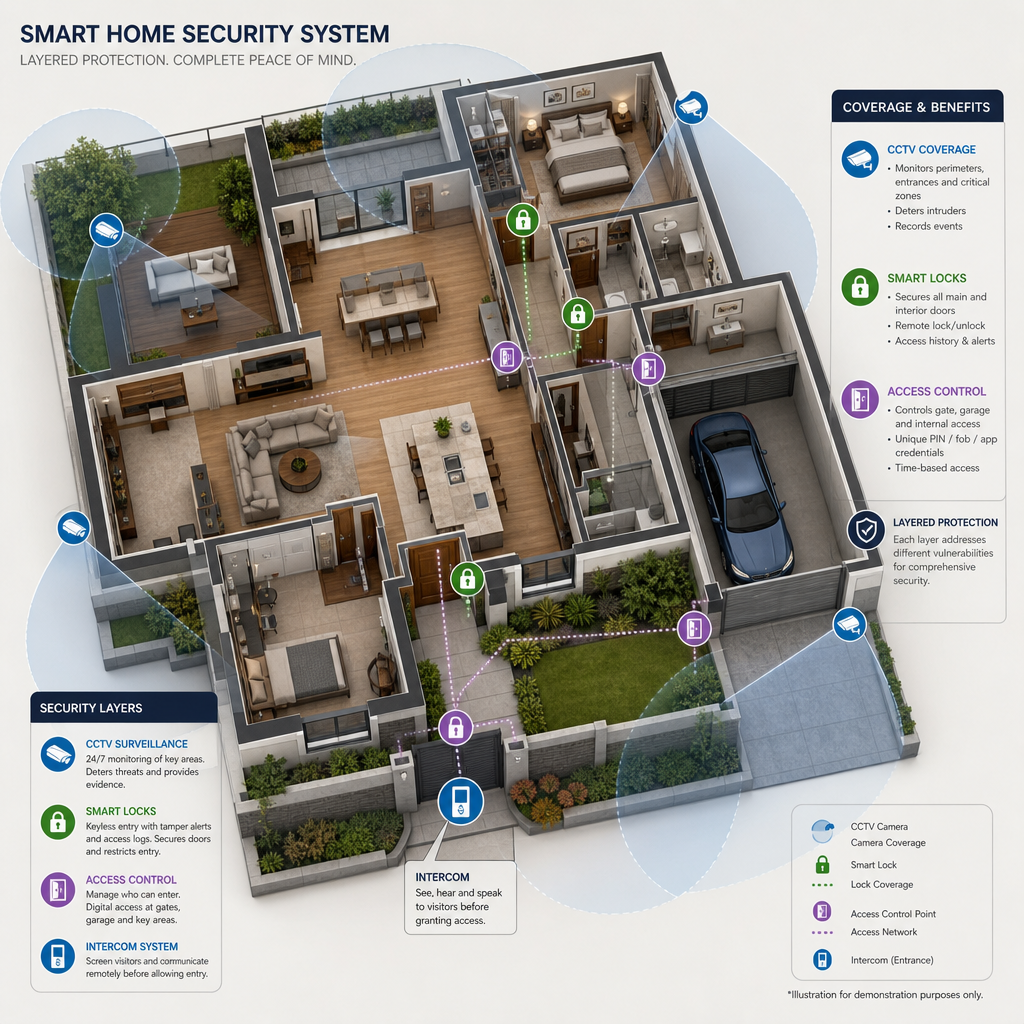
A properly designed layered security system is built around four distinct functions: visitor verification, physical access enforcement, permission management, and event documentation. Each function maps to a specific technology category. Intercoms handle verification. Smart locks handle physical enforcement. Access control panels handle permission management. CCTV handles documentation and deterrence.
The moment you treat these as separate purchases rather than an integrated architecture, you start creating seams. Seams are where security breaks. Property managers running apartment complexes or commercial office buildings cannot afford seams because they are managing dozens or hundreds of access events per day.
Why the Order of Layers Matters
The sequence in which layers intercept a visitor or potential intruder is not arbitrary. The outermost layer should be the least resource-intensive to operate. A video intercom at the perimeter gate costs nothing per interaction once installed. A security guard at the same position costs significant ongoing labor. Design outward layers to filter the volume so that inner layers only handle verified traffic.
For a large apartment building, this means the gate intercom filters delivery persons and guests, the lobby smart lock filters residents from non-residents, the elevator access control filters floor-level access, and CCTV covers all transition points. Each layer narrows the population of people penetrating deeper into the property.
How Intercoms Anchor Visitor Verification
The intercom is the first human touchpoint in a layered system. A video intercom adds visual verification to voice confirmation, which matters enormously in multi-tenant residential buildings where residents cannot be expected to recognize every authorized visitor by voice alone. Wireless intercom systems from UnikCCTV extend this capability to detached gates and secondary entrances without trenching cable infrastructure.
In practice, the most effective intercom setups include two-way audio, wide-angle video capture, and a direct mobile notification pathway so residents can grant or deny access remotely. This matters for deliveries, service calls, and guests arriving when the resident is not on-site. The intercom layer does not stop unauthorized people, but it creates a friction point that filters out low-effort intrusion attempts and logs visitor contact events for later review.
Wired Versus Wireless Intercom Systems
Wired intercoms offer higher reliability and lower latency, which matters for high-traffic entry points in commercial buildings. Wireless intercoms using modern 2.4GHz or DECT frequency bands perform well for residential gates, secondary entrances, and retrofit installations where cabling is impractical. The common mistake is selecting wireless purely for installation convenience without verifying signal coverage across the full property boundary.
For properties with extended perimeters, UnikCCTV’s wireless transmitter solutions extend intercom range significantly without requiring full cable runs. This is specifically relevant for agricultural properties, gated residential communities, and industrial compounds where entry points may be several hundred meters apart.
Pro tip: Install your intercom camera at a height between 150cm and 160cm from ground level. This angle captures face-level imagery for most adults without requiring visitors to position themselves deliberately, which improves the quality of recorded visitor logs.
Smart Locks as the Physical Enforcement Layer
A smart lock is not just a keyless entry device. At the system level, it is the mechanism that converts an access decision into a physical event. When integrated with an access control panel, a smart lock only releases when the panel authorizes the credential presented. This is fundamentally different from a standalone smart lock that makes its own decisions locally.
The data consistently shows that credential sharing is the primary cause of unauthorized access in multi-tenant buildings. A biometric smart lock, specifically a fingerprint or facial recognition model, eliminates credential sharing because the credential cannot be transferred. UnikCCTV’s facial recognition lock lineup addresses this directly, making them the preferred choice for high-security interior zones like server rooms, pharmacies, and executive office suites.
Facial Recognition Locks Versus PIN-Based Locks
PIN-based smart locks are appropriate for lower-risk entry points where convenience is a higher priority than strict accountability. Facial recognition locks are appropriate for any entry point where you need to know specifically who entered, not just that someone with the correct PIN entered. The difference sounds subtle but becomes critical in post-incident investigations.
For apartment main entrances, a combination of mobile credential and facial recognition creates a two-factor verification layer that neither standalone solution provides. Residents present their phone credential, the facial recognition confirms their identity, and the access control system logs the specific person and timestamp. This is comprehensive building security operating as designed.
Integrated Access Control: The Permission Engine
Access control is the nervous system of a layered security setup. It defines who can go where, at what times, using which credentials. Without a centralized integrated access control platform, you end up managing permissions separately in each device, which leads to configuration drift. Configuration drift is when the smart lock on the third floor still has a terminated employee’s credentials active two weeks after HR processed the departure.
A centralized access control panel connected to all entry points resolves this. When a credential is revoked at the panel, it is revoked everywhere simultaneously. This is not a convenience feature. It is a basic security requirement for any building with more than five regularly authorized users.
Time-Based Access Scheduling
One of the most underused features in access control systems is time-based scheduling. A cleaning crew should have access to office floors between 6pm and 9pm on weekdays. A contractor should have access to the basement mechanical room only during their scheduled work window. Setting time-based permissions means that a stolen or copied credential becomes useless outside its authorized window, which significantly limits the damage from credential compromise.
UnikCCTV’s time attendance clocks double as access control endpoints in many configurations, meaning the same credential that logs an employee’s work hours also controls which doors they can open during their scheduled shift. This eliminates the need for two separate credentialing systems.
Pro tip: When configuring access control for a multi-tenant building, create user groups rather than individual permission sets. Groups allow you to update dozens of users at once when a policy changes, and they prevent the permission inconsistencies that accumulate over months of individual edits.
CCTV: The Evidence and Deterrence Layer
CCTV serves two functions that are often conflated: deterrence and evidence collection. Deterrence works when cameras are visible. Evidence collection requires adequate resolution, frame rate, and retention period. Most property managers optimize for one and neglect the other, which is why so many security incidents produce footage that is either too low-resolution to identify a face or stored for only 48 hours when the incident is discovered five days later.
The minimum acceptable standard for entry-point CCTV in 2024 is 1080p resolution at 15 frames per second with 30 days of local storage. For high-value access points like bank branches, pharmacies, or server rooms, 4K resolution with motion-triggered recording extends storage capacity while maintaining quality. Smart intercom and CCTV integration takes this further by triggering a camera recording event every time the intercom is activated, creating a correlated log of every visitor contact and the corresponding video.
Camera Placement for Layered Coverage
Camera placement is where most DIY security setups fail. The instinct is to point cameras at the property boundary, which captures exterior activity but misses the most valuable coverage zone: the entry point transition. A camera positioned to capture the face of anyone pressing the intercom button provides identification-quality footage. A camera positioned to capture the door from the outside captures the approach but rarely the face clearly.
For a complete layered CCTV deployment, position cameras at: the outer perimeter approach, the intercom interaction zone, the door threshold from inside, internal corridors at access-controlled transition points, and the parking area if vehicles are regularly stored on-site. Each position corresponds to a specific layer of the access flow.
How to Integrate All Four Layers Without Creating Chaos
The technical integration of these four systems is where many property managers either overspend or give up. The key principle is to choose systems that share a common communication protocol or offer native integration with each other. Mixing a proprietary intercom, a standalone smart lock, a closed-loop access control system, and a CCTV NVR that has no API access creates four separate management interfaces, four separate credential databases, and four separate failure points.
When selecting equipment from a single supplier like UnikCCTV, the compatibility question is resolved before installation begins. The intercom panel communicates directly with the access control system, the smart lock is enrolled in the same credential database, and the CCTV system shares timestamps with the access log. This produces a unified audit trail rather than four disconnected event logs that must be cross-referenced manually after an incident.
Wiring and Network Infrastructure Planning
Do not start with devices. Start with infrastructure. A layered security system requires stable network connectivity at every access point, adequate power supply including backup power for critical entry points, and cable pathways that allow for future expansion. A Cat6 network run to every controlled door costs relatively little during construction and allows any IP-connected device to be added later without structural disruption.
For gate access control specifically, plan for a dedicated low-voltage power supply with at least 4-hour battery backup. A power outage that releases all mag-lock doors is not an acceptable failure mode for a security system designed to protect occupants.
System Comparison: Approaches to Building Layered Security
| Approach | Best Suited For | Key Limitation |
|---|---|---|
| Standalone smart intercom only (e.g., ButterflyMX-style single-device) | Small residential buildings with low daily access volume and minimal compliance requirements | No physical enforcement layer, no centralized credential management, no corroborated video evidence tied to access events |
| Integrated panel with intercom, access control, and CCTV (e.g., UnikCCTV multi-component system) | Apartment complexes, commercial office buildings, schools, and industrial facilities with multi-zone access requirements | Higher upfront installation complexity; requires proper infrastructure planning and professional configuration |
| Enterprise access control platform with third-party device integration (e.g., BEC Integrated-style deployment) | Large campuses and enterprise facilities with existing infrastructure and dedicated IT security teams | High licensing and integration costs, extended deployment timelines, dependency on ongoing vendor support contracts |
Common Mistakes That Undermine Layered Security
The most common mistake is treating system integration as optional. Property managers often purchase quality individual components and then connect them with workarounds rather than native integrations. The result is a system that works 90% of the time and fails in precisely the situations that matter most, such as a high-stress incident where staff needs real-time information from multiple sources simultaneously.
A second persistent mistake is neglecting firmware and software updates. Access control systems and smart locks run software, and that software develops vulnerabilities over time. A biometric facial recognition lock running two-year-old firmware may have known exploits that a basic web search would reveal to anyone motivated to find them. Schedule quarterly firmware reviews as part of routine building maintenance.
Overlooking Physical Security Around Electronic Devices
Electronic access control introduces a specific physical vulnerability: the device housing itself. An intercom panel with exposed wiring at the back can be bypassed by cutting the door release wire. A smart lock with an exposed battery compartment can be drained deliberately to force a mechanical override. Mount all exterior-facing devices in tamper-evident enclosures, and configure tamper alerts to trigger an immediate notification to building management.
CCTV cameras mounted at reachable heights without protective housings are routinely redirected or obscured in real-world incidents. Mount cameras at a minimum of 2.5 meters height and use vandal-resistant dome housings at any position below 3 meters. This is basic physical hardening that completes the layered security model at the hardware level.
“Security is always excessive until it’s not enough.” — Robbie Sinclair, Head of Security, Country Energy. This captures exactly why layered redundancy is the only defensible design philosophy for property security.
Frequently Asked Questions
What is the minimum viable layered security system for a small apartment building?
For a building with fewer than 20 units, the minimum effective setup is a video intercom at the main entrance, a smart lock on the lobby door connected to the intercom panel, and a minimum of two CCTV cameras covering the entrance approach and lobby interior. An access control panel that logs every entry event by credential is strongly recommended even at this scale, because incident investigations without logs are essentially guesswork.
Do I need professional installation or can I set up an integrated system myself?
For single-family homes, competent DIY installation is realistic with modern wireless intercom and smart lock systems. For any multi-unit building, professional installation is not optional if you want the system to function as a coherent whole. Incorrect wiring, misconfigured access panels, and improperly enrolled credentials are all common failure points in self-installed commercial systems that become apparent only during an actual security incident.
How does a facial recognition lock differ from a fingerprint lock in a building security context?
Facial recognition is contactless and faster at high traffic volumes, making it better suited for main building entrances where dozens of people may arrive within a short window. Fingerprint readers are more cost-effective for interior zone access where traffic is lower and where a slightly slower interaction is acceptable. Both eliminate the credential-sharing problem that plagues PIN-based systems. For a comprehensive building security strategy, use facial recognition at high-volume outer doors and fingerprint at restricted interior zones.
Can smart intercom and CCTV systems share the same network infrastructure?
Yes, and they should. Running all security devices on a dedicated VLAN (Virtual Local Area Network) separates security traffic from general building network traffic, which improves reliability and prevents general network congestion from affecting access control response times. Consult your network configuration against the device specifications from your supplier to confirm bandwidth requirements, particularly if your CCTV system is transmitting 4K streams.
How long should CCTV footage be retained for a commercial property?
The practical standard for most commercial properties is 30 days of continuous retention. Some industry standards, including those in financial services and healthcare, require 60 to 90 days. The Occupational Safety and Health Administration (OSHA) and various state-level security regulations may specify minimum retention periods for your industry. Check your jurisdiction’s requirements. Storage is inexpensive relative to the liability of having no footage when an incident is reported two weeks after it occurred.
What is the best way to manage access credentials for contractors and temporary staff?
Use time-limited temporary credentials issued through your access control panel. Assign these credentials to a specific access group with minimal permissions, covering only the zones the contractor needs, during only the hours they are scheduled to work. Set an automatic expiry date matching the last day of their contract. This eliminates the need to remember to revoke access manually, which is the single most common credential management failure in commercial buildings.
What does your current setup look like, and which layer do you feel is the weakest link right now? Share your experience in the comments.
References
- Statista: Property crime statistics and burglary rate data by country and year
- NIST National Institute of Standards and Technology: Physical access control system guidelines and security standards
- Forbes: Commercial building security trends and integrated access control investment analysis
- U.S. Department of Homeland Security: Layered security principles and best practices for critical infrastructure protection
- Security Industry Association: Research and technical standards for integrated security systems including biometrics, CCTV, and access control



 No products in the cart.