
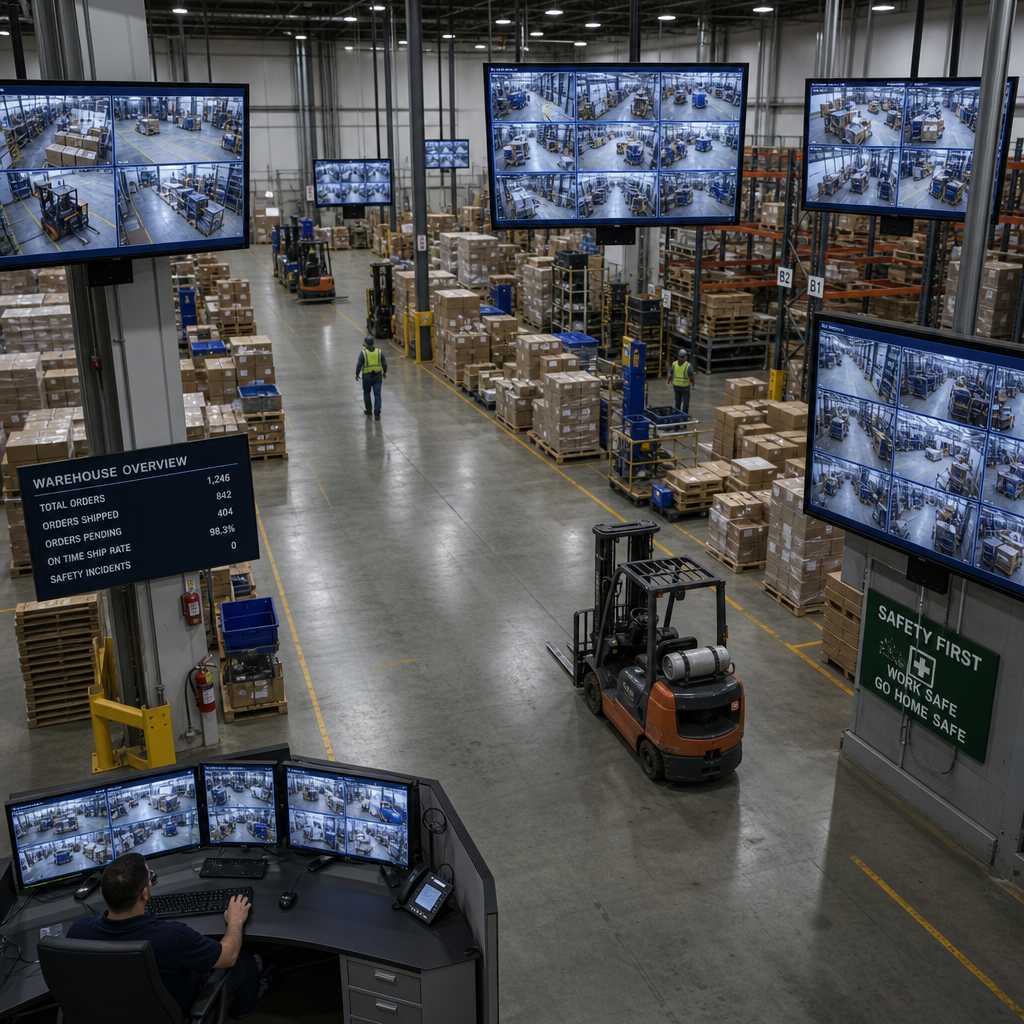
Running security footage from a single NVR to monitors spread across a 200,000-square-foot warehouse, a multi-story apartment complex, or a corporate campus is one of the most underestimated infrastructure challenges in physical security. A standard HDMI cable tops out at roughly 50 feet before signal degradation becomes a real problem, yet most facility operators don’t discover this limit until they’re already mid-installation. HDMI extender security solutions solve this directly, letting you push high-definition CCTV footage hundreds or even thousands of feet from the source without compression artifacts or lag that could compromise situational awareness.
Table of Contents
- Quick Takeaways
- Why HDMI Distance Limits Matter in Security Installations
- Types of HDMI Extenders: Which Technology Fits Your Facility
- HDMI over Network: Using IP Infrastructure for Monitor Distribution
- CCTV Monitor Distribution Planning for Large Facilities
- Comparing HDMI Extension Methods for Security Applications
- Common Installation Mistakes That Kill Signal Quality
- Frequently Asked Questions
- References
Quick Takeaways
| Key Insight | Explanation |
|---|---|
| Standard HDMI cables fail beyond 50 feet | Signal attenuation causes flickering, color loss, and dropped frames on CCTV monitors positioned far from the NVR or DVR. |
| HDBaseT is the industry benchmark for long runs | HDBaseT extenders carry 1080p or 4K video, audio, power, and control signals over a single Cat6 cable up to 328 feet (100 meters). |
| HDMI over network scales to entire buildings | AV-over-IP encoders convert HDMI signals into data packets distributed over your existing Gigabit Ethernet infrastructure, reaching unlimited distances. |
| Latency is a non-negotiable spec for security use | Any extender introducing more than 100 milliseconds of latency is unacceptable for live security monitoring where real-time response matters. |
| CCTV monitor distribution requires dedicated VLANs when using IP | Mixing surveillance traffic with general office network traffic causes bandwidth contention that degrades image quality at the worst moments. |
| Fiber HDMI extenders are the right call for runs exceeding 300 feet | Fiber eliminates electromagnetic interference from electrical conduit, machinery, and motors common in industrial and parking garage environments. |
| 4K CCTV footage demands at minimum 18 Gbps bandwidth capacity | Choosing an extender rated below this spec with a 4K NVR output guarantees downscaling or signal dropout under full camera load. |
Why HDMI Distance Limits Matter in Security Installations
The physics of HDMI signal transmission are unforgiving. HDMI uses a protocol called Transition Minimized Differential Signaling (TMDS), which degrades predictably over copper wire. At 1080p resolution, signal integrity starts dropping around 25 to 30 feet without active boosting. At 4K with HDR, that threshold drops even further, sometimes as low as 10 to 15 feet on lower-grade cables.
For a homeowner connecting a DVR to a single TV in the next room, this is a minor inconvenience. For a property manager running a security operations center that feeds monitors in lobby areas, stairwells, guard stations, and parking structures, this is a structural problem that needs a real engineering answer before cable is ever pulled.
In practice, facilities that ignore HDMI distance constraints end up with guards watching pixelated or frozen feeds during the exact incidents that demand clear footage. That is not a hypothetical. It is a predictable outcome of under-specified infrastructure.


The Real Cost of Signal Loss in a Security Context
Signal degradation is not just a technical annoyance. If a security operator cannot clearly read a license plate or identify a face on a monitor because the HDMI signal is corrupting video at the display end, the entire surveillance investment is compromised. A facility running a biometric access system or facial recognition lock at the entry point needs the corresponding monitor feed to be crystal clear for verification workflows to function correctly.
Replacing a poorly planned cable run after walls are closed, conduit is set, and monitors are mounted costs far more than specifying the right extender solution from day one. The math is simple and the decision should be made before installation begins.
Types of HDMI Extenders: Which Technology Fits Your Facility
There are four primary categories of HDMI extenders in active use for security and AV distribution. Each has a legitimate role, and choosing the wrong category for your facility type is a common and expensive mistake.
Active HDMI Cable Extenders
Active HDMI cables include signal boosting electronics built into the connector housing. They extend standard HDMI range to roughly 50 to 75 feet and require no separate power supply. These are appropriate for small office environments where a single NVR feeds a monitor at the security desk and the run is relatively short.
They are not appropriate for large facilities. They provide no switching capability, no signal splitting, and no integration with existing network infrastructure.
HDBaseT Extenders Over Cat5e or Cat6
HDBaseT extenders are the workhorse solution for mid-sized buildings. A transmitter unit connects at the NVR or DVR, and a receiver unit sits at the remote monitor. A single Cat6 cable carries the video signal, audio, IR control commands, RS-232 data, and Power over HDBaseT (PoH) up to 100 meters (328 feet) at 4K resolution.
For apartment complexes or commercial buildings where monitor distribution follows defined paths to guard stations, lobbies, and break rooms, HDBaseT is reliable, cost-effective, and widely supported by professional integrators. The infrastructure cost is low if Cat6 is already planned for the building’s access control or IP camera network.
Fiber Optic HDMI Extenders
Fiber HDMI extenders convert the HDMI signal to light, transmit it over single-mode or multimode fiber, and convert it back at the display end. Runs of 1,000 feet or more are common, and fiber is completely immune to electromagnetic interference.
This matters enormously in facilities with heavy electrical equipment, generators, HVAC motors, or industrial machinery. A parking garage or manufacturing floor that would corrupt a Cat6 signal with EMI noise is a perfect candidate for fiber-based HDMI extension.
AV-over-IP HDMI Encoders and Decoders
AV-over-IP systems encode the HDMI signal into compressed or uncompressed data streams distributed over standard Gigabit Ethernet switches. At the display end, a decoder unit converts the stream back to HDMI output. This approach supports one-to-many distribution, meaning a single NVR output can feed dozens of monitors simultaneously across an entire enterprise network.
The critical spec here is compression method. Visually lossless codecs like JPEG 2000 or proprietary zero-latency encoders are appropriate for live security monitoring. Lossy compression formats like H.264 introduce encoding delay that makes AV-over-IP feel sluggish for real-time guard use, even if it looks fine for recorded footage playback.
Pro tip: When specifying AV-over-IP for a security application, always ask the vendor for the end-to-end latency spec in milliseconds under maximum channel load, not just the baseline idle latency. Those two numbers are often very different.
HDMI over Network: Using IP Infrastructure for Monitor Distribution
HDMI over network distribution is the approach that scales best for large facilities, multi-building campuses, and any environment where the number of display points will grow over time. Instead of running dedicated video cable from each source to each display, you use the facility’s existing Gigabit Ethernet infrastructure to carry encoded video streams.
The practical advantage is enormous for facilities that already have structured cabling in place for access control panels, IP intercoms, or IP-based CCTV cameras. That same Cat6 plant can carry security monitor feeds to reception desks, guard posts, management offices, and lobby displays without any additional cable infrastructure investment.
Network Requirements for Reliable CCTV Video Distribution
Uncompressed 1080p video requires approximately 3 Gbps of bandwidth per stream. Even compressed formats like HDBaseT Lite or proprietary low-latency codecs require 100 to 500 Mbps per channel. A Gigabit switch handles multiple streams comfortably, but the switch must be managed to support proper QoS (Quality of Service) prioritization.
Setting up a dedicated VLAN for security monitor distribution is not optional in any facility with more than a handful of display points. General business network traffic, software updates, and file transfers will compete for bandwidth during peak hours and degrade live security feeds at exactly the wrong time without proper traffic segmentation.
Multicast vs. Unicast for Security Monitor Feeds
When one NVR output needs to feed multiple monitors simultaneously, the network must support IGMP snooping to handle multicast traffic efficiently. Without IGMP snooping enabled on the managed switch, the switch floods multicast video streams to every port on the network, which saturates bandwidth and causes visible degradation across all connected displays.
This is a configuration step that is frequently missed by installers more familiar with IP camera deployment than AV distribution. The result is a system that works fine during commissioning with two or three monitors but fails visibly when all display points are active simultaneously under real operating conditions.

CCTV Monitor Distribution Planning for Large Facilities
Planning CCTV monitor distribution for a facility larger than a single-floor office requires a documented signal flow diagram before any equipment is purchased. Every display point needs a defined source, a defined cable path, and a defined termination standard. Decisions made on the fly during installation almost always result in mismatched signal types, undersized infrastructure, or monitor locations that require expensive rework to fix.
Zoning Security Monitor Locations by Function
Not every monitor in a facility needs the same feeds. A lobby reception monitor might display door camera feeds and intercom status. A security operations center needs full NVR output with multi-channel display. A parking attendant booth needs gate camera coverage only. Designing monitor zones by function from the start lets you right-size the extender and distribution hardware for each zone rather than over-specifying every location.
Property managers running apartment buildings should consider separate distribution paths for common area monitoring and management office displays. Combining them on the same distribution system creates access control complications when tenant-facing and management feeds need to stay separated.
Integrating Monitor Distribution with Access Control and Intercom Systems
Modern security installations increasingly tie HDMI monitor distribution into door entry systems, wireless intercoms, and gate access controls. When a visitor activates a video intercom at the main entrance, the live feed from that door camera should appear automatically on the guard station monitor, which requires the distribution system to support source switching triggered by access control events.
Systems from UnikCCTV that combine intercom panels, IP cameras, and NVR recording can integrate with AV-over-IP distribution controllers that respond to control system triggers. This is a more sophisticated installation than passive cable runs, but for facilities with active guard staffing, automated source switching dramatically reduces response time to entry events.
Pro tip: When designing monitor distribution for a facility with video intercoms, specify an HDMI distribution controller that accepts RS-232 or TCP/IP control commands from the access control panel. This allows automatic camera-to-monitor routing when specific doors or gates are triggered, without requiring manual operator switching.
Comparing HDMI Extension Methods for Security Applications
The right extension method depends on run length, number of display points, existing infrastructure, and facility environment. The table below compares the three dominant approaches used in professional security installations.
| Extension Method | Maximum Range and Resolution | Best Fit for Security Facilities |
|---|---|---|
| HDBaseT over Cat6 | 328 feet (100 meters) at 4K, single display per transmitter | Mid-sized buildings, guard stations, lobby monitors, facilities with structured Cat6 cabling already in place |
| Fiber Optic HDMI Extender | Up to 3,000 feet (900+ meters) at 4K, EMI-immune, single display per run | Industrial facilities, parking garages, outdoor camera runs, environments with heavy electrical interference |
| AV-over-IP (HDMI over Network) | Unlimited distance over Gigabit Ethernet, supports one-to-many distribution to dozens of displays | Large campuses, enterprise buildings, multi-building facilities, installations where display count will grow over time |
“The security industry has moved decisively toward IP-based video distribution because the infrastructure is already in place in most modern buildings. The question is no longer whether to use the network for video, but how to do it without compromising the reliability and latency that security operations require.” – Security Industry Association, Infrastructure Technology Working Group
Common Installation Mistakes That Kill Signal Quality
The data consistently shows that most HDMI extender failures in security installations are not hardware failures. They are configuration and installation errors that produce symptoms indistinguishable from faulty equipment, causing integrators to swap hardware repeatedly without solving the underlying problem.
Using Consumer-Grade Patch Cables in Runs Over 50 Feet
A common mistake is pulling Cat5e patch cable rather than solid-core Cat6 for HDBaseT extender runs. Stranded patch cable has higher signal attenuation per foot than solid-core installation cable. An HDBaseT system that tests cleanly at 200 feet with solid-core Cat6 will show intermittent dropouts and HDCP handshake failures at the same distance with stranded patch cable.
The spec sheet from every major HDBaseT manufacturer specifies solid-core Cat6 for runs exceeding 150 feet. This is not a suggestion.
Ignoring HDCP Handshake Requirements
High-bandwidth Digital Content Protection (HDCP) is present on virtually all HDMI sources and displays, including many commercial NVRs and security monitors. When an extender or distribution switch does not properly pass HDCP handshake signals, the display shows a black screen even though the physical connection is solid and the signal is technically present.
In a security context, a black display during an access event is a critical failure, not a minor inconvenience. Verify HDCP compliance at every link in the signal chain before deployment, not during an incident response.
Placing Extender Hardware in Unventilated Spaces
HDBaseT transmitters, AV-over-IP encoders, and fiber converters all generate heat during normal operation. Placing them inside sealed junction boxes or directly against NVR chassis without airflow causes thermal throttling that manifests as intermittent signal dropout, usually under the high ambient temperatures of summer months or during extended system operation.
Rack-mounted equipment should follow standard thermal management guidelines with at least 1U of vented clearance above and below active components. Wall-mounted extender units need at minimum a vented enclosure with 2 inches of clearance around the unit.
Frequently Asked Questions
What is the maximum distance an HDMI extender can transmit security footage?
The maximum distance depends entirely on the extender technology. HDBaseT extenders over Cat6 support up to 328 feet at 4K resolution. Fiber optic HDMI extenders extend that to over 3,000 feet. AV-over-IP systems using Gigabit Ethernet have no practical distance limit within a building or campus network, making them the right choice for enterprise-scale CCTV monitor distribution.
Can I use my existing network switches for HDMI over network distribution of CCTV footage?
Only if those switches are managed Gigabit switches with IGMP snooping support and QoS configuration capability. Unmanaged switches will flood multicast video streams to all ports, causing bandwidth saturation and visible degradation across all connected displays. Consumer-grade or unmanaged switches are not suitable for live security monitor distribution over a network.
Will an HDMI extender introduce lag that affects live security monitoring?
HDBaseT extenders introduce approximately 1 millisecond of latency, which is imperceptible. Fiber extenders are similarly near-zero latency. AV-over-IP systems vary widely: visually lossless uncompressed systems typically run 1 to 16 milliseconds end-to-end, while compressed systems using H.264 or similar codecs can introduce 100 to 500 milliseconds of delay. That level of latency is unacceptable for live guard monitoring where real-time awareness is required.
Do I need a separate HDMI extender for each camera or each NVR output?
You extend NVR or DVR outputs, not individual camera signals. Most NVRs output a composite multi-camera view over a single HDMI port, and that single output is what you extend to remote monitors. If you need different camera groupings at different monitor locations, that switching happens at the NVR or a video management system, not at the extender level. For multi-output NVRs feeding multiple display zones, each output requires its own extender transmitter.
Is an HDMI extender the right solution for distributing footage to monitors in outdoor guard booths?
Outdoor runs require fiber optic HDMI extenders specifically. Copper-based HDBaseT and Cat6 runs are vulnerable to ground loop voltage differences between buildings, lightning-induced surges, and EMI from outdoor electrical infrastructure. Fiber is electrically isolated, immune to surge, and rated for the temperature ranges that copper-based extenders are not. Any outdoor or inter-building security monitor run should be specified as fiber from the planning stage.
How does HDMI extender selection change when upgrading from 1080p to 4K CCTV cameras?
Significantly. A 4K HDMI signal at 60Hz requires 18 Gbps of bandwidth versus 10.2 Gbps for 1080p. HDBaseT 2.0 supports 4K at full bandwidth over Cat6 up to 100 meters. First-generation HDBaseT 1.0 extenders do not. AV-over-IP systems require uncompressed or visually lossless encoders rated for 4K throughput. Verifying the extender’s bandwidth spec against your NVR’s output resolution is the first step in any 4K upgrade project, and it is frequently skipped during planning.
Have you run into specific signal quality or distance challenges distributing security footage in your facility? Share what you encountered and how you solved it, or what you are still working through.
References
- National Institute of Standards and Technology, guidelines and standards on physical security infrastructure and network reliability
- Statista, market data and industry statistics on global CCTV and video surveillance system deployment
- Forbes, analysis and reporting on enterprise security technology investments and facility management trends
- Cybersecurity and Infrastructure Security Agency, physical security guidance for facilities and critical infrastructure operators
- Ahrefs Blog, research and data on technology content strategy relevant to security and AV distribution topics



 No products in the cart.