
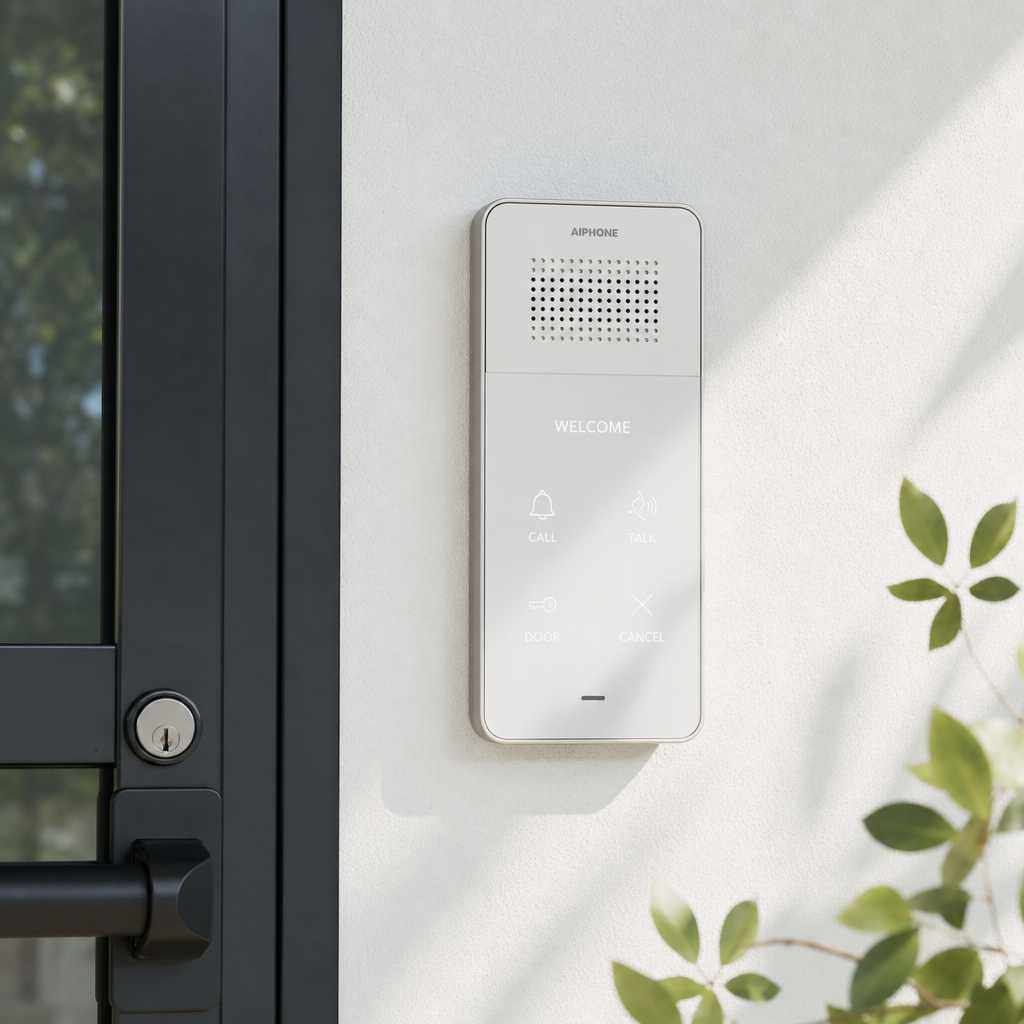
Drilling into walls is not always an option. Renters face lease restrictions, historic buildings have protected surfaces, and small office setups change too frequently to justify permanent installations. Yet security gaps at entry points remain a real liability. A wireless intercom system solves this directly: no studs to locate, no patch-and-paint repair bills, and no contractor scheduling. The market for smart home security devices is growing steadily, with Statista projecting the global smart home segment to surpass $170 billion by 2025, and intercom systems represent one of the fastest-adopting subcategories. This guide covers what actually works, what does not, and how to choose the right system for your property.
Table of Contents
- Quick Takeaways
- What Is a Wireless Intercom System?
- Why No-Drill Matters for Homes and Small Offices
- How Wireless Intercom Systems Work
- Types of Wireless Intercom Systems
- Comparison: Wired vs. Wireless vs. App-Based Intercoms
- Installing a Wireless Intercom System Without Drilling
- Top Features to Prioritize in a Home Intercom System
- Common Mistakes When Buying a No-Drill Intercom
- Frequently Asked Questions
- References
Quick Takeaways
| Key Insight | Explanation |
|---|---|
| No-drill does not mean no security | Modern wireless intercoms use adhesive mounts, door-frame clips, or magnetic brackets that hold securely without affecting structural surfaces. |
| Wi-Fi range is the most common failure point | Systems that rely solely on Wi-Fi can drop connection in thick-walled buildings. DECT or RF-based units perform more consistently across distances up to 300 meters. |
| Battery life determines real-world usability | Outdoor door stations with motion-triggered activation last significantly longer than units that stay in constant listening mode. Expect 3 to 6 months per charge on quality units. |
| Two-way audio is the minimum acceptable standard | One-way speaker systems are not intercoms. Any system marketed as an intercom must support bidirectional voice communication to qualify. |
| Video adds accountability, not just convenience | Properties with visible video intercom systems see measurable deterrence effects. A camera at the entry point changes visitor behavior before anyone even answers. |
| Frequency interference affects apartment buildings | In dense multi-unit buildings, 2.4 GHz channels get congested fast. Systems operating on 5 GHz or dedicated DECT 6.0 frequencies handle channel crowding better. |
| Pairing with smart locks multiplies access control value | A wireless intercom system connected to a smart lock lets you verify identity at the door and grant entry remotely, eliminating the need for physical key handoffs. |
What Is a Wireless Intercom System?
A wireless intercom system is a communication device that connects two or more entry points without requiring physical wiring between units. The door station, typically mounted at the entrance, communicates with one or more indoor monitors or mobile apps using radio frequency, Wi-Fi, or DECT protocols. No network of copper cables runs through your walls.
In practice, a basic home setup involves one outdoor panel and one indoor receiver. More advanced configurations, common in small offices or apartment lobbies, connect a single outdoor station to multiple indoor stations or to a property manager’s smartphone. The system handles both voice calls and, in video-enabled models, live image feeds.
What separates a legitimate intercom from a basic doorbell is the bidirectional communication requirement. A wireless doorbell is a one-way notification device. A wireless intercom system allows the person inside to speak back, see who is at the door, and in many cases release a door lock, all without opening the door first.


Why No-Drill Matters for Homes and Small Offices
The no-drill requirement is not about laziness. It reflects three distinct real-world situations that affect a large portion of buyers: tenants with lease agreements that prohibit permanent modifications, property managers who need to deploy systems across multiple units without coordinating contractors, and small office operators who move or reconfigure spaces frequently.
The Renter Problem
Standard residential leases explicitly prohibit drilling into walls without landlord written consent. Violating this can result in security deposit deductions. A no-drill intercom solves this by using door-frame adhesive strips, suction mounts for glass panels, or clip-on brackets that grip door frames without penetrating surfaces. Removal is clean, and the surface is left intact when tenants move out.
The Multi-Unit Deployment Problem
Property managers overseeing apartment complexes or mixed-use buildings face a different version of the same issue. Installing wired systems across 20 or 40 units requires licensed electrical contractors, permits in many municipalities, and weeks of scheduling disruption. Wireless intercom systems allow phased deployment, unit by unit, with in-house maintenance staff handling installation in under 30 minutes per door.
The Small Office Rotation Problem
Small businesses that lease coworking or flexible office space face constant physical reconfiguration. A permanent wired system becomes a sunk cost the moment the lease changes. A wireless system moves with the tenant, protects the investment, and adapts to the new layout without additional installation costs.
Pro tip: If you are a property manager deploying across multiple units, choose a wireless intercom system with centralized app management so you can grant and revoke access from a single dashboard rather than visiting each unit individually.
How Wireless Intercom Systems Work
The communication chain in a wireless intercom system runs from the door station to the receiver unit or app. When a visitor presses the call button at the door station, the device sends a signal using one of three primary transmission methods: Wi-Fi (802.11), DECT (Digital Enhanced Cordless Telecommunications), or RF (Radio Frequency) at 900 MHz or 2.4 GHz.
Wi-Fi Based Systems
Wi-Fi intercoms connect to your existing home or office router and route calls through the internet. This means you can answer the door from anywhere in the world using a smartphone app. The downside is latency during peak network hours and complete failure during internet outages. For properties with reliable broadband, Wi-Fi based systems are extremely flexible. For properties with inconsistent connectivity, they are a poor fit.
DECT Systems
DECT operates on a dedicated 1.9 GHz frequency in North America, which is rarely congested by other consumer devices. The result is a clear, low-latency connection that functions independently of your internet router. DECT systems are the preferred choice for facilities operators who need consistent, interference-resistant performance across multiple floors or through concrete walls.
RF Systems
RF-based intercoms use 900 MHz or 2.4 GHz channels and operate without a router or internet connection. They are the simplest to set up and the most affordable, but they share frequencies with baby monitors, cordless phones, and microwave ovens in some configurations. The 900 MHz band penetrates walls more effectively than 2.4 GHz, making it a better option for older buildings with thick plaster or concrete construction.
“The best intercom system is the one that actually connects when you need it. Signal reliability is not a feature, it is a baseline requirement.” — UnikCCTV technical consultation team, based on multi-site deployment reviews.
Types of Wireless Intercom Systems
The category of wireless intercoms covers a wide range of form factors and use cases. Understanding which type fits your situation prevents buying a system that works on paper but fails in your specific building layout or security requirement.
Video Wireless Intercoms
These include a camera at the outdoor door station and a screen or app on the indoor side. Video resolution typically ranges from 720p to 1080p. Night vision using infrared LEDs is a standard inclusion in quality units. For any property where visual identity verification matters, a video wireless intercom is the correct starting point. UnikCCTV’s wireless video intercom units are designed to pair with door locks, so the entire verify-and-release workflow happens within one system.
Audio-Only Wireless Intercoms
Audio-only systems are smaller, cheaper, and have longer battery lives. They work well in internal office settings where you need room-to-room communication without a camera. They are not the right choice for front-door security where visual identification matters.
Multi-Unit Wireless Intercoms
Designed for apartment buildings or larger offices, these systems support one outdoor station calling multiple indoor units. Tenants or employees each receive an individual indoor handset, and the outdoor station can be programmed to dial specific rooms. This configuration mirrors a wired building intercom system without the infrastructure cost.
Intercom and Smart Lock Combinations
The most complete access control setup combines a wireless intercom with a smart lock. The visitor rings at the door station, you verify identity through the intercom, and you trigger the lock to release remotely. This eliminates the physical key distribution problem entirely and creates an audit trail of every entry event.

Comparison: Wired vs. Wireless vs. App-Based Intercoms
Choosing between these three approaches requires honest evaluation of your building type, technical resources, and long-term commitment. Here is a direct comparison based on practical deployment experience across residential and commercial properties.
| Factor | Wired Intercom | Wireless Intercom (DECT/RF) | App-Based Wi-Fi Intercom |
|---|---|---|---|
| Installation complexity | High. Requires licensed electrician and wall penetration. | Low. Adhesive or clip mounting, no cabling. | Low to medium. Requires stable Wi-Fi and router configuration. |
| Reliability | Very high. No signal interference or battery dependency. | High. Dedicated frequency with low interference. | Moderate. Depends on internet uptime and router performance. |
| Remote access | No. Indoor-only operation unless bridged to a network. | No. Operates within local signal range only. | Yes. Full remote access from any location via smartphone. |
| Best fit | New construction or full renovation projects. | Rentals, historic buildings, multi-unit deployments. | Properties with strong Wi-Fi and remote management needs. |
| Cost over 5 years | High upfront, low ongoing. | Low upfront, minimal ongoing (battery replacements). | Low upfront, potential subscription fees for cloud storage. |
The data consistently shows that wireless DECT or RF systems outperform app-based Wi-Fi systems in buildings with poor router coverage or thick walls, while app-based systems win decisively when remote management across multiple locations is a priority. Neither is universally superior. The building dictates the answer.
Installing a Wireless Intercom System Without Drilling
Installing a no-drill intercom correctly takes under 30 minutes in most residential and small office settings. The variables that determine success are surface type, door frame material, and the mounting hardware included with the unit.
Adhesive Mounting on Wood and Metal Door Frames
Most quality wireless intercom outdoor stations ship with industrial-grade adhesive mounting plates rated for outdoor temperature extremes. The process is straightforward: clean the surface with isopropyl alcohol, let it dry fully, press the adhesive plate against the frame for 60 seconds, and allow 24 hours cure time before loading the unit. A common mistake is skipping the alcohol wipe step. Oil and dust residue on the surface cut adhesive bond strength by more than 50 percent, and the unit falls within weeks.
Clip Mounting on Glass and Metal Surfaces
For all-glass storefronts or metal-framed commercial doors, adhesive strips are less reliable due to surface texture. Clip-on frames that grip the door or glass panel edge are a better solution. These frames apply clamping pressure across a wider area and do not depend on adhesion chemistry. UnikCCTV’s intercom accessories range includes clip mounts compatible with door frames between 1.5 mm and 8 mm thickness.
Indoor Unit Placement
The indoor receiver or monitor should sit within the operating range of the outdoor station. For DECT systems, this is typically up to 50 meters indoors through walls. For RF systems, range varies by frequency and wall material. A practical rule: test the connection with the unit placed at your intended location before committing the mount. Move closer to the router or door station if call quality drops.
Pro tip: For small offices with glass partition walls, use the suction cup mounting kit on interior glass panels for the indoor monitor. It holds securely on flat glass and removes without leaving residue, which is important for leased commercial spaces.
Top Features to Prioritize in a Home Intercom System
Not every feature listed in a spec sheet translates to real-world value. The following features consistently matter based on deployment feedback from both residential and commercial properties.
Night Vision Range
The outdoor camera must capture usable images in low light. Infrared night vision effective to at least 5 meters is the minimum for a front door. Units advertising “night vision” without specifying range often mean 1 to 2 meters, which is insufficient for capturing approaching visitors before they reach the door.
Motion Detection with Adjustable Sensitivity
Motion-triggered recording extends battery life and reduces review time on footage. Adjustable sensitivity is essential in high-traffic environments like office entrances or apartment corridors where constant activation from pedestrian traffic would drain the battery within days.
Two-Way Talk with Echo Cancellation
Budget wireless intercoms often produce echo or feedback during calls because the speaker output loops back into the microphone. Echo cancellation circuitry eliminates this and results in natural conversation quality. It sounds like a minor detail until you try to conduct an actual two-way conversation on a unit without it.
App Integration and Remote Unlock
For property managers or business owners who are frequently off-site, smartphone app integration with remote door release capability transforms the intercom into a full remote access management tool. Look for systems that support multiple user accounts so both a property manager and an on-site contact can monitor and respond to entry requests.
Local Storage or Encrypted Cloud Storage
Video intercoms that store footage only on cloud servers with monthly subscription fees become an ongoing cost. Systems that support local SD card storage give you a baseline archive without recurring charges. Encrypted storage is non-negotiable for any commercial application where visitor footage is captured, as data privacy obligations apply in most jurisdictions.
Common Mistakes When Buying a No-Drill Intercom
The most expensive mistakes in wireless intercom purchasing happen before installation, not during it. Buyers consistently underestimate two things: the operating environment and the integration requirements.
A common mistake is buying a system rated for indoor use only and mounting the outdoor unit in an exposed position. IP ratings matter. An outdoor door station needs at minimum an IP54 rating to handle rain splash and dust. IP65 or higher is appropriate for units exposed to direct rainfall or dusty industrial environments.
A second common mistake is purchasing a standalone wireless intercom without checking whether it integrates with existing access control systems already in place. If your building uses a keypad entry system or biometric reader at the front gate, adding an incompatible intercom creates two separate systems that do not communicate. The result is complexity, not security improvement.
A third mistake is ignoring the frequency environment before selecting a system. Buyers in apartment buildings or dense office parks often purchase 2.4 GHz Wi-Fi intercoms and experience consistent dropped calls because 30 neighboring networks compete for the same channel space. Testing with a Wi-Fi analyzer app before purchase would have revealed the congestion and pointed toward a DECT alternative.
Finally, single-user app systems fail in any setting with shared responsibility. If only one smartphone can receive door calls, that person becomes the full-time gatekeeper. Choose systems that support multi-user access with role-based permissions from the start, even if only one user manages it initially.
Frequently Asked Questions
Can a wireless intercom system work in a building with thick concrete walls?
Yes, but protocol selection matters. Standard 2.4 GHz Wi-Fi degrades significantly through dense concrete. DECT 6.0 systems and 900 MHz RF units penetrate concrete more effectively due to their lower frequency characteristics. For buildings with reinforced concrete construction, test the signal at your specific installation points before committing to a system. DECT-based intercoms from UnikCCTV are a practical starting point for these environments.
How long does the battery last on a no-drill wireless intercom?
Battery life depends heavily on usage patterns and whether the unit uses motion-triggered activation or continuous standby mode. A motion-triggered outdoor door station on a low-traffic residential door can last 4 to 6 months on a single charge. The same unit on a busy retail entrance with 200 daily trigger events may require monthly recharging. Manufacturer claims are usually based on low-use assumptions, so factor in your actual traffic volume when evaluating battery ratings.
Is a wireless intercom system secure enough for a business property?
Modern wireless intercom systems use AES-128 or AES-256 encryption on Wi-Fi and app-based communications, making signal interception practically infeasible for opportunistic attackers. DECT systems use built-in encryption at the protocol level. The greater security risk is not interception of the wireless signal but weak app credentials or shared access permissions. Use strong, unique passwords for intercom app accounts and audit user access quarterly.
What is the difference between a home intercom system and an apartment building intercom?
A home intercom system typically handles one outdoor station and one or two indoor units covering a single dwelling. Apartment building intercoms must support one outdoor station calling multiple independent indoor units, each associated with a specific tenant. The outdoor panel in a multi-unit building includes a directory or numbered keypad so visitors can call the correct unit. Multi-unit wireless systems cost more per station but eliminate the wiring infrastructure that traditional apartment intercoms require.
Can I integrate a wireless intercom with a smart lock for remote entry?
Yes, and this is one of the most practical configurations for property managers and small business owners. When the wireless intercom system and the smart lock share a compatible ecosystem, you can visually verify the visitor through the intercom camera and trigger the lock release from your smartphone without physically approaching the door. UnikCCTV offers intercom and smart lock combinations designed for this exact workflow, including models with facial recognition and PIN backup access.
Do wireless intercoms work if the internet goes down?
It depends on the protocol. Wi-Fi and app-based intercoms require internet connectivity for remote access features, and some require it for basic local operation if they route calls through cloud servers. DECT and RF intercoms operate entirely without internet, communicating directly between the outdoor station and indoor receiver on their dedicated radio frequency. For critical entry points where access must work regardless of ISP performance, DECT or RF systems are the more dependable choice.
What has your experience been with wireless intercom installation in rental or commercial spaces? Share your setup or questions below so we can help you find the right configuration.
References
- Statista: Smart home market size and device category growth data used to contextualize intercom adoption trends
- Forbes: Coverage of smart home security device adoption among homeowners and property investors
- U.S. Department of Energy: Building energy codes and construction standards relevant to installation requirements in commercial and residential properties
- NIST: Wireless communication security standards and encryption guidelines applicable to DECT and Wi-Fi intercom system deployments
- HUD: Tenant rights and property modification guidelines relevant to no-drill installation in leased residential units


 No products in the cart.