
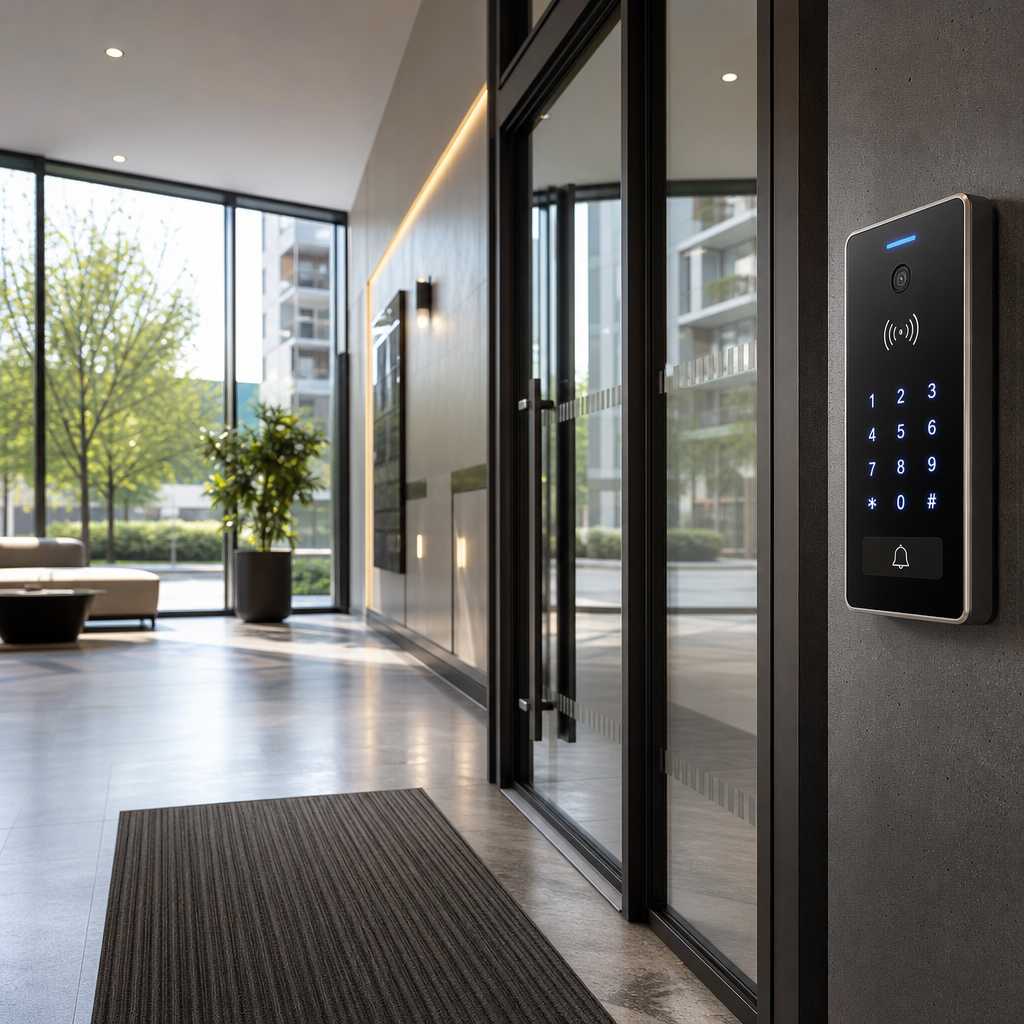
Property managers lose sleep over one question: if someone unauthorized walks into your building right now, what stops them? According to the FBI’s Uniform Crime Reporting data, apartment and multi-unit residential properties account for a disproportionate share of residential burglaries, largely because shared entry points create shared vulnerabilities. Multi-unit building security is not a one-time purchase. It is an ongoing operational system that requires the right hardware, clear policies, and regular audits. This checklist gives property managers and facility operators a practical, prioritized path to closing the gaps that put residents, staff, and property at risk.
Table of Contents
- Quick Takeaways
- Why Multi-Unit Buildings Face Unique Security Risks
- Access Control Is the Foundation of Building Security
- Intercom and Visitor Management Systems
- CCTV Surveillance Placement Strategy
- Smart Locks and Biometric Access for Common Areas
- The Complete Property Manager Security Checklist
- Comparing Access Control Approaches for Multi-Unit Buildings
- Frequently Asked Questions
- References
Quick Takeaways
| Key Insight | Explanation |
|---|---|
| Layered access control outperforms single-barrier systems | Combining perimeter gates, lobby intercoms, and individual unit locks means a breach at one layer does not compromise residents directly. |
| Keypad and fob credentials must be audited quarterly | Former tenants and contractors retain access longer than necessary. Regular credential audits are the simplest fix for this overlooked vulnerability. |
| Camera placement at blind spots matters more than total camera count | A building with 8 strategically placed cameras consistently outperforms one with 20 cameras covering overlapping zones while missing stairwells and parking exits. |
| Wireless intercom systems reduce installation cost by up to 40% | For older buildings where running new cable is expensive, wireless intercoms provide full two-way communication without major structural modifications. |
| Biometric access eliminates credential sharing between tenants | Shared fobs and PIN codes are a chronic problem in apartment buildings. Fingerprint or facial recognition access ties entry directly to an individual. |
| Time attendance clocks double as access logs for staff accountability | Maintenance and cleaning staff access records are a critical but often missing part of multi-unit building security audits. |
| Gate access control requires a separate management policy from building entry | Parking and vehicle gates have different traffic patterns and tailgating risks than pedestrian entry points and need dedicated rules. |
Why Multi-Unit Buildings Face Unique Security Risks
A single-family home has one household managing one front door. A multi-unit residential building has dozens of households sharing corridors, parking structures, mail rooms, and laundry facilities. Every shared space is a potential point of unauthorized entry, and the more residents a building has, the harder it becomes to distinguish authorized visitors from strangers who simply followed someone through an open door.
The problem is compounded by turnover. A typical apartment building sees 40 to 60 percent tenant turnover annually in urban markets, according to data tracked by the National Apartment Association. Each departure creates an opportunity for unreturned keys, deactivated-but-functional fobs, and access credentials that were never properly removed from the system.
Tailgating is the single most underreported security failure in multi-unit buildings. A resident holds the door open out of politeness, and an unauthorized person walks in without any credential check. No camera captures this as an incident. No alarm sounds. And yet the building’s entire access control investment has just been bypassed in three seconds.
“The weakest point in any access control system is not the technology. It is human behavior at the door. Physical barriers that require deliberate action to bypass, like turnstiles or mantrap vestibules, reduce tailgating by over 70 percent compared to standard door systems.” – Security Industry Association, Physical Security Standards Overview
Property managers who treat security as a checkbox exercise, installing one camera and one keypad and calling it done, consistently see incidents that a layered system would have prevented. The buildings with the lowest incident rates have one thing in common: they treat access control as a living system, not a one-time installation.


Access Control Is the Foundation of Building Security
Apartment building access control starts at the perimeter and works inward. The goal is to create decision points where only credentialed individuals can pass, and to log every entry and exit so that incidents can be reconstructed accurately after the fact.
Perimeter and Gate Access Control
For buildings with parking structures or exterior yards, gate access control is the first line of defense. Vehicle gates controlled by RFID fobs or license plate recognition prevent unauthorized vehicles from entering and reduce parking abuse simultaneously. Pedestrian gates adjacent to vehicle entrances need independent authentication; a common mistake is wiring the pedestrian gate to open automatically when the vehicle gate opens, which eliminates the pedestrian access check entirely.
At UnikCCTV, gate access control systems are designed to handle both vehicle and pedestrian traffic independently, with separate credential management for each. This matters operationally because maintenance trucks and delivery vehicles legitimately need different access rules than residents on foot.
Lobby and Main Entry Points
The main lobby door is the highest-traffic credential checkpoint in any multi-unit building. Key fob systems are the baseline, but they carry a well-documented weakness: fobs get shared, lost, and duplicated. Upgrading to a PIN-plus-fob two-factor system, or moving entirely to biometric authentication at lobby entry, eliminates most credential-sharing problems.
For buildings undergoing renovation or working with tight budgets, proximity card readers offer a practical middle ground. They are faster than biometric systems for high-traffic lobbies and can be integrated with existing access management software without a complete hardware overhaul.
Pro tip: Install an automatic door closer with a delayed alert on every propped-door sensor. Buildings that alert the management desk after a door has been held open for more than 30 seconds stop tailgating incidents at the source rather than discovering them on camera footage after the fact.
Intercom and Visitor Management Systems
An intercom system is not just a communication device. It is the first identity verification step for any visitor attempting to enter the building. A property manager who installs only cameras but no intercom is watching problems happen rather than preventing them.
Wired vs. Wireless Intercom Systems
Wired intercom systems offer the most reliable connection and are the right choice for new construction where cable infrastructure can be planned from the start. In practice, retrofitting an older building with a wired intercom requires significant work inside walls, which can push installation costs well above the hardware budget.
Wireless intercom systems have improved substantially in reliability over the past five years. Modern units from UnikCCTV use encrypted digital signals that are not susceptible to the interference problems that plagued earlier analog wireless systems. For a 40-unit building with existing cable constraints, wireless intercoms typically cut total installation costs by 35 to 40 percent compared to running new wired infrastructure.
Video Intercom and Remote Access Features
Video intercoms add a layer of visual verification that audio-only systems cannot provide. A resident can confirm that the person claiming to be a delivery driver actually matches the uniform before buzzing them in. For property managers, video intercom logs provide documentation of every visitor event, which is valuable both for incident investigation and for demonstrating due diligence to insurers.
Remote access intercoms allow residents to manage visitor entry from a smartphone app. This is particularly useful in large buildings where residents may not be near the intercom unit when a visitor arrives. The property manager’s office can also be integrated as a monitoring station, giving staff real-time visibility into lobby activity without being physically present at the door.
Pro tip: Set intercom permissions so that the management office receives a copy of every guest entry event during after-hours periods, defined as 10 PM to 6 AM. This single configuration change creates a passive audit trail without requiring any additional staff monitoring time.
CCTV Surveillance Placement Strategy
Camera placement decisions in a multi-unit building should be driven by two questions: where do incidents most commonly occur, and where does the existing coverage have gaps? In practice, the areas that property managers overlook most often are stairwells, secondary exits, and parking structure pedestrian walkways.
High-Priority Camera Locations
The lobby entrance and main vehicle gate are obvious starting points. Beyond those, the following locations consistently appear in post-incident investigations as unmonitored areas: mailroom entrances, elevator interiors, rooftop access doors, and the back exits that residents use to access parking lots. A camera at the front lobby means nothing if an intruder knows to enter through the rear service door.
For parking structures specifically, wide-angle cameras with low-light capability are essential. Parking garage lighting is notoriously inconsistent, and a camera that performs adequately during daytime provides essentially no useful footage after dark without infrared or starlight sensor capability.
Storage and Retention Policies
Most property managers do not think about storage until after an incident when they discover that footage was only retained for 48 hours. The standard recommendation for multi-unit residential buildings is a minimum of 30 days of continuous recording for common areas. High-risk zones like parking structures and secondary exits warrant 60 to 90 days of retention.
Network video recorders (NVR) paired with high-capacity drives are now cost-effective enough that a 90-day retention policy for a 16-camera system is achievable under most property management budgets. The alternative, losing evidence because of a three-day retention window, is not a cost saving.

Smart Locks and Biometric Access for Common Areas
Smart locks and biometric access systems are no longer premium features reserved for high-end buildings. The price point for reliable biometric door locks has dropped significantly, making them a practical choice for amenity rooms, gyms, package rooms, and other high-value common areas in mid-market apartment buildings.
Facial Recognition Locks for Amenity Access
Facial recognition locks serve a specific purpose in multi-unit buildings: they eliminate the problem of credential transfer. In a building with a shared gym, a single fob can pass through ten residents’ hands. A facial recognition system ensures that only enrolled residents gain access, and the enrollment database can be updated immediately when a tenant moves out, without issuing or deactivating any physical credential.
UnikCCTV’s facial recognition lock systems include enrollment management software that allows property managers to add and remove residents remotely, making turnover processing faster and more reliable than physical key handover processes.
Time Attendance Clocks for Staff Access Control
Maintenance staff, cleaning crews, and contractors present a separate access control challenge. These individuals need access to mechanical rooms, common areas, and sometimes individual units, but their access should be time-bounded and fully logged. Time attendance clocks, when integrated with an access control system, enforce scheduled access windows automatically.
A cleaning crew member should not be able to badge into the building at 2 AM on a Saturday. A time attendance system configured with approved work schedules will simply reject that credential outside of authorized hours, creating both a security barrier and a documented record of the attempt.
The Complete Property Manager Security Checklist
This checklist is organized by frequency, separating what needs to happen during initial setup from what requires ongoing maintenance. A common mistake is treating security as a setup task rather than an operational responsibility. The buildings with the fewest incidents are the ones where this checklist is reviewed on a schedule, not filed away after opening day.
Initial Setup Checklist
- Conduct a full perimeter walk to identify all entry and exit points, including service doors and emergency exits.
- Install access control credentials (fob, PIN, biometric) at every controlled entry point, not just the main lobby.
- Set up a video intercom system at the primary resident entrance and any secondary visitor entry points.
- Deploy CCTV cameras at lobby entrances, elevator interiors, stairwell landings, parking structure entrances, and all secondary exits.
- Configure NVR storage for a minimum 30-day retention period, 60 days for parking and secondary exits.
- Enroll all residents and authorized staff in the access control system with role-appropriate permissions.
- Install gate access control for vehicle entries and ensure pedestrian gates have independent authentication.
- Configure time-bounded access windows for maintenance and contractor credentials.
- Install door-propped sensors with management alerts on all fire exits and secondary doors.
Quarterly Maintenance Checklist
- Audit all active credentials and deactivate any associated with former tenants, expired contractors, or staff who have left.
- Review camera footage storage logs to confirm retention settings are functioning correctly.
- Test all intercom units for audio and video quality, replacing units with degraded performance.
- Inspect all door closers and lock mechanisms for wear or tampering.
- Review access logs for anomalies, including off-hours entries, repeated failed attempts, and unusual traffic patterns.
- Update biometric enrollment records to add new residents and remove departed ones.
- Test all door-propped sensors and management alert configurations.
Annual Security Audit Checklist
- Commission a professional security assessment to identify new vulnerabilities introduced by building changes or equipment aging.
- Review and update the visitor management policy, particularly for package delivery and contractor access.
- Evaluate whether the current camera count and placement still covers all active traffic areas, accounting for building modifications.
- Assess whether the access control technology in use still meets current security standards or requires an upgrade.
- Document all security incidents from the past 12 months and identify patterns that indicate systemic gaps.
Comparing Access Control Approaches for Multi-Unit Buildings
Property managers evaluating access control upgrades typically weigh three main approaches: traditional key-based systems, electronic fob and keypad systems, and modern biometric or smart access systems. The comparison below reflects real operational differences that matter at the property management level.
| Access Control Approach | Strengths | Weaknesses for Multi-Unit Buildings |
|---|---|---|
| Traditional Key Systems | Low upfront cost, no power dependency, familiar to all residents | No audit trail, keys can be duplicated without authorization, rekeying entire building on tenant turnover is expensive and frequently skipped |
| Electronic Fob and Keypad Systems | Credential deactivation without hardware changes, PIN backup if fob is lost, access logging available | Fobs get shared or transferred, PINs get written down and passed around, requires active credential management to stay effective |
| Biometric and Smart Access Systems | Credential cannot be transferred or duplicated, strongest audit trail, remote enrollment management, integrates with intercom and CCTV | Higher upfront hardware cost, requires reliable power and network connectivity, enrollment process adds onboarding steps for new residents |
The data consistently shows that electronic fob systems represent the practical sweet spot for most mid-size multi-unit buildings when combined with a rigorous quarterly credential audit. Biometric systems deliver measurably better security outcomes but require a property management team committed to keeping enrollment records current. A biometric system with a neglected enrollment database is functionally no more secure than a well-managed fob system.
Frequently Asked Questions
How many cameras does a typical 50-unit apartment building need?
A 50-unit building typically requires 12 to 18 cameras to achieve meaningful coverage without redundant overlap. The specific number depends on the building’s layout, but the priority locations are the main lobby entry, elevator interiors, each stairwell landing, parking structure entrances and exits, and all secondary building exits. Start with coverage of every access point before adding interior corridor cameras.
What is the most cost-effective access control upgrade for an older apartment building?
For older buildings where wired infrastructure is limited, wireless intercom systems combined with electronic keypad or fob entry represent the best return on investment. This combination eliminates the two most common vulnerabilities in older buildings, which are no visitor verification at the lobby and no ability to deactivate lost or copied keys, without requiring major structural modifications.
How often should a property manager audit building access credentials?
Quarterly audits are the minimum standard. In practice, the most effective property management teams tie credential audits directly to the lease cycle, reviewing and deactivating credentials within 24 hours of a tenant’s official move-out date. Waiting for a quarterly review after a tenant departs leaves the building exposed for weeks or months.
Can biometric access systems work for tenants who do not want to enroll their fingerprints?
Yes. A well-designed biometric access system should offer a backup credential method such as a PIN or proximity card for residents who decline biometric enrollment. In most jurisdictions, requiring biometric data as the sole access method raises legal questions around consent and data privacy, so building a system with an opt-out path is both practically and legally sensible.
What is the difference between a video intercom and a standard access control system?
An access control system manages who can enter using stored credentials such as fobs, PINs, or biometrics. A video intercom manages visitor verification by allowing residents to see and speak with a person requesting entry before granting or denying access. The two systems serve complementary functions. Access control handles resident entry automatically, while video intercoms handle guest and visitor entry through resident-initiated authorization. Most modern multi-unit security setups integrate both into a single managed platform.
How should property managers handle package delivery access without compromising building security?
The most effective approach is a dedicated secure package room with a separate access credential issued only to registered carriers, combined with a video intercom at the delivery entrance. Residents are notified automatically when a package is deposited. This eliminates the need to buzz delivery drivers into the main building while still providing a secure, tracked handoff point. Package theft from lobbies drops to near zero in buildings that implement this approach.
If you manage a multi-unit residential building, share what access control challenges you have run into that this checklist does not address. Real-world feedback from property managers shapes better security planning for everyone.
References
- FBI Uniform Crime Reporting data on residential burglary patterns and multi-unit property incidents
- Statista research on apartment tenant turnover rates and residential vacancy statistics
- Forbes coverage of smart building technology adoption and property management security trends
- Security Industry Association standards and physical access control best practices for commercial and residential properties
- National Association of Home Builders guidelines on residential building security infrastructure and access systems

 No products in the cart.