
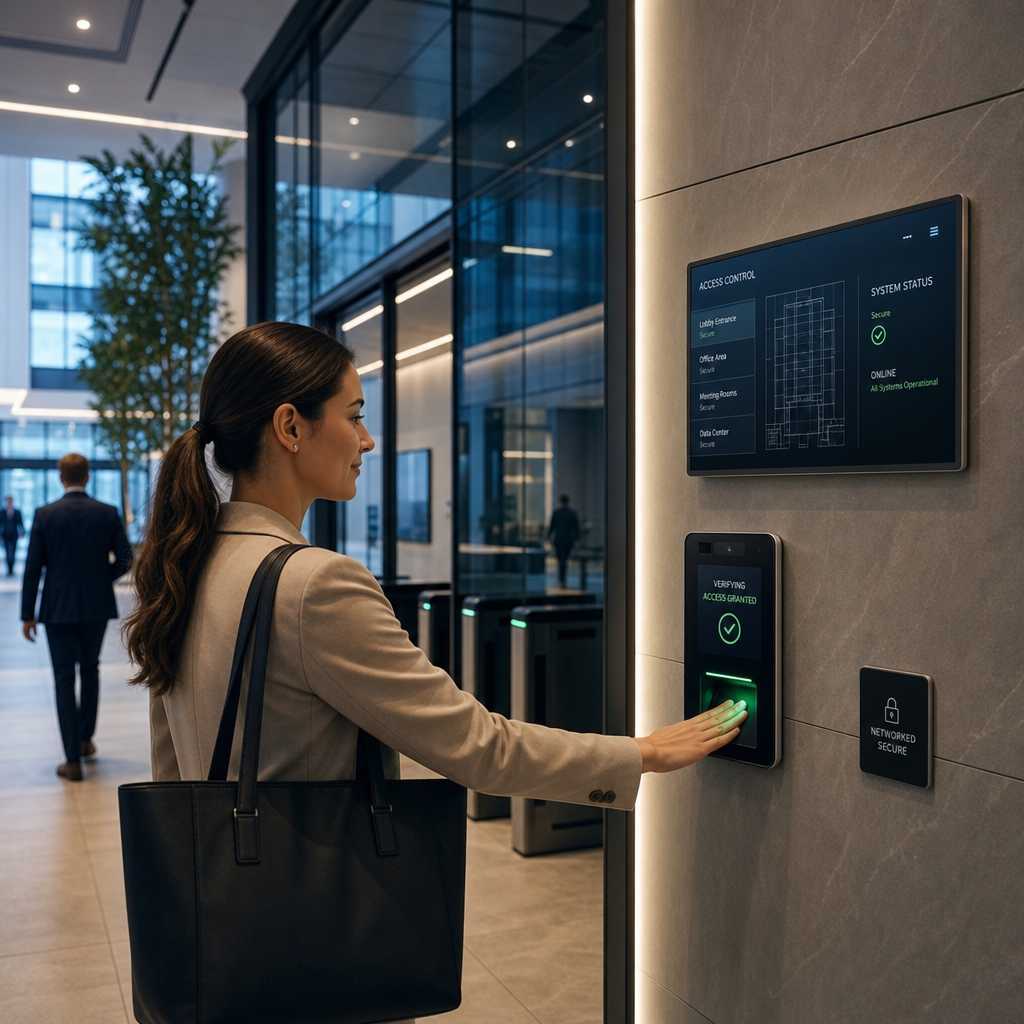
Traditional key cards and PIN pads have a serious problem: they treat every door as an isolated checkpoint with no shared intelligence. A lost badge in one building has no effect on another until someone manually updates a standalone controller. IP access control fixes this by routing credential verification, door events, and alarm triggers through a standard network infrastructure, giving facility managers a single pane of glass for every entry point across every floor. According to Statista, the global access control market is projected to exceed $12 billion by 2025, and the majority of that growth is driven by networked, IP-based deployments replacing legacy panel systems.
Table of Contents
- Quick Takeaways
- What Is IP Access Control and How Does It Differ from Legacy Systems
- The Office Building Security Gaps That Legacy Systems Cannot Fix
- How a Networked Access Control System Is Actually Built
- Real-World Benefits for Property Managers and Facility Operators
- Comparing IP, Cloud, and On-Premise Access Control Approaches
- Choosing the Right Hardware for IP-Based Office Security
- Common Mistakes When Deploying IP Access Control in Office Buildings
- Frequently Asked Questions
- References
Quick Takeaways
| Key Insight | Explanation |
|---|---|
| IP controllers use standard Ethernet and PoE | No proprietary cabling is needed. Existing network infrastructure handles both power and data to door controllers, reducing installation cost significantly. |
| Real-time audit logs are non-negotiable for compliance | IP systems timestamp every access event and sync logs instantly, which is required for HIPAA, SOC 2, and many commercial lease agreements. |
| Remote credential management changes the game for multi-tenant buildings | Property managers can add, suspend, or revoke access for any tenant or employee from a browser without physically touching a single panel. |
| Integration with CCTV is where the real ROI appears | Pairing IP access control with IP cameras creates event-linked video, so every door-open event pulls a timestamped clip automatically. |
| Biometric readers on IP networks eliminate credential sharing | Fingerprint and facial recognition terminals connected via IP cannot have their credentials lent or cloned the way a key card can. |
| Wireless IP intercoms reduce wiring costs at entry points | Wireless intercom systems on IP networks allow two-way audio and video at gates or lobbies without running new cable through finished walls. |
| Scalability is linear, not exponential in cost | Adding a new door to an IP system means adding one controller to the network switch. With legacy systems, adding doors often requires a full panel replacement. |
What Is IP Access Control and How Does It Differ from Legacy Systems
An IP access control system uses standard TCP/IP networking to connect door controllers, card readers, biometric terminals, and management software. Every device on the network communicates in real time through the same infrastructure that carries your internet traffic and security cameras.
Legacy access control works differently. Traditional systems use RS-485 serial buses or proprietary wiring to connect readers back to a centralized panel. That panel stores all the credential data locally. If the panel goes down, access decisions stop. If you want to add a reader in a new wing, you run new cable back to that panel, and if the panel is at capacity, you buy a new one.
IP-based controllers are each an independent node. They store a local cache of credentials so doors still operate during a network outage, but they sync continuously with the management server when the network is available. This distributed architecture is fundamentally more resilient than a star topology wired to one central box.
Why PoE Matters More Than Most Buyers Realize
Power over Ethernet (PoE) means a single Cat6 cable runs to each door controller, delivering both data and 15.4 watts (or up to 30 watts with PoE+) of power. No separate power supply, no conduit for power wiring running parallel to data wiring. In practice, this cuts rough-in labor costs by 30 to 40 percent on a typical multi-floor office retrofit.
For property managers retrofitting a leased office building where they cannot easily run new conduit, PoE-based IP controllers are the practical choice. Wireless IP intercoms extend this further, eliminating structured cabling at entry points like parking gates and exterior doors.


The Office Building Security Gaps That Legacy Systems Cannot Fix
A common mistake facility operators make is assuming their existing panel-based system is adequate simply because it has not been breached yet. Absence of a known incident is not the same as having a secure system.
The three most persistent gaps in legacy office building security are credential cloning, delayed revocation, and siloed event data. A standard 125 kHz proximity card can be cloned with a device that costs under $50 online. Legacy panels cannot detect cloned credentials because they only verify that the card number matches a stored value, not that the physical card is legitimate.
Delayed revocation is a serious liability. When an employee is terminated, the HR department notifies IT, IT notifies the facilities team, and the facilities team physically updates the panel. This chain can take hours or days. An IP access control system with centralized software lets a manager revoke access in under 30 seconds from any browser, and the change propagates to every door controller within seconds.
The Siloed Data Problem in Multi-Tenant Buildings
Office buildings with multiple tenants or departments create a specific audit problem. Legacy systems often run separate panels per tenant, managed by different people, with no unified log. When a security incident occurs, investigators have to pull logs from four different panels, often in different formats, and manually reconcile timestamps.
A networked access control system aggregates every event into one database with synchronized timestamps. Security teams can query the entire building’s access history from a single interface. For buildings subject to compliance requirements like SOC 2 or ISO 27001, this unified audit capability is not optional.
Pro tip: Before specifying any IP access control system for a multi-tenant building, confirm that the management software supports role-based administration, so each tenant can manage their own doors without seeing other tenants’ access logs.
How a Networked Access Control System Is Actually Built
A well-designed networked access control system for an office building has four layers: the physical devices at each door, the network infrastructure connecting them, the management server processing events and credentials, and the integration layer connecting to CCTV, HR systems, and alarm panels.
At the door level, you have the reader (card, biometric, or mobile credential), the controller (the intelligent device making the access decision), the electric lock or electromagnetic lock, and the door contact sensor confirming the door actually closed. Each of these connects back through the network switch, ideally on a dedicated VLAN for security segmentation.
VLAN Segmentation Is Not Optional for Office Environments
Putting access control devices on the same network segment as general office computers is a real security risk. If a workstation is compromised, an attacker on the same VLAN could potentially send spoofed commands to door controllers depending on the system’s authentication model. A separate VLAN with firewall rules restricting traffic to only the management server eliminates this attack surface.
The management server can be on-premise, cloud-hosted, or a hybrid. Cloud-hosted systems allow the vendor to push firmware updates automatically and give administrators access from anywhere. On-premise servers give the organization full control over data residency, which matters for some regulated industries.
At UnikCCTV, the range of door controllers, smart locks, and biometric terminals available is specifically designed for this kind of layered deployment, whether you are securing a single-floor office or a multi-building campus. The key is matching the hardware capability to the threat model, not just buying the cheapest reader that fits the cutout.

Real-World Benefits for Property Managers and Facility Operators
The data consistently shows that IP-based access control reduces total cost of ownership over a five-year horizon compared to legacy panel systems, even though the upfront hardware cost is sometimes higher. The savings come from three sources: reduced service calls, eliminated rekeying costs, and operational efficiency in credential management.
Rekeying a mechanical lock averages $150 to $400 per lock per incident, according to locksmith industry surveys. A 200-door office building that experiences even moderate turnover and a handful of lost key incidents per year can spend $15,000 to $40,000 annually on rekeying alone. IP-based smart locks and electronic credentials eliminate this entirely.
Integration with CCTV Creates Event-Linked Intelligence
The most operationally valuable feature of IP access control is not the access control itself. It is the integration with IP camera systems. When a door controller and a camera share the same network and management platform, every access event can automatically trigger a video clip to be tagged and saved.
In practice, this means a security manager can search for “all access events at the server room door between 2 AM and 4 AM last Tuesday” and get back a list of timestamped clips, not just a text log. Incident investigation that used to take hours now takes minutes. For businesses running CCTV surveillance alongside access control, this integration is where the combined system becomes genuinely powerful.
Pro tip: When specifying an IP access control system alongside CCTV, confirm that both systems support a common API or native integration. Generic Wiegand output from a controller connected to a camera system via a separate middleware layer works, but native integrations are faster to configure and more reliable under load.
Time and Attendance as a Byproduct, Not a Separate System
For office buildings with hourly employees or contractors, IP access control terminals can double as time and attendance clocks. Every badge-in and badge-out event is already timestamped in the access control database. Exporting this to payroll software eliminates a separate punch-clock system and the data discrepancies that come from running two systems that do not sync.
Comparing IP, Cloud, and On-Premise Access Control Approaches
The table below compares three deployment models that property managers and facility operators actually choose between. Each has a legitimate use case, and the right choice depends on your building’s compliance requirements, IT staffing, and growth plans.
| Approach | Best For | Key Limitation |
|---|---|---|
| IP with On-Premise Server | Regulated industries (healthcare, finance) requiring local data residency and maximum control over access event logs | Requires dedicated server hardware, IT maintenance, and on-site backup. Remote access requires VPN configuration. |
| IP with Cloud Management | Multi-site property managers who need to administer dozens of locations from a single browser interface without dedicated IT staff at each site | Dependent on internet connectivity for remote management. Outages do not stop local door operation, but cloud-only reporting is affected. |
| Hybrid IP (Edge + Cloud Sync) | Large office buildings that need local decision-making speed and resilience plus centralized reporting and remote credential management | Higher initial configuration complexity. Requires careful planning of which data lives locally versus in the cloud to avoid sync conflicts. |
“The shift to IP-based access control is less about the technology and more about the operational model. Organizations that treat access control as a data system rather than a hardware system get dramatically more value from it.” – SecurityInfoWatch Industry Analysis, 2023
Choosing the Right Hardware for IP-Based Office Security
Hardware selection for a networked access control system in an office building is where most procurement errors happen. Buyers focus on the reader form factor (what employees actually touch) and underspecify the controller (the device that makes the actual access decision). The controller determines system reliability, integration capability, and long-term firmware support.
For office environments, the key hardware decisions are reader technology, controller processing power, lock type, and intercom capability at entry points.
Reader Technology: Matching Credential Type to Threat Level
Standard 13.56 MHz smart card readers (MIFARE, DESFire) offer significantly better security than 125 kHz proximity cards because they support encrypted communication between card and reader. Biometric readers, including fingerprint scanners and facial recognition terminals, eliminate credential transfer entirely. A badge can be shared or cloned; a fingerprint cannot.
For high-security areas like server rooms, executive offices, or pharmaceutical storage within an office building, biometric readers on IP controllers are the correct specification. For general office doors with lower security requirements, smart card readers on IP controllers are a cost-effective and secure choice. Mobile credential readers using Bluetooth or NFC are increasingly popular for tenant-friendly deployments because employees use their smartphones instead of carrying a separate card.
Lock Type Determines Fail-Safe Behavior
Electromagnetic locks (maglocks) fail open by default when power is cut, which is required by fire code for most egress paths. Electric strikes can be specified as either fail-safe (open on power loss) or fail-secure (locked on power loss), depending on the door’s security and egress requirements. Getting this specification wrong creates either a fire code violation or a security gap. Always confirm the required fail mode with the local Authority Having Jurisdiction before finalizing hardware.
Wireless intercoms at building entry points and parking gates are a practical complement to the main access control system. They allow visitors to request access and have two-way communication with a receptionist or security desk without requiring wired cabling through finished lobbies or exterior walls.
Common Mistakes When Deploying IP Access Control in Office Buildings
A common mistake is treating the IP access control deployment as a pure IT project or a pure physical security project, when it is actually both. IT teams who manage the network need to be involved from day one in VLAN design, firewall rules, and server provisioning. Physical security teams need to be involved in door hardware selection, fail-mode specifications, and alarm integration. Projects that exclude one team until the other team has already made binding decisions routinely result in rework.
A second common mistake is purchasing controllers with insufficient onboard credential storage. If a controller can only store 5,000 credentials locally and your building has 8,000 employees, that controller will have to query the server for every unrecognized badge. Under normal conditions, this is imperceptibly fast. During a server outage or network disruption, doors either fall back to a stored subset of credentials or stop granting access. Specify controllers with enough local storage to hold your entire user population plus a 50 percent growth buffer.
The third and most expensive mistake is buying proprietary systems where only one vendor can add doors, update firmware, or replace hardware. Open-protocol systems based on OSDP (Open Supervised Device Protocol) give you the freedom to source hardware from multiple manufacturers and avoid vendor lock-in. The upfront price difference between an OSDP-compatible system and a proprietary one is usually small. The long-term cost difference over a ten-year building lifecycle is substantial.
Pro tip: Request the API documentation and integration partner list from any IP access control vendor before signing a purchase agreement. A vendor who cannot provide this or restricts integrations to a closed list is effectively locking you into their ecosystem for the life of the system.
Frequently Asked Questions
What is the difference between IP access control and cloud access control?
IP access control refers to the physical communication protocol: controllers and readers communicate over a standard TCP/IP network rather than proprietary wiring. Cloud access control refers to where the management software and credential database are hosted. A cloud-managed system is almost always IP-based, but an IP-based system can be managed by either an on-premise server or a cloud platform. The two terms describe different aspects of the same system architecture.
Can IP access control work during an internet outage?
Yes, properly designed IP access control systems store credentials locally on each door controller. If the network connection to the management server is lost, doors continue to grant or deny access based on the locally cached credential list. Events are logged locally and sync to the server when connectivity is restored. The only functions that require live network connectivity are remote credential changes, real-time monitoring, and cloud-based reporting.
How does IP access control integrate with existing CCTV systems?
Integration depends on whether both systems support a common API, SDK, or middleware platform. Many modern IP camera systems and access control platforms support bidirectional integration where an access event triggers a camera to record a clip tagged with the credential ID and timestamp. For buildings already running IP CCTV surveillance, choosing an access control platform that lists your camera system as a native integration partner is the most reliable path to event-linked video.
Is IP access control suitable for small office buildings, or is it only cost-effective at scale?
IP access control is cost-effective starting from approximately three to five doors. Below that threshold, a simpler standalone system may make more sense. Above five doors, the operational benefits of centralized management, real-time event logging, and remote credential administration typically justify the system cost within the first two years. For small office buildings, cloud-managed IP systems eliminate the need for a dedicated on-site server, which significantly reduces the upfront investment.
What credentials are most secure for office building IP access control?
Ranked from most to least secure: biometric credentials (fingerprint, facial recognition) are the highest security because they cannot be transferred or cloned. Mobile credentials using encrypted Bluetooth or NFC are next, as they tie access to a specific smartphone rather than a card. 13.56 MHz smart cards with encrypted communication are a strong mid-tier option. Standard 125 kHz proximity cards are the least secure and should be replaced wherever possible, as they are trivially cloneable with widely available hardware.
How do I ensure my IP access control system meets fire code requirements?
The critical compliance point is fail-safe behavior on egress doors. Electromagnetic locks on fire egress paths must release on power loss and on fire alarm signal. Your IP access control system must integrate with your building’s fire alarm panel so that when the fire alarm activates, door controllers receive a signal to release all egress-path locks simultaneously. This integration should be specified and tested during commissioning with documentation provided to the local Authority Having Jurisdiction for inspection sign-off.
Have you deployed or evaluated an IP access control system for your office building? Share what worked, what surprised you, or what you would do differently, because real-world experience from property managers and facility operators is what helps others make better decisions.
References
- Statista: Access Control Market Size and Industry Growth Projections
- Forbes: Commercial Real Estate Security Technology Trends and Investment
- NIST: Federal Guidelines on Physical Access Control Systems and Cybersecurity Integration
- U.S. General Services Administration: Physical Access Control System Standards for Federal Facilities
- McKinsey and Company: Smart Building Technology Adoption and Operational Efficiency Research


 No products in the cart.