
Roughly 30% of small business break-ins happen through an unlocked or improperly secured door, according to the FBI’s Uniform Crime Report. If your office still relies on physical keys distributed to a rotating roster of employees, contractors, and cleaning crews, you are not running a security system, you are running an honor system. Setting up a proper office access control system does not require an enterprise budget or a dedicated IT team. With the right hardware, a clear zoning plan, and a realistic credential strategy, a small office can go from vulnerable to locked down in a single weekend.
Table of Contents
- Quick Takeaways
- Why Small Offices Need Real Access Control
- Step 1: Audit Your Doors and Define Access Zones
- Step 2: Choose Your Credential Type
- Step 3: Select the Right Hardware
- Step 4: Integrate an Intercom or Door Entry System
- Step 5: Install and Configure Your System
- Step 6: Add CCTV Surveillance as a Verification Layer
- Comparing Access Control Approaches for Small Offices
- Managing and Maintaining Your System
- Frequently Asked Questions
- References
Quick Takeaways
| Key Insight | Explanation |
|---|---|
| Start with a door audit, not a product search | Mapping every entry point and defining access zones before buying hardware prevents over-spending and under-protecting. |
| Card access systems outperform keys for offices with 5 or more staff | A lost key requires a re-key. A lost card is deactivated in seconds from a dashboard, with zero hardware cost. |
| Keypads work best as a secondary layer, not a primary one | A door keypad access system is highly convenient but codes get shared. Pair keypads with biometric or card credentials for sensitive areas. |
| Intercom integration is non-negotiable for the front entry | Visitor management without an intercom means someone must physically walk to the door to verify every guest. |
| Cloud-managed systems are worth the subscription for small teams | Cloud control lets you revoke access remotely, view logs from your phone, and avoid a dedicated on-site server. |
| CCTV and access control work together, not in parallel | Linking camera footage timestamps to access logs creates an audit trail that stands up in insurance claims and police reports. |
| Budget for credentials, not just hardware | A 15-person office needs at least 20 active credentials when you account for spares, contractors, and emergency cards. |
Why Small Offices Need Real Access Control
Small offices are not small targets. They often store client data, expensive equipment, and financial records, but they operate with none of the physical security infrastructure that larger companies take for granted. The assumption that a small team means lower risk is exactly the kind of thinking that leads to avoidable losses.
A proper small business security setup addresses three distinct threats: unauthorized external entry, internal theft or data access, and liability gaps when something goes wrong and there is no record of who was where. Access control solves all three simultaneously.
In practice, the offices that skip formal access control are not saving money. They are deferring a much larger cost, whether that is a break-in, a wrongful access claim, or an insurance policy that does not pay out because there was no documented security infrastructure.
Step 1: Audit Your Doors and Define Access Zones
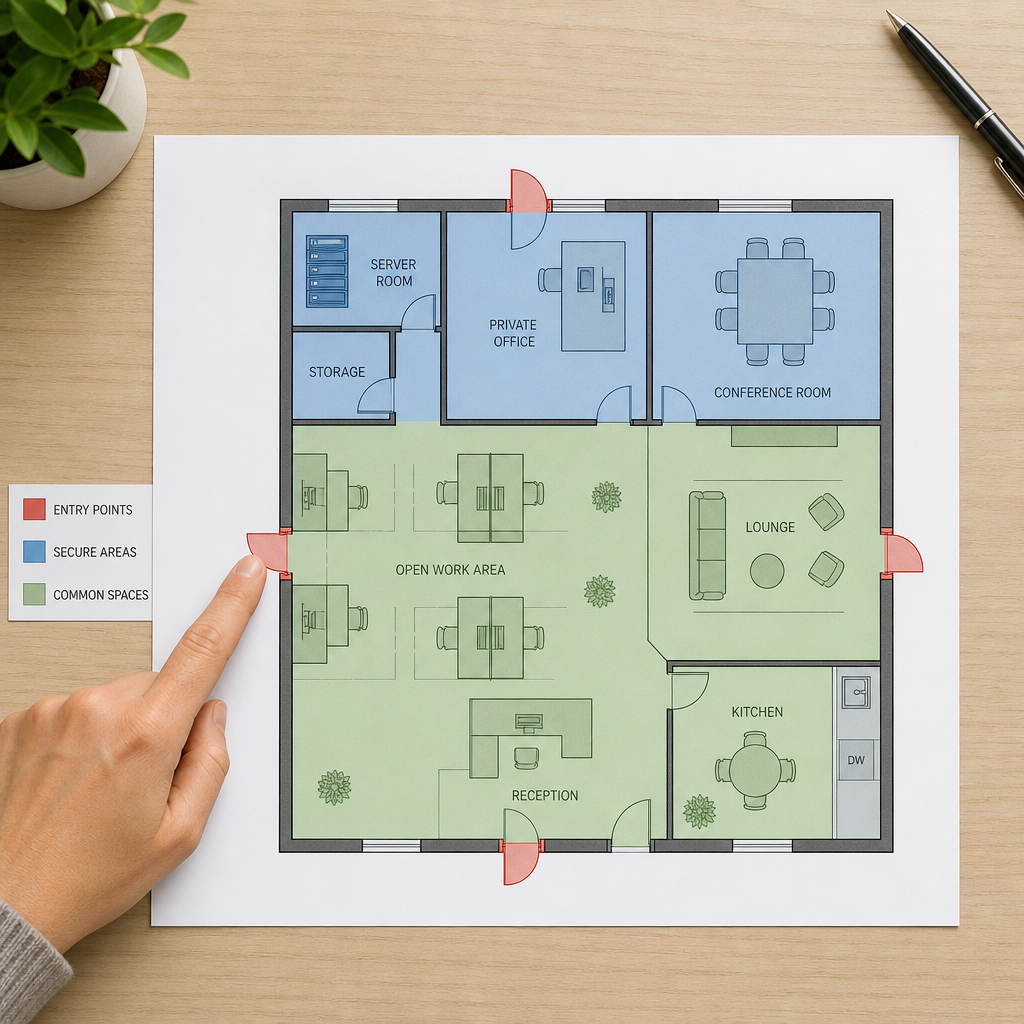
Before touching a single piece of hardware, walk every door in your office with a notepad. Count exterior doors, server room doors, storage closets, executive offices, and any shared spaces like kitchens or conference rooms. Write down who should legitimately access each one and how often.
Creating a Zone Map
Divide your office into access tiers. A simple three-tier model works for most small offices:
- Tier 1 (Public): Reception, waiting area, shared conference rooms. Visitors can access with escort or buzzer entry.
- Tier 2 (Employee-only): Open-plan work areas, kitchens, restrooms. All staff credentials work here.
- Tier 3 (Restricted): Server rooms, file storage, executive offices, equipment storage. Only specific roles get access.
This zone map becomes the foundation of your entire credential programming strategy. Every access control decision from this point forward references it.
Counting Controlled Entry Points
A common mistake is only securing the front door. Side exits, loading docks, and internal server room doors are where most internal security failures happen. Budget for every Tier 2 and Tier 3 door to have active electronic access control, not just a deadbolt.
Pro tip: Photograph every door frame, including the latch side, before ordering hardware. Door frame depth and latch type determine whether you need a surface-mount or mortise lock, and getting this wrong means returning equipment and delaying your installation by weeks.
Step 2: Choose Your Credential Type
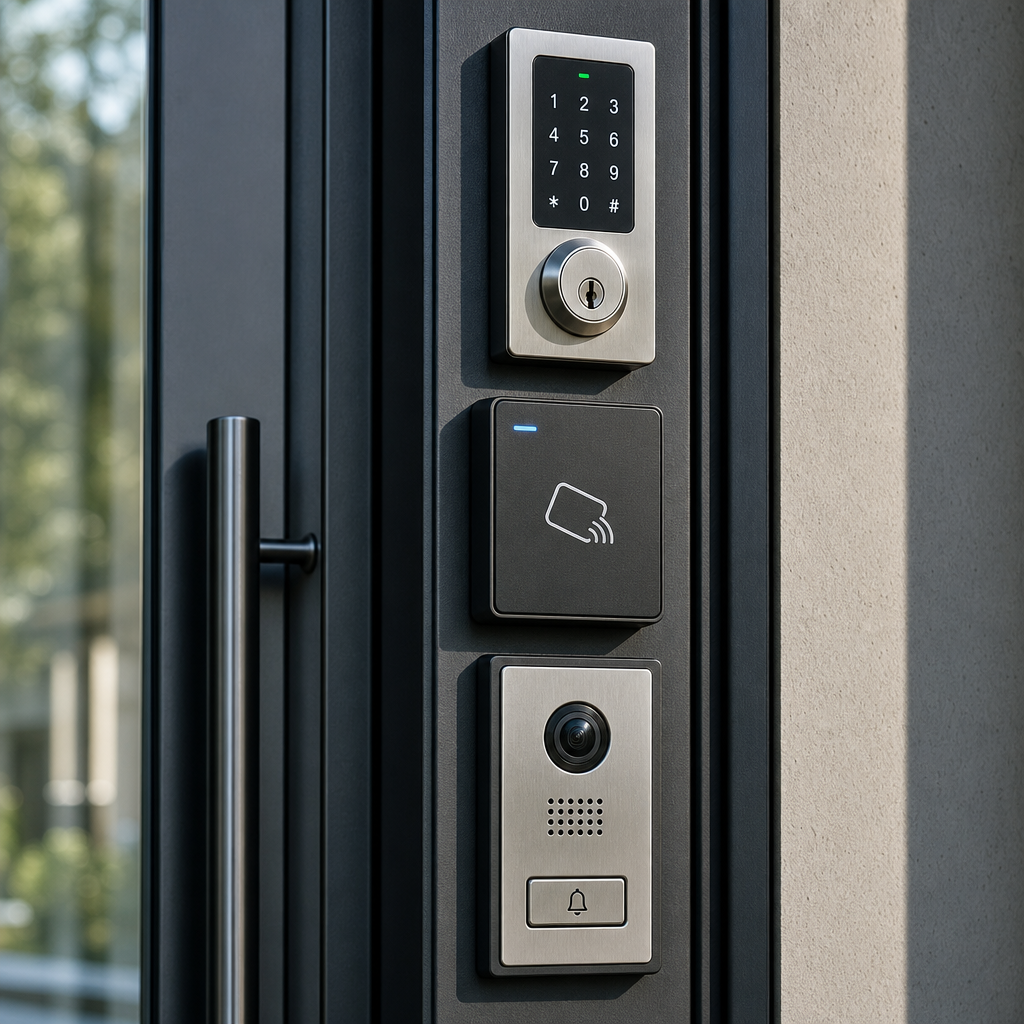
Credentials are what users present to gain entry: a card, a PIN, a fingerprint, or a smartphone. Each type has real trade-offs, and the right answer depends on your staff size, turnover rate, and the sensitivity of your restricted zones.
RFID Cards and Fobs
A card access system using RFID (Radio Frequency Identification) is the most reliable daily-use credential for offices with five or more employees. Cards are fast, durable, and instantly deactivatable. The downside is that cards can be loaned to a colleague, which defeats the audit trail. Use cards as the baseline credential for Tier 1 and Tier 2 access.
PIN Keypads
A door keypad access system is genuinely useful for shared spaces or after-hours access scenarios where issuing individual cards is impractical. The critical discipline is changing codes on a fixed schedule, at minimum quarterly, and immediately after any staff departure. Codes that are never rotated become public knowledge within months.
Biometric Credentials
Fingerprint readers and facial recognition locks are the right choice for Tier 3 restricted areas. They cannot be shared, lost, or cloned with a basic card duplicator. UnikCCTV offers biometric access systems and facial recognition locks that fit standard door frames and can be integrated into a unified access management platform. The higher upfront cost is justified when the door being secured holds servers, financial records, or controlled inventory.
Mobile Credentials
Smartphone-based access via Bluetooth or NFC is gaining adoption in small offices because it eliminates card issuance entirely. The risk is that not all staff will have compatible phones, and battery-dead phones mean locked-out employees. Treat mobile credentials as a convenient supplement, not a replacement for physical credentials.
Step 3: Select the Right Hardware
Hardware selection follows directly from your zone map and credential decisions. For each controlled door, you need four components: a reader or keypad, an electric lock mechanism, a door controller, and a power supply. Getting these four to work together is where most DIY installs go wrong.
Electric Lock Types
For interior doors, electric strike locks are the simplest retrofit option because they replace only the strike plate, leaving the existing door hardware in place. For exterior doors requiring higher security, electromagnetic locks (mag locks) provide 600 to 1,200 pounds of holding force and have no moving parts to wear out. For offices wanting a premium finish, smart mortise locks handle everything in a single unit.
Standalone vs. Networked Controllers
Standalone controllers handle one door independently. They are inexpensive but require programming each unit separately, which becomes unmanageable past three or four doors. Networked controllers connect to a central platform, letting you manage all doors, all users, and all schedules from one interface. For any office with more than two controlled doors, networked is the only practical choice.
Pro tip: Always buy controllers that support both Wiegand and OSDP protocols. Wiegand is the legacy standard that works with almost every reader on the market. OSDP is the modern encrypted standard that provides tamper detection. Starting with a dual-protocol controller future-proofs your investment without paying extra upfront.
Step 4: Integrate an Intercom or Door Entry System
Access control manages your credentialed users. An intercom system manages everyone else: delivery drivers, clients, job candidates, inspectors, and the occasional person who simply got the wrong address. Without an intercom at the front entry, someone on staff must physically walk to the door for every unannounced visitor.
Wired vs. Wireless Intercom Systems
Wired intercoms are more reliable and are the right call for permanent installations where running cable is feasible. Wireless intercoms, including models using wireless transmitters, are the practical solution for offices in leased spaces where running new cable through walls would violate the lease or require permits. UnikCCTV carries both wired and wireless intercom options suitable for small office front entries.
Video Intercom for Remote Verification
A video intercom at the front door allows any staff member to verify and buzz in a visitor from their desk. This eliminates the productivity interruption of a dedicated receptionist for offices that cannot staff one full-time. The staff member sees the visitor on a display or mobile app, speaks with them, and triggers the door release remotely. In practice, this is one of the highest-value upgrades a small office can make relative to its cost.
“Access control is not just about keeping people out. It is about creating a verifiable record of who was in, when they were there, and what they accessed.” – Security Industry Association (SIA) guidance on electronic access control best practices
Step 5: Install and Configure Your System
Installation sequence matters. Start with the wiring and power infrastructure before mounting any readers or locks. A system that loses power reverts to whatever fail-state the lock is set to, so every controlled door needs to be on an Uninterruptible Power Supply (UPS) with at least four hours of backup capacity.
Wiring Best Practices
Run dedicated 18-2 shielded cable for each reader. Do not share conduit with high-voltage electrical runs. Electromagnetic interference from nearby power lines is a known cause of reader dropouts that get misdiagnosed as hardware failures. Label every cable at both ends before you close up the walls.
Software Configuration and User Enrollment
Once hardware is installed and powered, configure your access groups before enrolling any users. Create the group structures that match your zone tiers (Tier 1, Tier 2, Tier 3), assign time schedules to each group, and then enroll users into groups rather than assigning individual door permissions. This structure means adding a new employee takes 30 seconds and removing a departed one takes the same.
Testing the Fail-Safe
Before declaring the installation complete, cut power to each controller and verify that doors fail to the correct state. Fire code in most jurisdictions requires that exterior egress doors fail to unlocked (fail-safe) so occupants can exit during a fire. Server room doors and interior restricted doors should fail locked (fail-secure). Confirm this for every door before staff begins relying on the system.
Step 6: Add CCTV Surveillance as a Verification Layer
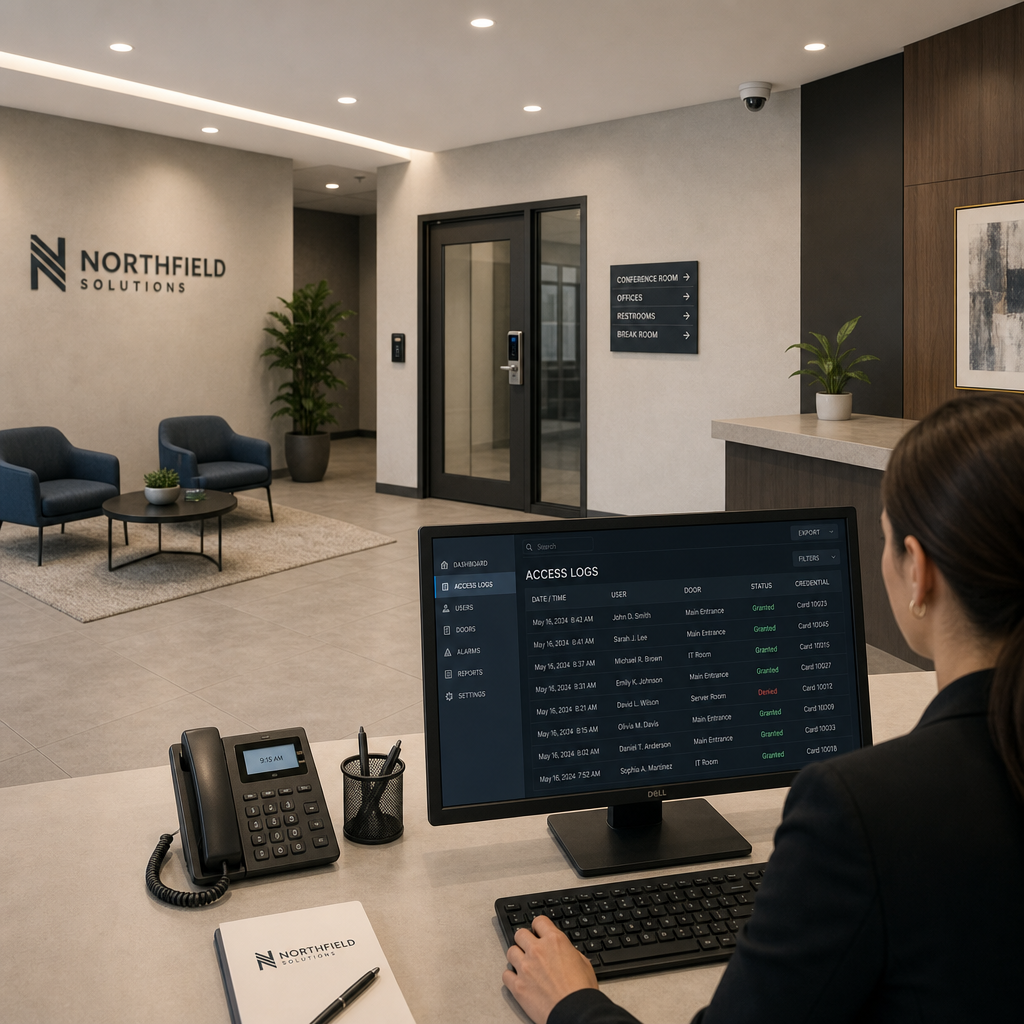
Access control tells you that credential 0042 was used at the server room door at 2:14 AM. CCTV tells you whose face was attached to that credential. Together, they create accountability that neither system provides alone.
Camera Placement for Access Control Support
Place cameras to cover every controlled door reader, angled to capture the face of the person presenting their credential, not just the back of their head. A camera aimed at a card reader that only shows a hand is nearly useless as evidence. Mount cameras at a downward angle between 15 and 30 degrees for reliable facial capture.
UnikCCTV’s CCTV surveillance equipment integrates with access control platforms, allowing you to pull synchronized footage alongside access event logs. This is the configuration that insurance carriers and law enforcement find most useful when incidents need to be reviewed.
Storage and Retention
The data consistently shows that most incidents are not discovered until 24 to 72 hours after they occur. A minimum of 30 days of continuous footage storage is the practical standard for small offices. Network Video Recorders (NVRs) with 2TB drives handle 8 cameras at 1080p for approximately 30 days of continuous recording at moderate compression settings.
Comparing Access Control Approaches for Small Offices
Not all systems are built for the same office profile. The table below compares three real approaches based on common small office scenarios.
| Approach | Best Fit | Key Trade-off |
|---|---|---|
| Standalone Keypad-Only System (e.g., single door keypad access system) | Single-door offices, low-traffic entries, budget under $500 | No audit trail, codes get shared, no remote management capability |
| Networked Card Access System with Cloud Management | Offices with 5 to 50 employees, multiple controlled doors, moderate turnover | Monthly subscription cost, requires network infrastructure, best overall value for most small offices |
| Biometric Plus Card Hybrid System | Offices with restricted data or equipment zones requiring individual accountability | Higher hardware cost per door, enrollment takes more time, but provides the strongest audit trail available |
Managing and Maintaining Your System
A system that is not actively managed degrades. Within six months of installation, most small offices have orphaned credentials for departed staff, expired temporary access cards still active in the system, and door schedules that no longer match actual business hours. These are not minor oversights, they are open security gaps.
Quarterly Access Audits
Schedule a quarterly review of every active credential in your system. Cross-reference the active user list against your current HR roster. Any credential not matched to a current employee, contractor, or approved vendor gets deactivated immediately. This single discipline eliminates the most common internal access vulnerability in small office environments.
Firmware and Software Updates
Access control hardware, particularly networked controllers and smart locks, runs embedded firmware. Manufacturers release updates that patch security vulnerabilities. A common mistake is treating access control hardware as set-and-forget infrastructure. Enable automatic updates where the platform allows it, and manually check for updates quarterly on any hardware that does not support auto-update.
Emergency Access Protocols
Every system needs a documented emergency procedure: who has master override credentials, where the physical backup key is stored (for fail-secure doors), and who to call if the system goes offline. Write this down, store it somewhere accessible to at least two people, and review it annually. An access control system that locks your staff out during a power event is a liability, not an asset.
Frequently Asked Questions
How much does it cost to set up an office access control system for a small business?
A realistic budget for a small office with two to five controlled doors ranges from $1,500 to $6,000 for hardware, including readers, electric locks, a networked controller, and a basic intercom at the front entry. Cloud management subscriptions typically run $10 to $30 per door per month. Biometric readers and facial recognition locks for restricted zones add $300 to $800 per door. The wide range reflects door count and credential type, not product quality variation. Budget on the higher end if you are securing server rooms or high-value equipment storage.
What is the difference between a card access system and a keypad access system?
A card access system assigns a unique physical credential to each user and logs every access event tied to that individual. A keypad access system uses a shared PIN code, which means multiple users share the same credential and individual accountability is impossible. For offices tracking who accessed what and when, card systems are the only practical choice. Keypads are appropriate for low-security shared spaces where convenience matters more than individual accountability.
Can I install an office access control system myself, or do I need a professional?
Single-door standalone keypad or smart lock installations are genuinely DIY-feasible for anyone comfortable with basic electrical work. Multi-door networked systems with electric strikes, mag locks, and intercoms involve low-voltage wiring, network configuration, and controller programming that benefits significantly from professional installation. Getting the fail-safe versus fail-secure configuration wrong is not a minor mistake, it is a fire code violation. UnikCCTV provides professional installation resources and consultation services for exactly this scenario.
How do I handle access control for temporary employees or contractors?
Issue temporary credentials with built-in expiration dates set to the last day of the contractor’s engagement. Most cloud-managed access control platforms support time-limited credentials natively. Set the expiration at issuance, not after the contractor departs. A common mistake is planning to deactivate a credential manually and then forgetting. Automated expiration removes the human dependency entirely and keeps your active credential list accurate without quarterly audit heroics.
Do I need a separate system for time attendance tracking?
Not necessarily. Most networked access control platforms generate access logs that can serve as basic time attendance records, with the added benefit that the data is already tied to individual credentials. For offices needing payroll-grade time tracking with break logging, overtime calculation, and reporting, a dedicated time attendance clock that integrates with your access control database is worth the additional cost. UnikCCTV carries time attendance clocks designed to work alongside access control infrastructure rather than duplicate it.
What happens to my access control system during a power outage?
This depends entirely on how the system is configured and powered. Electric locks need continuous power to maintain their state. Without a UPS backup, most systems default to their fail-state the moment power drops. Fail-safe locks (standard for exterior exit doors) will unlock during an outage, which meets fire code but creates a security gap. Fail-secure locks (correct for server rooms and restricted areas) will lock during an outage, which maintains security but requires physical key backup for emergency access. Every controlled door should have a clearly documented outage behavior and a tested manual override.
If you are currently evaluating or upgrading your office access control setup, share what your biggest challenge has been in the comments, whether it is hardware selection, managing credentials, or integrating with existing infrastructure.
References
- Statista: Security and access control market data and small business crime statistics
- Forbes: Small business physical security spending trends and risk analysis
- NIST: Federal guidelines on physical access control systems and credential management
- U.S. Small Business Administration: Physical security planning resources for small business owners
- U.S. Department of Homeland Security: Access control and perimeter security recommendations for commercial facilities



 No products in the cart.