
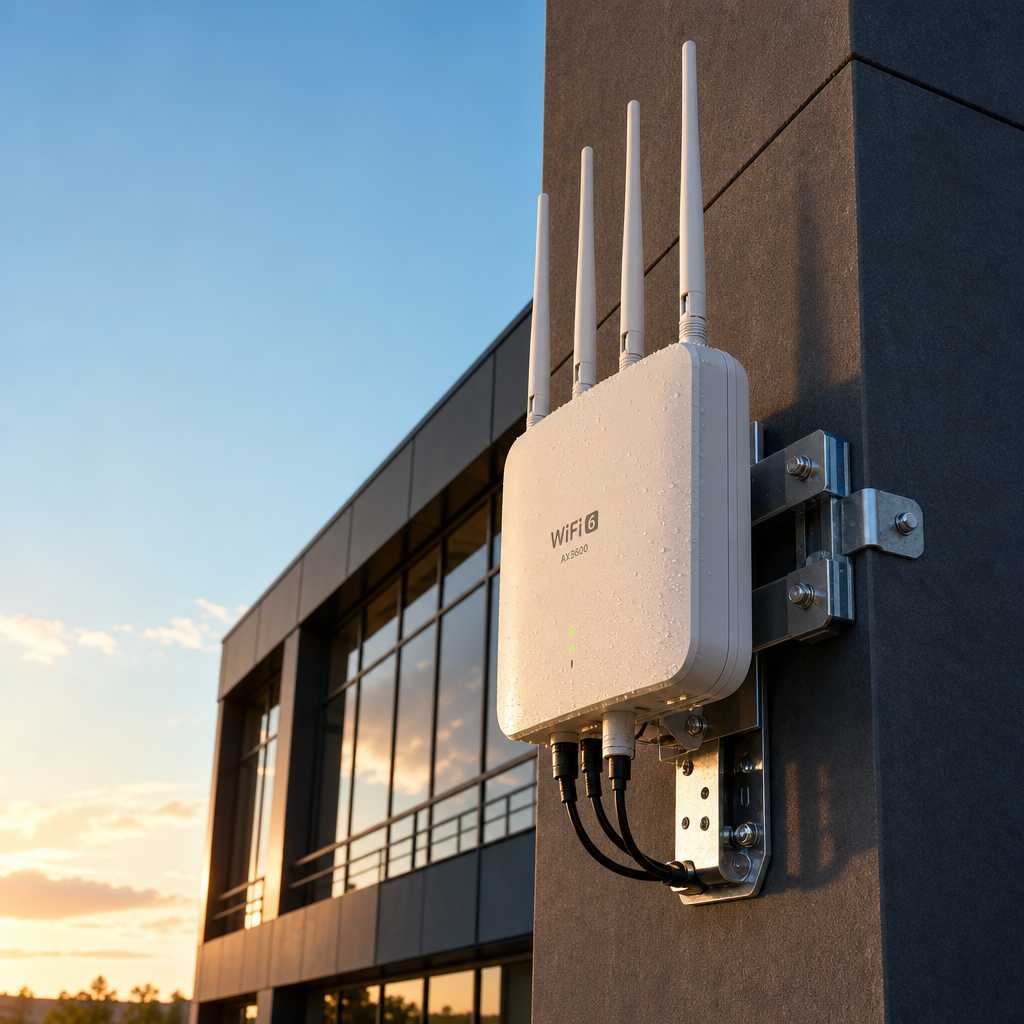
When a property’s wireless network fails during a security event, everything connected to it fails too. IP cameras freeze, smart locks lose remote control, intercoms drop calls, and access logs stop recording. The culprit is almost never the security hardware itself. It is almost always an outdoor Wi-Fi 6 access point that was either never installed or was substituted with a consumer-grade router someone mounted near a window. For property managers and facility operators running surveillance cameras, biometric entry systems, and gate access controls, this is not a small infrastructure gap. It is a liability.
Table of Contents
- Quick Takeaways
- Why Wi-Fi 6 Matters for Security-Connected Properties
- What Makes Outdoor Access Points Different from Indoor Units
- Key Use Cases Across Property Types
- Network Architecture That Supports Physical Security Systems
- Comparing Outdoor Wi-Fi Deployment Approaches
- Property Network Security: Protecting the Infrastructure Itself
- Wireless Networking for Buildings: Planning the Right Coverage
- Frequently Asked Questions
- References
Quick Takeaways
| Key Insight | Explanation |
|---|---|
| Wi-Fi 6 supports up to 9.6 Gbps theoretical throughput | This matters when a building runs simultaneous HD camera feeds, door intercoms, and access control logs on the same network |
| OFDMA technology reduces congestion in dense device environments | Multi-unit apartment buildings and commercial campuses with dozens of connected security devices benefit directly from this efficiency |
| IP67 or higher weatherproofing is non-negotiable for outdoor units | Units rated below IP67 fail within one to two seasons in environments with rain, humidity, or temperature swings |
| Segmenting security devices onto a dedicated VLAN reduces breach risk | If a tenant’s IoT device is compromised, it cannot reach cameras or access control panels on a properly segmented network |
| PoE-powered access points simplify outdoor installation significantly | Running a single Cat6 cable handles both power and data, eliminating the need for outdoor electrical work at every mounting location |
| BSS Coloring in Wi-Fi 6 reduces interference between neighboring networks | In multi-tenant buildings, this prevents adjacent wireless signals from slowing down security-critical traffic |
| Access point placement should be driven by device location, not aesthetics | Mounting an access point near your main entrance, gate, and parking area camera clusters gives security hardware the strongest signal where it counts |
Why Wi-Fi 6 Matters for Security-Connected Properties
Wi-Fi 6, formally known as 802.11ax, was designed to handle environments with many simultaneous devices competing for bandwidth. That description fits every modern property running a serious security stack: multiple IP cameras streaming at 4K, wireless intercoms handling audio and video simultaneously, biometric access terminals syncing authentication data to a central server, and time attendance clocks logging entries and exits in real time.
The previous standard, Wi-Fi 5, was built around throughput for individual devices. Wi-Fi 6 was built around efficiency across device-dense environments. For a property manager at a 200-unit apartment building, that distinction is the difference between a security network that holds under load and one that stutters every morning when residents are entering and leaving.
Target Wake Time (TWT) is one of Wi-Fi 6’s most underappreciated features for security applications. It lets the access point schedule when devices transmit and receive data, reducing congestion and extending battery life on wireless sensors and intercoms. In practice, properties using TWT-capable devices see measurably fewer dropped connections from battery-powered gate sensors and wireless door controllers.


Pro tip: When evaluating outdoor Wi-Fi 6 access points for a security deployment, prioritize units that support MU-MIMO with at least 4 spatial streams. Single-stream units will bottleneck multi-camera setups even if the access point itself is Wi-Fi 6 certified.
What Makes Outdoor Access Points Different from Indoor Units
A common mistake is purchasing a high-spec indoor Wi-Fi 6 access point and mounting it inside a protective enclosure near an exterior wall, expecting it to serve outdoor cameras and gate controllers. It rarely works reliably. Signal attenuation through walls, temperature fluctuations inside the enclosure, and condensation all degrade performance within months.
Purpose-built outdoor access points are engineered differently from the ground up. They use wider operating temperature ranges, typically from minus 20 to 60 degrees Celsius. They are rated IP67 or IP68 for dust and water intrusion resistance. Their antennas are designed for directional or wide-area outdoor propagation rather than the omni-directional patterns that work well in enclosed rooms.
Antenna Configuration for Property Coverage
For large parking areas, gated entries, and perimeter coverage, directional antennas give you focused signal strength across a longer distance. For courtyards, building facades, and mixed-traffic outdoor areas, sector antennas with a 120-degree horizontal beamwidth cover more area with fewer units. Understanding this distinction saves property operators from over-deploying hardware to patch coverage gaps that better antenna selection would have prevented.
PoE Budget and Cabling Requirements
Most enterprise-grade outdoor Wi-Fi 6 access points consume between 25 and 35 watts, which falls into the PoE+ (802.3at) or PoE++ (802.3bt) range. Before specifying access point placement, check that your network switch’s PoE budget can handle simultaneous full-power operation across all connected ports. Undersized PoE budgets are the leading cause of intermittent access point dropouts in properties where someone upgraded the APs but kept the original switches.
Key Use Cases Across Property Types
The security device ecosystems at a single-family home, a mid-rise apartment complex, and a corporate campus are structurally different. The wireless networking strategy should reflect that.
Residential Properties and Smart Home Security
Homeowners integrating wireless intercoms, smart locks, and outdoor cameras need coverage that reaches the driveway, side gates, and backyard without dead zones. A single outdoor Wi-Fi 6 access point mounted at the roofline or on an exterior eave is usually sufficient for properties under 5,000 square feet, provided the unit has a strong omnidirectional antenna. The data consistently shows that dual-band (2.4 GHz and 5 GHz) coverage matters here because smart locks and older intercoms often use 2.4 GHz while cameras prefer 5 GHz.
Multi-Unit Buildings and Apartment Complexes
For property managers overseeing apartment buildings with gate access, lobby intercoms, and hallway cameras, the density of connected devices is the primary challenge. A single access point near the entrance is inadequate. A properly designed mesh or controller-managed deployment with outdoor access points at building corners and parking structures gives every camera and access panel a strong, consistent connection. UnikCCTV’s range of wireless intercoms and facial recognition door locks are designed to operate reliably in exactly this kind of distributed wireless environment.
Commercial and Industrial Facilities
Manufacturing facilities, warehouses, and office campuses often span large footprints. Here, outdoor Wi-Fi 6 access points serve two functions simultaneously: extending connectivity to remote buildings and supporting time attendance clocks, biometric access points, and perimeter cameras that may be hundreds of meters from the main network closet. Mesh backhaul with dedicated wireless uplinks between access points eliminates the need for trenched Ethernet across large sites.
Network Architecture That Supports Physical Security Systems
Wireless infrastructure for security is not just about getting devices online. It is about ensuring those devices stay online under load, remain isolated from guest or tenant traffic, and recover automatically from brief outages without requiring manual intervention.
The best architecture for security-connected properties uses a controller-managed wireless LAN where all access points report to a central management platform. This allows administrators to monitor signal quality, client counts per AP, channel utilization, and rogue device detection from a single dashboard. Properties relying on standalone access points configured individually have no visibility into degraded performance until a camera stops recording or a lock loses connectivity.
“The network is the foundation. If the network is unreliable, every device on it is unreliable, regardless of how sophisticated the endpoint hardware is.” — Cisco, Enterprise Network Design Guide
Quality of Service (QoS) configuration is non-negotiable when security devices share bandwidth with other traffic. QoS rules should prioritize traffic from access control panels and surveillance cameras above all other traffic classes. Without this configuration, a large file transfer or firmware update download can throttle live camera streams during the exact moments security footage is needed most.
Pro tip: Configure your security devices, including IP cameras, intercoms, and biometric locks, on a dedicated VLAN with inter-VLAN routing disabled. This prevents lateral movement if any other device on the network is compromised and keeps security traffic prioritized at the switch level, not just at the access point.

Comparing Outdoor Wi-Fi Deployment Approaches
Not every property needs the same outdoor wireless strategy. Below is a direct comparison of the three deployment models most relevant to security-connected properties, with honest trade-offs for each.
| Deployment Approach | Best Fit | Key Trade-offs |
|---|---|---|
| Controller-Managed Enterprise APs (e.g., Cisco Catalyst, Ubiquiti UniFi, Aruba Instant On) | Multi-unit buildings, commercial campuses, properties with 20+ connected security devices | Higher upfront cost, requires technical setup; delivers centralized visibility, seamless roaming, and automatic channel management that standalone units cannot match |
| Standalone Outdoor Wi-Fi 6 APs with individual configuration | Single-family homes, small commercial properties with fewer than 10 security endpoints | Lower cost and simpler installation; no centralized management, no automatic failover, performance tuning must be done manually per unit |
| Outdoor Mesh Wi-Fi 6 Systems (e.g., Eero Pro, TP-Link Deco XE75 Pro Outdoor) | Medium-sized properties, gated communities, facilities where trenching cable is not feasible | Easy to expand without cabling; wireless backhaul consumes bandwidth headroom, dedicated backhaul radios (tri-band) are essential to avoid significant throughput loss on security device traffic |
Property Network Security: Protecting the Infrastructure Itself
The outdoor Wi-Fi 6 access point is a network entry point exposed to weather and to anyone within signal range. This makes property network security an active concern, not a background consideration. WPA3 encryption, which is native to Wi-Fi 6 certified devices, closes several vulnerabilities present in WPA2 networks, including offline dictionary attacks against poorly chosen passwords.
Access points facing public areas should have management interfaces disabled on the wireless side entirely. All administrative access should happen over a wired management VLAN only. In practice, properties that leave web-based management interfaces accessible over Wi-Fi are giving any nearby device a direct path to reconfigure or disable their security network.
Firmware and Patch Management for Outdoor APs
Outdoor access points are frequently overlooked during firmware update cycles. They are out of sight, they are working, and nobody wants to risk a brief outage to patch them. This is exactly backward. According to the U.S. Cybersecurity and Infrastructure Security Agency, unpatched firmware is one of the most common attack vectors against building network infrastructure. Setting access points to pull automatic updates during low-traffic overnight windows eliminates this gap without manual scheduling.
Physical Security of the Access Points Themselves
An outdoor access point that someone can physically reach, unplug, or reset becomes a denial-of-service tool. Mount units above 3 meters where possible, use tamper-resistant mounting hardware, and select units with a physical security lock slot. Some enterprise units include a tamper detection alarm that alerts the management console if the unit is opened or forcibly disconnected.
Wireless Networking for Buildings: Planning the Right Coverage
Effective wireless networking for buildings starts with a site survey, not with product selection. A site survey maps physical obstructions, existing wireless interference sources, and the exact locations of every security device that will connect to the network. Skipping this step and guessing at access point placement is the reason so many security installations have persistent dead zones near stairwells, parking garage corners, and rear gate controllers.
For properties with metallic fencing, concrete perimeter walls, or rolling steel doors, signal prediction is especially important. These materials attenuate 5 GHz signals significantly more than 2.4 GHz. A site survey tool that models both bands simultaneously, such as Ekahau or NetSpot, will show where 5 GHz drops out and where devices should be configured to fall back to 2.4 GHz automatically.
Coverage Planning for Specific Security Hardware
When planning coverage for a property using UnikCCTV’s product range, including wireless transmitters, facial recognition locks, and wireless intercom systems, map each device’s wireless requirements first. Facial recognition terminals that process biometric data locally but sync logs over Wi-Fi need a reliable connection more than high throughput. IP cameras running 4K streams need both. Gate access controllers with cellular fallback can tolerate brief dropouts better than continuous-stream cameras. Knowing these differences lets you prioritize access point placement and QoS rules accurately.
Pro tip: During the planning phase, mark all planned security device locations on a floor plan or site map and calculate the farthest device from the nearest proposed access point. If that distance exceeds 40 meters outdoors in a non-line-of-sight scenario, add an access point rather than expecting a single unit to cover the gap reliably.
Frequently Asked Questions
Can an outdoor Wi-Fi 6 access point be used to connect indoor security cameras as well?
Yes, but with realistic expectations. Outdoor access points typically have directional or sector antennas optimized for outdoor propagation. They can serve cameras just inside a building’s perimeter, such as lobby cameras near an exterior wall, but their coverage inside a multi-story building will be limited. For comprehensive indoor coverage, pair outdoor units at the perimeter with indoor access points on each floor.
What is the realistic outdoor range of a Wi-Fi 6 access point for security devices?
Under ideal line-of-sight conditions, enterprise outdoor Wi-Fi 6 access points can reliably serve devices up to 150 to 300 meters away on 2.4 GHz. The 5 GHz band is more limited, typically 50 to 100 meters in open outdoor conditions. Obstructions, interference, and the receive sensitivity of the client device all reduce effective range. Security hardware in a parking structure or behind a masonry wall should be planned for 30 to 50 percent of the theoretical maximum range.
Do I need Wi-Fi 6 specifically, or will Wi-Fi 5 work for my security cameras?
Wi-Fi 5 will work for a small number of cameras in a low-density environment. The argument for Wi-Fi 6 is not raw throughput, it is performance under concurrent load. When a property has 20 cameras streaming simultaneously alongside intercom traffic and access control data, Wi-Fi 6’s OFDMA and MU-MIMO improvements keep latency low and packet loss minimal in ways that Wi-Fi 5 cannot match under the same conditions.
How do I secure an outdoor access point against unauthorized access?
Use WPA3-Enterprise where supported, disable SSID broadcast on security-only networks, restrict management interface access to the wired management VLAN, set up MAC address filtering as an additional layer for fixed-location security devices, and enable automatic firmware updates. Physically, mount the unit above accessible height and use tamper-resistant hardware. Review access logs monthly and alert on any new device association to the security SSID.
What is the difference between a mesh outdoor Wi-Fi system and a controller-managed access point deployment for a security network?
A mesh system is self-organizing and easy to expand, but it uses radio bandwidth for its own backhaul communication between nodes, which reduces the bandwidth available to client devices like cameras. A controller-managed deployment with wired backhaul (each AP connected via Ethernet) delivers full bandwidth to every device at every access point, provides centralized management, supports seamless client roaming, and gives you detailed per-device analytics. For serious security installations with multiple cameras and access control panels, wired-backhaul controller-managed deployments outperform mesh systems in reliability and diagnostics.
How many outdoor access points does a typical apartment building need for its security devices?
A rough starting point for a mid-rise building with a perimeter gate, lobby, parking area, and several external cameras is three to five outdoor access points positioned to cover each distinct zone. A proper site survey will refine this number. The goal is to ensure no security device operates at a signal strength below negative 65 dBm, which is the minimum for reliable HD video streaming and access control data sync.
If you are currently designing or upgrading the wireless infrastructure for a security-connected property, share your biggest challenge below or reach out to the team at UnikCCTV for a property-specific consultation on pairing the right wireless networking foundation with intercom systems, smart locks, and surveillance equipment that will depend on it.
References
- Cisco networking resources covering enterprise wireless architecture and security design principles
- U.S. Cybersecurity and Infrastructure Security Agency guidance on securing building network infrastructure and firmware patching
- Statista data and market research on Wi-Fi 6 adoption rates and connected device growth across commercial properties
- Forbes technology coverage on enterprise wireless networking trends and smart building security infrastructure
- Wi-Fi Alliance official technical specifications and certification information for Wi-Fi 6 and WPA3 standards
 No products in the cart.